
Updated October 2026
A wave explodes, a cyclist cuts through the frame, or somebody walks into a perfect patch of light. You do not always have time to argue with every camera setting. Shutter priority mode lets you choose the thing that matters most in that moment: how movement looks.
Freeze it. Let it streak. Follow it and turn the background into a rush of color. That is the creative decision. But the camera still needs enough light to make the exposure, and its automatic aperture choices can change the picture in ways you did not expect. This guide shows you how to use S or Tv with intention, recognize its limits, and leave with sharp subjects or deliberate blur instead of accidental mush.
What shutter priority mode does
In shutter priority, you select the shutter speed and the camera chooses an aperture based on its meter reading. Many cameras label this mode S; others use Tv. The shutter speed is the length of the exposure. A fast setting such as 1/1000 second records a much shorter slice of time than 1/30 second. That difference affects motion, but it also affects the light available for the image.
ISO may be fixed or automatic depending on your settings. With fixed ISO, the camera tries to match your chosen shutter speed by opening or closing the lens. With Auto ISO, it can also change ISO within the rules and limits of your camera. Learn which setup you are using before judging the results. A mode name does not tell you the whole exposure strategy.
The camera can only choose apertures your lens supports. When it reaches the widest or narrowest opening, it has run out of that adjustment. Your exposure can then become too dark or too bright unless another setting changes. Shutter priority is a way to make one decision quickly, not a way around the physical limits of the camera and lens.
Choose the photograph’s motion before choosing a number
First decide whether you want the subject frozen, the movement visible, or the subject relatively sharp against a moving background. Those are different goals and usually need different shutter speeds. A frozen splash can show power and detail. A slower wave can draw a line across the sand. A panned cyclist can feel faster than one standing perfectly still in the picture.
Do not treat sharpness as the only possible success. A moving subject can be soft for a reason, provided the rest of the composition makes that reason clear. The problem is blur that does not support the picture: a slightly smeared face, a shaky horizon, or a subject that almost looks sharp but never quite gets there.
Watch the movement before raising the camera. Is it crossing your view, coming toward you, or repeating in a cycle? Is there a peak moment you can anticipate? Your position and timing can make as much difference as changing the shutter. A good exposure of the wrong instant is still the wrong instant.
 Save
SaveStart with a short comparison rather than a magic setting
For a moving subject in good light, try a fast exposure such as 1/1000 second as a test. Then inspect the important details at full size. If movement still blurs, go faster if the light and equipment allow. If the result is more frozen than you want, try a slower setting. The right speed depends on the subject, its direction, its distance, the focal length, and how you will display the image.
Make a few frames of similar movement at different speeds. Keep the framing as consistent as possible and let the camera handle the changing aperture. Compare the subject’s edges, not just the brightness. Notice what happened to the background too. A different aperture may have changed depth of field while you were concentrating on motion.
For slower effects, make a sequence around 1/30, 1/8, and one second with a stable camera where appropriate. These are exercise points, not recipes for every scene. A walking person, a fast stream, and a slowly rolling wave will produce very different results at the same speed. Learn from the files instead of copying a number forever.
Freezing movement: shutter speed is only one part
A fast shutter can reduce motion blur, but it cannot fix missed focus. Choose an autofocus mode suited to the subject and learn how your camera tracks movement. Keep the focus area on the subject you want sharp, not the fence behind it. For unpredictable motion, practice before the important event rather than changing unfamiliar tracking settings while the action happens.
Light matters. A very fast shutter needs more light, a wider aperture, a higher ISO, or some combination. If the lens is already wide open and ISO is fixed low, a dark result is not a mystery. You asked the camera for an exposure it could not supply. Raise ISO, move into better light, or accept a slower speed and a different motion treatment.
Use a burst only when it helps catch the moment, and review the sequence honestly. Ten nearly identical missed-focus frames are not ten chances you successfully used. Anticipate the subject’s path, leave room in the frame, and check whether the camera is focusing where you think it is. Technique still matters after you choose a fast number.
Panning: follow the subject smoothly
Panning means moving the camera with the subject during the exposure. The aim is often a subject that is relatively sharp while the background streaks. Start with a predictable subject passing across your view and a shutter slower than you would use to freeze it. A test around 1/30 or 1/60 second can be useful, but faster or slower may work better for that motion and your focal length.
Follow before pressing the shutter, release while tracking, and keep following afterward. Abruptly stopping the movement at the click can spoil the frame. Keep your stance comfortable and rotate smoothly. Leave space in the direction the subject is traveling. Avoid backgrounds with bright distractions that become messy streaks rather than useful lines.
Expect some misses. Even a well-timed pan can have uneven sharpness because different parts of the subject move differently. Judge the area that carries the picture, such as the rider’s face or the main body of a vehicle. Practice in a safe position away from traffic and never step into a road to chase a composition.
Slow water and intentional movement
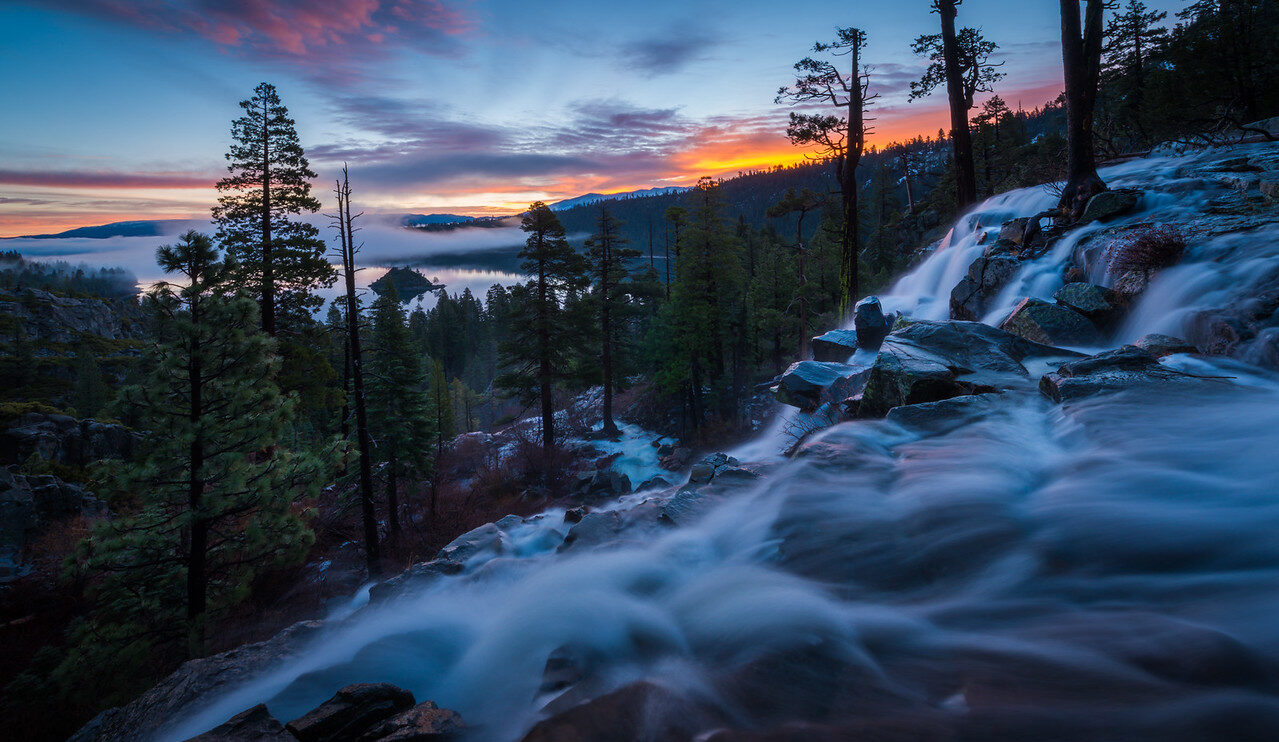
With water, shutter speed changes texture. A short exposure can hold droplets and foam. A moderate one can keep visible ribbons of movement. A long one can soften waves into a quiet surface. Watch several cycles and decide which effect serves the composition. More seconds do not automatically make a better landscape.
For a static camera, use a stable tripod when the exposure becomes too long to hold sharply. Check a rock or other solid subject at full size. If it is soft, you may have camera movement or missed focus rather than beautiful water blur. Use a remote release or self-timer when helpful, and keep the tripod away from currents, slippery edges, and breaking surf.
In bright conditions the camera may stop the lens down fully and still overexpose at your chosen slow shutter. A neutral-density filter can reduce light and make that exposure possible. It does not make the scene safer or the composition stronger. Our moving-water photography guide covers filter calculations, highlight protection, and texture tests in more detail.
 Save
SaveWatch the aperture the camera chooses
Shutter priority gives you motion control while handing aperture to the camera. That means depth of field can change as the light changes. In dim light a wide opening may soften the background but leave less of a group sharp. In bright light a narrow opening may reveal background clutter or soften fine detail through diffraction at very small apertures.
Check the displayed aperture between sequences. If it no longer supports your picture, choose a different exposure setup. For a group with important faces at several distances, you may need direct control of aperture as well as shutter. Manual exposure with a suitable ISO strategy can be clearer than hoping the meter picks the same opening every time.
If depth of field is the main creative decision and movement is less demanding, aperture priority may be the better tool. Camera modes are choices about what you want to control first. Switching modes is not admitting failure; it is matching the controls to the photograph.
Auto ISO and exposure compensation
Auto ISO can help maintain your selected shutter in changing light when the lens runs out of aperture adjustment. Set a sensible maximum ISO based on files you have actually reviewed. The camera’s exact adjustment order and limits differ by model. Read the manual, especially if a safety-shift feature can override a selected setting under some conditions.
Exposure compensation changes the automatic exposure target. Positive values generally aim brighter and negative values darker. With fixed ISO in shutter priority, the camera normally responds through aperture until it reaches a limit. With Auto ISO, ISO can be involved as well. Compensation does not give the lens a wider opening than it physically has.
Review important highlights in white clothing, foam, or reflective objects. A bright-looking screen is not a reliable measurement of exposure outdoors. Use the histogram and highlight warnings, then adjust according to the picture you want. Reset compensation when you change scenes if the earlier correction no longer applies.
Recognize overexposure and underexposure warnings
A blinking aperture value or another exposure warning can mean the camera cannot reach the meter’s target with the available settings. In low light with a fast shutter, you may need more ISO, more light, or a slower exposure. In bright light with a slow shutter, you may need lower ISO, an ND filter, or a shorter exposure. Check your camera’s warning system because displays differ.
Do not ignore a warning because the preview appears okay. Screen brightness, automatic preview adjustments, and viewing conditions can hide a problem. Take a test frame and inspect the histogram and critical detail. If a setting is beyond the exposure range, fix the range problem before making a long sequence.
For artificial light, flicker and rolling-shutter behavior can also affect results, especially with some electronic-shutter modes. Banding or distorted moving shapes is not always ordinary motion blur. Check the camera’s supported anti-flicker options and shutter guidance. Test the actual lights and movement before an important assignment.
 Save
SaveStabilization does not freeze your subject
Image stabilization can help reduce blur from camera movement, but it does not stop a runner, a bird, or a breaking wave. That distinction matters indoors, where a camera may hold a still room sharply at a slow shutter while the people in it blur. Decide whether the problem is your movement, their movement, or both.
For panning, some lenses and cameras offer specific stabilization behavior. Follow the relevant manual rather than assuming every system should be turned off or left on. For tripod work, advice also varies by equipment. Learn what your own combination does and confirm it with test frames.
Good handling still helps. Support the camera comfortably, avoid jabbing the shutter button, and stay balanced. With long lenses, small shakes become more obvious. If every frame is soft, step back and check your whole technique rather than pushing the shutter speed faster without understanding the cause.
When manual exposure makes more sense
If you need a particular shutter and a particular aperture, manual gives you both controls. In stable light you can set ISO too and keep a sequence consistent. On supported cameras, manual with Auto ISO lets brightness adjust through ISO while your shutter and aperture remain chosen, subject to the camera’s limits and any special settings.
Flash adds another layer. Normal synchronization limits, high-speed-sync support, flash power, and ambient exposure interact. Do not assume any fast shutter works with any flash. Check the camera and flash documentation and test the setup. Shutter priority does not remove synchronization limits or create extra flash power.
Use the simplest setup that reliably gives the picture you want. S or Tv is useful for quick motion decisions; it is less useful when automatic aperture changes keep undermining your composition. Understanding that boundary is more valuable than treating one mode as the answer to everything.
A practice plan for your next shoot
Pick one predictable movement and photograph it three ways: frozen, visibly blurred from a static viewpoint, and panned if the subject’s path makes that safe and practical. Note the shutter, aperture, and ISO for each result. Review the files together and identify what changed beyond the subject’s movement.
Repeat in different light. Notice when the lens reaches its aperture limit and when Auto ISO steps in. That exercise turns a dial label into real control. For camera settings, composition, and editing tips you can put to work immediately, explore the Shut Your Aperture Academy. Motion should be a decision you make, not a surprise you discover at home.
Shutter priority mode Q&A
What does shutter priority mode control?
You select shutter speed and the camera selects aperture for its meter reading. ISO may be fixed or automatic depending on your settings.
What is the difference between S and Tv?
Both are common labels for shutter priority on different camera systems. Check your manual for the controls on your model.
What shutter speed freezes action?
There is no universal number. Try a fast setting such as 1/1000 second, inspect the subject, and adjust for its speed, direction, distance and your focal length.
Why is my shutter priority photograph too dark?
The lens may already be at its widest aperture and ISO may be too low for the chosen shutter. Raise ISO, add light or use a slower shutter if the picture allows it.
Can shutter priority create intentional blur?
Yes. Use a slower shutter with a stable camera for flowing water, or follow a moving subject for a pan. Review sharp static details or the important part of the subject.
References: Nikon exposure-mode documentation and Auto ISO guidance. Photographs illustrate water movement, not a controlled shutter-speed comparison.
Recommended gear for shutter priority
Buy what solves a real problem in your setup. Check lens filter diameter, camera-release compatibility, and tripod capacity before ordering. A tripod must include a suitable head and plate, or you need to add them separately.
Stable tripod and compatible head: useful for static landscapes when the selected shutter becomes long.
Compare on Amazon | Compare at B&H
Fixed neutral-density filter: choose the strength and diameter for your lens and exposure goal.
Compare on Amazon | Compare at B&H
Lens cloth and air blower: keep spray and dust from spoiling the frame.
Compare on Amazon | Compare at B&H
Affiliate disclosure: we may earn a commission from qualifying purchases through these links, at no extra cost to you. These are gear-search links, not claims that every listed item fits your camera.

