ISO Photography — Complete Beginner’s Guide to Camera ISO
Master ISO photography and you’ll never come home with a blurry, dark, or grain-wrecked photo again.
If you’ve ever wondered why your indoor photos look grainy, or why your camera has numbers like 100, 400, 3200, and 12800 buried in its menu — this guide is for you. ISO photography is one of the three pillars of exposure (alongside aperture and shutter speed), and once you understand it, everything about your camera starts to click. In the next 20 minutes you’ll learn exactly what ISO is, how it affects your images, which ISO settings to use in every common shooting situation, how to manage noise, and when to let your camera handle ISO automatically. Real settings, real examples, no fluff.
What Is ISO in Photography?
ISO is your camera’s sensitivity to light. Turn it up and your camera becomes more sensitive — it can capture a usable image in a dimly lit room. Turn it down and your camera is less sensitive — you need more light to get a proper exposure, but the image will be cleaner and sharper.
Think of it like your eyes adjusting when you walk from a bright street into a dark cinema. At first you can barely see. Then your pupils dilate — your eyes become more “sensitive” to the available light. ISO does the same thing for your camera’s sensor, just as a number you dial in yourself.
The trade-off is noise. The higher the ISO, the more the camera amplifies the signal from the sensor — and the more it amplifies electronic noise along with it. You’ve seen this as a grainy or speckled look in photos taken in dim light. Understanding when that trade-off is worth it, and when to avoid it, is the whole game.
The One-Sentence Definition for Featured Snippets
ISO in photography is a numerical scale that controls how sensitive your camera sensor is to light; lower numbers (ISO 100–400) produce clean images in good light, while higher numbers (ISO 1600–12800) allow shooting in dim conditions at the cost of increased digital noise.
What Does ISO Stand For in Photography?
ISO stands for the International Organization for Standardization — the international body that sets measurement standards across industries. In photography, ISO replaced an older system called ASA (American Standards Association) which was used on film cameras.
The numbers have stayed the same across the transition from ASA to ISO, and from film to digital. ISO 400 film and ISO 400 digital are both twice as sensitive as ISO 200 — the doubling relationship is preserved. So if you learned photography on film, you already understand digital ISO intuitively.
One thing worth knowing: ISO doesn’t literally make your sensor more sensitive in the way a wider pupil works. In a digital camera, what actually happens is that the analog signal from the sensor is electronically amplified before it’s converted to a digital value. The sensor itself captures the same amount of photons — ISO just tells the camera how aggressively to amplify what the sensor sees. That’s why noise increases at high ISO: amplification magnifies imperfections alongside the real signal.
How ISO Works — The Simple Explanation
Here’s the process in plain steps:
- Light enters the lens and lands on the sensor.
- The sensor generates an electrical signal proportional to how much light it received.
- The camera amplifies that signal based on your ISO setting — ISO 400 amplifies twice as much as ISO 200.
- The amplified signal is converted to pixel data and written to your memory card.
The problem with step 3 is that the sensor also generates random electrical noise, even in total darkness. At ISO 100, this noise is a tiny fraction of the true signal — invisible in the final image. At ISO 6400, the signal has been amplified 64x compared to ISO 100, and so has the noise. That’s when you see the grain.
The ISO Doubling Rule
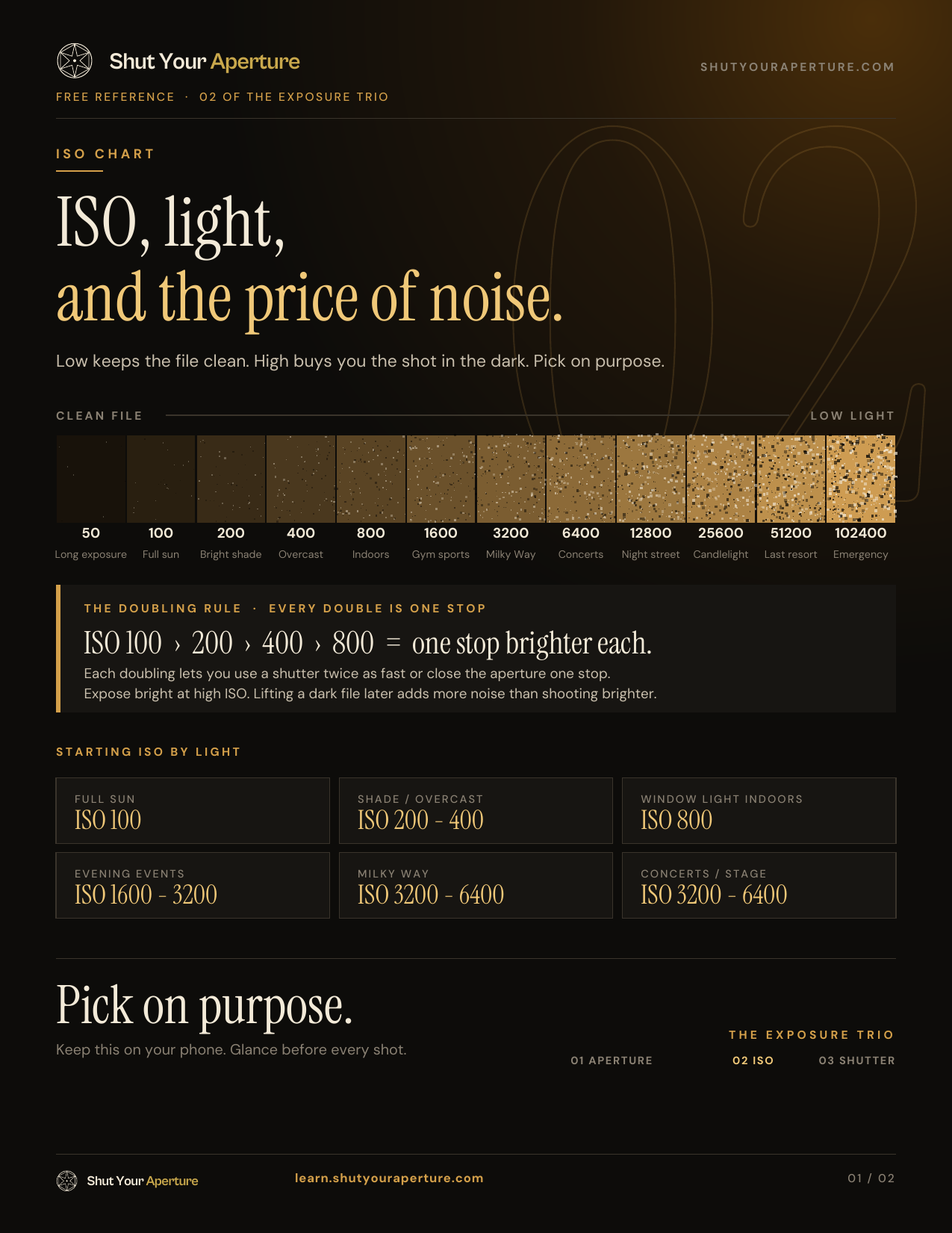
Every time you double your ISO, you double your camera’s sensitivity to light — and you need half as much light to achieve the same exposure. This is exactly like opening your aperture by one stop or halving your shutter speed. All three controls are interchangeable in terms of exposure — they just have different side effects. ISO’s side effect is noise. Shutter speed’s side effect is motion blur. Aperture’s side effect is depth of field change.
Common ISO Values and When to Use Each
Most cameras offer ISO values from around 100 to 51200 (or higher with extended modes). Here’s what each range is for:
| ISO Value | Sensitivity | Noise Level | Best For |
|---|---|---|---|
| ISO 100 | Lowest | Almost none | Bright sunny outdoor, studio with flash, landscapes on a tripod |
| ISO 200 | Low | Negligible | Overcast days, shaded outdoor, beach in the morning |
| ISO 400 | Moderate | Very low | Cloudy days, indoor with large windows, golden hour without tripod |
| ISO 800 | Medium | Low | Dim indoor spaces, early evening, indoor portraits without flash |
| ISO 1600 | High | Visible on close inspection | Dimly lit venues, indoor sports, street photography at dusk |
| ISO 3200 | Very high | Moderate | Concert halls, dark restaurants, night street photography |
| ISO 6400 | Very high | Significant | Extremely dark scenes, astrophotography (full-frame cameras), action in low light |
| ISO 12800+ | Maximum | Heavy | Emergency-only; used when getting the shot matters more than technical quality |
ISO 100 — Your Default Starting Point
Whenever you have enough light, shoot at ISO 100. This is called your base ISO and it’s where your sensor produces the cleanest files, the most dynamic range, and the most accurate colors. Landscape photographers, studio photographers, and product photographers almost always shoot at ISO 100 or 200 because they control the light.
ISO 400 — The Versatile Middle Ground
ISO 400 is where a lot of photographers land for everyday shooting. You can handhold the camera in most daytime conditions, get clean images, and react quickly to changing light. It’s also the most common speed for ISO 400 film (like Kodak Portra 400) — used exactly because it balances versatility and quality.
ISO 1600 to 3200 — When the Lights Go Down
This is the range where your camera earns its keep. Modern cameras handle ISO 1600 extremely well — noise is present but manageable, especially in RAW files processed in Lightroom. Don’t be afraid of it. A sharp ISO 3200 photo is always better than a blurry ISO 400 photo.
ISO 6400 and Above — The High-ISO Question
Full-frame cameras like the Sony A7 IV, Nikon Z6 III, and Canon R6 Mark II handle ISO 6400 with impressive results. Crop-sensor (APS-C) cameras show more noise at the same setting. But even at ISO 6400, if you expose correctly and shoot RAW, Lightroom’s AI Denoise tool can salvage remarkable detail.
ISO and the Exposure Triangle
You’ll hear “exposure triangle” constantly in photography education. It refers to the three settings that together determine how bright or dark a photo is:
- Aperture — controls how much light the lens lets in (and affects depth of field)
- Shutter Speed — controls how long the sensor is exposed to light (and affects motion blur)
- ISO — controls how sensitive the sensor is to the light that comes in (and affects noise)
Change any one of these and you must compensate with one or both of the others to maintain the same exposure. For example:
- You’re at ISO 400, 1/125s, f/2.8. The room gets dimmer. You want to keep your shutter speed to avoid blur.
- You can open your aperture to f/2.0 (lets in more light) — but you have less depth of field.
- Or you raise ISO to 800 (sensor twice as sensitive) — but you get a little more noise.
- The “right” choice depends on what matters most for that particular shot.
ISO is the last dial you typically reach for. Set your aperture for the depth of field you want. Set your shutter speed for the motion you want to freeze or blur. Then raise ISO until the exposure is correct. This is the practical workflow for 90% of shooting situations.
To go deeper on the other two sides of the triangle, read our guides to aperture in photography and shutter speed photography.
ISO Settings Photography — By Shooting Scenario
Here’s the practical guide most beginners actually need: not just what ISO is, but what ISO to dial in for real situations.
Outdoor Photography ISO Settings
| Condition | Recommended ISO | Notes |
|---|---|---|
| Bright midday sun | ISO 100 | Use the Sunny 16 rule: f/16, 1/100s, ISO 100 |
| Slight overcast / haze | ISO 200 | One stop less light than full sun |
| Heavy overcast / open shade | ISO 400 | Two stops less than full sun |
| Golden hour (sunrise/sunset) | ISO 400–800 | Light drops quickly; bump ISO as sun descends |
| Blue hour (just after sunset) | ISO 800–1600 | Tripod recommended below ISO 800 |
| Night (city lights, streets) | ISO 1600–6400 | Depends on ambient light; check histogram |
| Night (dark sky, astrophotography) | ISO 1600–3200 | Tripod + wide aperture essential |
Indoor Photography ISO Settings
| Location | Recommended ISO | Notes |
|---|---|---|
| Bright studio (flash or strobes) | ISO 100 | Flash provides the light; keep ISO at base |
| Well-lit home / office (large windows) | ISO 400–800 | Natural window light is surprisingly bright |
| Average living room / café | ISO 800–1600 | Open aperture + raise ISO |
| Church / cathedral | ISO 1600–3200 | Often no flash allowed; high ISO is your friend |
| Restaurant (dim/candlelit) | ISO 3200–6400 | Shoot RAW; Lightroom AI Denoise recovers this well |
| Concert hall / music venue | ISO 3200–12800 | Varies enormously; start at 3200, adjust by eye |
| Indoor sports arena | ISO 1600–6400 | Shutter speed priority — freeze motion first, then adjust ISO |
Portrait Photography ISO Settings
For portraits, you want clean skin tones above all else. If you have control over the lighting — studio strobes, a flash, or a window — keep ISO at 100–200. If you’re shooting outdoors in natural light, ISO 100–400 is your comfortable range. For indoor natural light portraits (a common wedding or family session scenario), ISO 400–1600 is typical. The goal is always to expose correctly — a well-exposed ISO 1600 portrait looks far better than an underexposed ISO 400 portrait that you’ve tried to lift in post.
Night Photography ISO Settings
Night photography is where many photographers first confront high ISO — and then realize their camera is capable of a lot more than they thought. For Milky Way and astrophotography, ISO 1600–3200 with a wide aperture (f/2.8 or wider) and a 15–25 second exposure is a common starting point. For urban night scenes with light sources everywhere, ISO 800–3200 handheld works well on modern cameras. Check out our dedicated guide to night photography for a full breakdown.
Auto ISO Explained — When to Use It (and When Not To)
Auto ISO is one of the most useful features on modern cameras, and one of the most underused. Here’s how it works and when it saves you.
How Auto ISO Works
When you enable Auto ISO, you set:
- A maximum ISO (e.g., 6400) — the camera won’t go above this, so you control the maximum noise you’ll accept
- A minimum shutter speed (e.g., 1/250s) — the camera won’t drop below this, so you control motion blur
The camera then automatically raises ISO as light decreases to maintain a correct exposure within those limits. When there’s enough light, it drops back down to base ISO.
When Auto ISO Is the Right Choice
- Events and weddings — light changes constantly as you move between ceremony, cocktail hour, and reception. Auto ISO keeps you shooting.
- Street photography — you’re moving fast. You don’t want to miss a moment fiddling with ISO.
- Sports and wildlife — your priority is freezing motion (shutter speed) and controlling depth of field (aperture). Let the camera handle ISO.
- Any documentary/photojournalism scenario — capturing the moment always beats technical perfection.
When to Set ISO Manually
- Studio shooting with flash — your flash provides a consistent, controlled light source. Set ISO 100 and leave it there.
- Landscape on a tripod — you have time; shoot at base ISO for maximum quality.
- Astrophotography — you want precise control over noise levels for long exposures.
- Any situation where the light is constant — manual ISO removes one variable and gives you consistent results frame to frame.
Base ISO and Native ISO — What Every Photographer Should Know
Base ISO (also called native ISO) is the lowest ISO your camera sensor supports natively — without electronic amplification at all. For most cameras, this is ISO 100 or ISO 200. At base ISO, your sensor produces the cleanest files with the widest dynamic range.
Extended ISO — Handle with Care
Many cameras offer “extended” ISO values below the base (like ISO 50 or “L 1.0”) and far above the maximum native ISO. These are simulated values, not genuine sensor sensitivities. Extended low ISOs typically reduce dynamic range (highlight clipping becomes more likely). Extended high ISOs (like ISO 102400 or “H 2.0”) are extremely noisy and only useful in desperation. Stick to the native range for any image that matters.
Dual Native ISO
Some cameras — particularly Sony cinema cameras like the FX3, and the Panasonic S5 — offer two native ISO values (for example, ISO 800 and ISO 5000). Between those two values, one of the camera’s analog gain circuits is operating at its optimal point, meaning the signal-to-noise ratio is better than on cameras with a single native ISO. If your camera has dual native ISO, check the manual — you’ll want to know which ISO values are “native” and prioritize shooting there in low light.
ISO and Image Noise — How to Manage It
Digital noise shows up in two forms:
- Luminance noise — a grainy, film-like texture. This is generally more acceptable and can even look good in black and white or documentary work.
- Chroma noise (color noise) — random red, green, and blue speckles that look unpleasant. This is what you really want to eliminate.
At high ISO, both types of noise increase. But here’s what most beginners don’t realize: exposure matters as much as ISO. An underexposed ISO 1600 shot will look far worse than a correctly exposed ISO 1600 shot. When you expose to the right (ETTR — keeping your histogram shifted to the right without blowing highlights), you maximize the signal relative to the noise, even at high ISO.
Reducing ISO Noise in Lightroom
Adobe Lightroom’s AI Denoise feature (introduced in 2023) has changed the high-ISO game dramatically. It analyzes the structure of your RAW file and reconstructs true detail rather than just blurring away noise. The results at ISO 6400 and even ISO 12800 are genuinely impressive. As a rule: shoot RAW, expose correctly, and use Lightroom’s Denoise as your primary noise reduction tool. Learn the full workflow in our Lightroom guide.
In-Camera Noise Reduction — Leave It Off (for RAW Shooters)
Most cameras offer “High ISO NR” in the menu. For JPEG shooters, a moderate setting is fine. For RAW shooters, turn it off — the camera applies NR to the JPEG preview and the embedded JPEG, but your RAW file is unaffected. You want to do your NR in Lightroom where you have full control.
Does ISO Affect Sharpness?
Indirectly, yes. High ISO noise reduces the perceived sharpness of fine details — the noise pattern breaks up edges and texture. But ISO itself doesn’t affect the optical sharpness of the lens or introduce blur. A high-ISO shot that’s technically in focus will always be sharper than a low-ISO shot with camera shake or missed focus.
How to Change ISO on Your Camera
The exact steps vary by camera brand and model, but here are the most common methods:
On Most DSLRs and Mirrorless Cameras
- Dedicated ISO button — Many cameras have a button labeled “ISO” on the top or back of the body. Press it, then rotate the control dial to change the value.
- Quick menu / Q menu — Canon, Sony, and Fujifilm cameras have a customizable quick-access menu. ISO is almost always in there.
- Main menu — You can always find ISO in the shooting menu as a fallback, though it’s the slowest method.
- Auto ISO toggle — On most cameras, scrolling past the lowest native ISO value takes you into Auto ISO territory, or there’s a specific “AUTO” position in the ISO selection screen.
On Canon DSLRs (e.g., Rebel series, 90D)
Press the ISO button on the top of the camera, then use the Main Dial to scroll through values. On entry-level Rebels, go to the Quick Control screen (Q button) and select the ISO box.
On Nikon DSLRs (e.g., D3500, D7500)
Hold the ISO button (on the left side of the camera back, near the viewfinder) and rotate the Main Command Dial. On the D3500, go to the menu under Shooting → ISO Sensitivity Settings.
On Sony Mirrorless (e.g., A6000, A7 series)
Press the Fn (Function) button to open the Quick Menu, then navigate to ISO. Alternatively, you can assign ISO to a custom button for one-press access — highly recommended for fast-changing situations.
For a full brand-by-brand walkthrough with screenshots, see our dedicated guide: How to Change ISO on Your Camera.
Common ISO Mistakes to Avoid
Mistake 1: Leaving ISO on Auto When You Have Time
Auto ISO is a lifesaver in chaotic situations, but if you’re shooting landscapes or portraits in controlled light, set ISO manually to 100 or 200. Auto ISO might push to 400 or 800 when you don’t need it, adding unnecessary noise.
Mistake 2: Being Too Afraid of High ISO
Many beginners obsess over keeping ISO as low as possible — and end up with motion blur or dark, underexposed images that look far worse than a well-exposed high-ISO shot. A sharp, slightly grainy photo beats a blurry, dark one every time.
Mistake 3: Underexposing to Avoid High ISO
If you underexpose at ISO 800 hoping to lift the shadows later, you’ll get more noise than if you had just exposed correctly at ISO 1600. “Expose to the right” — give your sensor as much light as possible without blowing highlights — and you’ll minimize noise even at high ISO.
Mistake 4: Not Shooting RAW at High ISO
JPEG files apply heavy-handed noise reduction that destroys detail. RAW files preserve everything and give you full control in post. Always shoot RAW when you’re pushing ISO above 800.
Mistake 5: Using Extended ISO Values
Extended low ISOs (like ISO 50 or L 0.7) reduce dynamic range and can cause highlight clipping. Extended high ISOs (H 1.0, H 2.0) produce extreme noise. Stay within your camera’s native ISO range for any image that matters.
Mistake 6: Ignoring the Exposure Triangle Context
ISO doesn’t exist in a vacuum. A photo that looks too dark can be fixed by raising ISO — but it might be better fixed by opening the aperture (f/1.8 instead of f/4) or slowing the shutter speed (1/60s instead of 1/250s). Always consider all three exposure variables before reaching for ISO.
ISO Quick-Reference Cheat Sheet
| Situation | Start Here | Note |
|---|---|---|
| Sunny outdoors | ISO 100 | Clean, maximum dynamic range |
| Overcast/cloudy | ISO 200–400 | One to two stops darker than full sun |
| Open shade | ISO 400 | About two stops darker than full sun |
| Indoor, bright windows | ISO 400–800 | Natural light varies; check histogram |
| Indoor, average lighting | ISO 800–1600 | Open aperture first |
| Indoor, dim lighting | ISO 1600–3200 | RAW + Lightroom Denoise strongly recommended |
| Concert / club | ISO 3200–6400 | Shutter speed is priority to freeze motion |
| Night street | ISO 800–3200 | Depends on city/ambient light |
| Astrophotography | ISO 1600–3200 | Tripod + wide aperture essential |
| Studio with flash | ISO 100 | Flash provides light; stay at base |
| Fast-moving sports | ISO 400–3200 | Shutter speed first; let ISO compensate |
Frequently Asked Questions About ISO Photography
What is ISO in photography?
ISO is your camera’s sensitivity to light. A low ISO (like 100) means the sensor is less sensitive and produces clean images in bright conditions. A high ISO (like 3200) means the sensor is more sensitive and can capture images in dim light, but introduces digital noise (grain).
What does ISO stand for in photography?
ISO stands for the International Organization for Standardization — the global body that created the standard for measuring film and sensor sensitivity. In the film era, the same scale was called ASA.
What is a good ISO for photography?
A good ISO depends on your lighting. In bright sunlight, ISO 100–200 gives the cleanest images. Indoors with decent light, ISO 400–800 is usually fine. In dim or dark environments — concerts, night scenes, sports arenas — ISO 1600–6400 is often necessary. The “best” ISO is always the lowest one that gives you a correct exposure while maintaining the shutter speed and aperture you need.
Does high ISO cause noise?
Yes, but the real culprit is low light. High ISO amplifies the electrical signal from your sensor — and amplifies electronic noise along with it. The less light hitting your sensor, the noisier the amplified signal becomes. This is why noise is worse at night than under studio lighting, even at the same ISO.
What is auto ISO and should I use it?
Auto ISO lets your camera choose the ISO value automatically based on available light. You set an upper limit (e.g. ISO 6400) and a minimum shutter speed, and the camera adjusts ISO as light changes. It’s ideal for events, sports, street photography, and any situation where light is unpredictable. For controlled situations (studio, landscape, tripod work), set ISO manually to stay at base ISO.
What is base ISO?
Base ISO is the lowest ISO your camera produces natively — typically ISO 100 or ISO 200. At base ISO the sensor produces the cleanest files with the widest dynamic range. Always start here when lighting allows.
Does ISO affect depth of field?
No. ISO has zero effect on depth of field. Only aperture (f-stop) controls depth of field. ISO only controls how sensitive the sensor is to the light that aperture and shutter speed allow in.
What ISO should I use indoors?
For well-lit indoor spaces with large windows, try ISO 400–800. For average living rooms or offices, ISO 800–1600. For dimly lit restaurants or churches, ISO 1600–3200. For dark concert venues, ISO 3200–6400 or higher. Always check your histogram to confirm correct exposure.
Grab the Free ISO Cheat Sheet
A one-page reference card with every ISO setting, scenario, and noise-management tip in this guide — formatted to print or keep on your phone. Download it free, then put it to work on your next shoot.
The cheat sheet is included with your Framehaus membership, along with the full ISO Mastery course — step-by-step video lessons, real-world shooting exercises, and a private community of photographers at every level.
30-day money-back guarantee. Cancel any time.