Let’s be real for a second. There was a time, not too long ago, when "AI" in photography was just a fancy way of saying your camera was smart enough not to overexpose a white cat in a snowstorm. We had face detection, maybe some basic noise reduction, and that was about it. Fast forward to 2026, and the landscape hasn't just changed: it’s been completely terraformed. If you’re still clicking through the same manual sliders you were using back in 2019, you aren’t just behind the curve; you’re practically using a stone chisel in the age of 3D printing.
The reason everyone is buzzing about new AI photo editing tutorials is that they aren't just teaching you where to click. They are teaching you a new language of creativity. We’re moving away from the "one-click fix" and moving into "iterative collaboration" with our software. This shift is massive. It’s changing how we shoot, how we bill clients, and honestly, how much we actually enjoy the "work" part of being a photographer.
The Myth of the "Magic Button"
I hear it all the time from the purists: "AI is for people who don't know how to use a camera." That is, quite frankly, a load of rubbish. AI isn't a "make good" button. If your composition sucks, AI might make it a pretty-looking sucky photo, but it’s still a bad photo.
The real magic of AI, and the reason you need to be diving into photography tutorials right now, is efficiency. It’s about taking the 80% of the work that is boring: masking hair, cleaning up sensor dust, matching skin tones across a 500-shot wedding gallery: and letting the computer handle it. This leaves you with the 20% that actually matters: the soul, the style, and the storytelling.

Luminar Neo 2026: The Beast in the Room
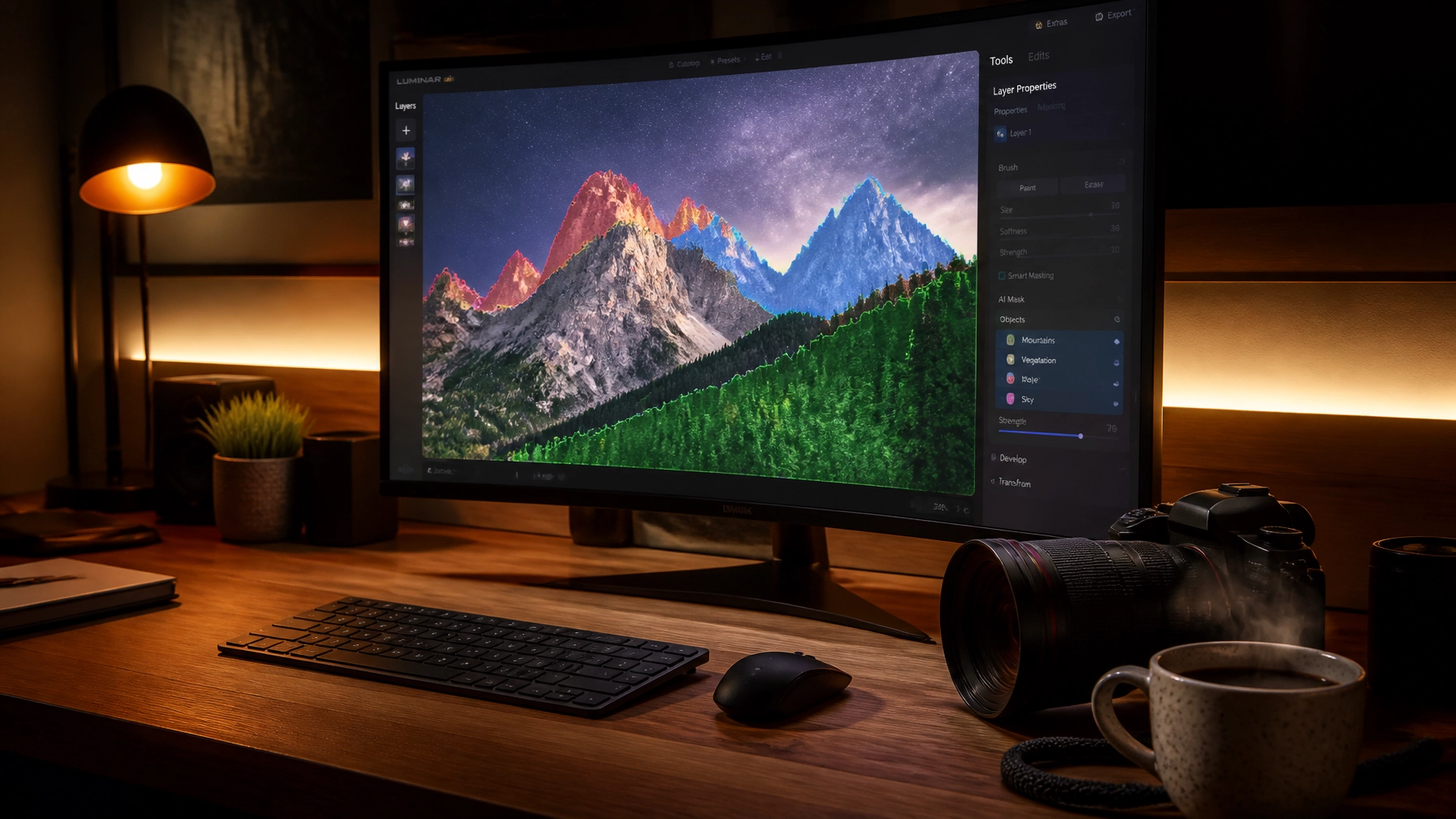
If you haven't checked out Luminar lately, you’re missing out on what is arguably the most aggressive evolution in editing software history. While other programs are slowly trickling out AI features, Luminar has built its entire foundation on it.
The 2026 updates have brought things like "Light Depth" and "Bokeh AI" to the forefront. These aren't just filters. When you use Luminar, the software actually maps the 3D space of your 2D image. It knows that the mountain in the back is three miles away and the blade of grass in the front is three feet away.
Why You Need Tutorials for This
You might think, "If it's so smart, why do I need a tutorial?" Because these tools have depth (pun intended). In Luminar, the Light Depth tool allows you to literally move a virtual light source around your subject after the photo is taken. If you don't know the principles of three-point lighting or how light naturally falls off, you’ll end up with a photo that looks like a bad CGI movie from the 90s.
This is why we focus so heavily on practical application at Shut Your Aperture’s learning hub. We don't just show you what the slider does; we show you why you should use it and when to stop before it looks fake.
The Power of "Light Depth" and "Bokeh AI"
Let's talk about the Bokeh AI upgrade for a minute. It used to be just for portraits. Now? You can apply it to anything. Shot a product photo at f/8 because you needed the whole thing in focus, but now you wish the background was a bit creamier? Boom. Luminar can handle that. It creates a depth map that is scarily accurate, allowing you to roll on blur that looks like it came from a $2,000 prime lens.
And then there's the Light Depth tool. For landscape photographers, this is a game changer. Imagine being able to "re-light" a valley to look like the sun was hitting it from a slightly different angle, or adding a soft glow to the foreground that mimics the golden hour you just missed by ten minutes. It’s powerful stuff, and it’s why keeping up with photography news and trends is so vital.

Workflow Transformation: From Hours to Minutes
Let’s talk about the "grunt work." You know what I'm talking about. You come home from a shoot with 1,000 images. You have to cull them, then you have to basic-edit them, then you have to do the "fine" retouching.
In the old days (aka three years ago), that was a weekend-long process. Today, with the workflows taught in modern AI tutorials, you can automate about 90% of that.
- AI Culling: Tools now look for closed eyes, blurry shots, and even "aesthetic quality" based on your previous favorites.
- Batch Editing: Instead of copying and pasting settings, AI analyzes each individual photo and applies adjustments based on the specific lighting of that shot, while maintaining a consistent "vibe."
- Skin and Face AI: I remember spending 20 minutes on a single portrait just to get the skin looking natural but clean. In Luminar, the Skin AI tool does this in about five seconds. It even handles dark circles and shine without making the person look like a plastic doll.
If you’re still doing this manually, you’re literally throwing money away. Time is the only thing we can't buy more of, so why waste it on tasks a computer can do better? Check out some of our advanced tips and tricks to see how you can reclaim your weekends.
Generative Fill: The Creative's New Best Friend
Generative Fill is where things get really wild. It’s no longer just about removing a stray trash can from the background (though it’s brilliant at that). We’re now at a point where we can extend our canvases.
Shot a vertical portrait but now you need it for a horizontal website banner? Generative AI can "dream up" the rest of the scene based on the existing pixels. It’s shockingly good. It understands textures, lighting, and perspective.
But here’s the catch: it takes skill to make it look seamless. You have to understand how to prompt the AI and, more importantly, how to blend it. This is a core part of what we teach in our latest tutorials. If you want to see some of the industry-leading work being done with these tools, head over to PhotoGuides.org for some deep dives.
Restoring the Past with High-Tech Tools
AI isn't just about the photos you took yesterday. It’s about the photos your grandfather took in 1945. One of the most rewarding parts of the AI revolution is restoration AI.
We’ve all got those dusty old boxes of prints. They’re faded, torn, and losing their life. New tutorials are showing us how to use AI to scan these, remove the scratches, fix the tears, and even colorize them with terrifying accuracy. It’s like giving a high-tech resurrection to your family history. It’s emotional, it’s powerful, and it’s a service you can actually offer to clients as a high-value add-on.

Character and Style Consistency: Building Your Brand
One of the biggest struggles for any photographer is maintaining a consistent "look." You want someone to see a photo and know it’s yours before they even see the watermark.
In 2026, AI is making this easier than ever. You can actually "train" your own AI style profile. By feeding your software a selection of your best-edited work, it learns your color preferences, your contrast curves, and how you handle light.
Then, when you go to edit a new batch, you aren't just applying a preset. You’re applying your own artistic DNA. This ensures that your Instagram feed, your portfolio at Edin Fine Art, and your client galleries all look like they came from the same brain. It’s about brand consistency at scale.
The AI Assistant: Your New Mentor
Imagine having a master retoucher sitting next to you while you work, giving you tips and suggesting tools. That’s what the new AI Assistants in programs like Luminar are becoming.
Instead of searching through a menu for "that one tool that fixes red eyes," you can just ask the assistant. "How do I make the sky look more dramatic?" or "What’s the best way to clean up this messy hair?" The AI will suggest a workflow, walk you through the steps, and even apply the base settings for you. It’s like a built-in tutorial that lives inside your software.
This doesn't replace the need for deep learning, though. You still need to understand the "why" so you can overrule the assistant when it gets too aggressive. For more on the balance between gear and software, you might want to read our thoughts on whether gear really matters in 2026.
The Human Element: Keeping the Soul in the Shot
With all this talk about automation and smart tools, it’s easy to feel like the photographer is becoming obsolete. But I’d argue the opposite is true.
As the technical barriers to entry drop, the value of vision sky-rockets. Anyone can use AI to make a sharp, colorful image. Not everyone can capture a moment that makes you feel something.
Don't let the tools dictate your art. Use the tutorials to master the tools so they become invisible. You want your viewers to talk about the mood of the photo, not the AI sky replacement you used. If you find yourself leaning too hard on the "magic," take a step back and revisit the basics. Sometimes, fixing mistakes in manual mode is exactly what you need to ground your creative process.

Why You Can’t Afford to Wait
The pace of change in the photography world is blistering. Every month, a new tool or technique emerges that can save you hours of work or open up a creative door you didn't even know existed.
If you aren't actively seeking out new tutorials and staying on top of the latest news, you are letting your skills stagnate. Photography is a craft, and like any craft, it requires constant refinement.
But here’s the good news: it’s never been more fun to be a photographer. The "drudgery" is dying, and the "dreaming" is becoming more accessible. Whether you’re a pro looking to optimize your business or an enthusiast wanting to make your travel photos pop, these AI-driven changes are for you.
For more personal insights and behind-the-scenes looks at how we're using these tools in the field, don't forget to check out Edin’s personal blog. There’s a whole world of inspiration out there waiting for you.
Wrapping It Up
So, will AI change the way you process your images? Absolutely. It already has. The question is whether you’re going to be the pilot of this new technology or just a passenger.
Dive into the tutorials. Experiment with Luminar. Fail spectacularly with generative fill until you figure out how to make it work. The future of photography isn't about the camera; it's about the connection between your vision and the tools you use to bring it to life.
Head over to learn.shutyouraperture.com and let's get to work. The images of tomorrow are waiting for you to create them today.