
Original date July 8, 2014. Updated October 2026.
A camera can give you a bright picture and still give you the wrong picture. The face is soft. The water looks frozen when you wanted it to flow. The background fights the subject. Getting out of Auto is not about memorizing numbers. It is about deciding what the photograph should look like, then making the settings work for that decision.
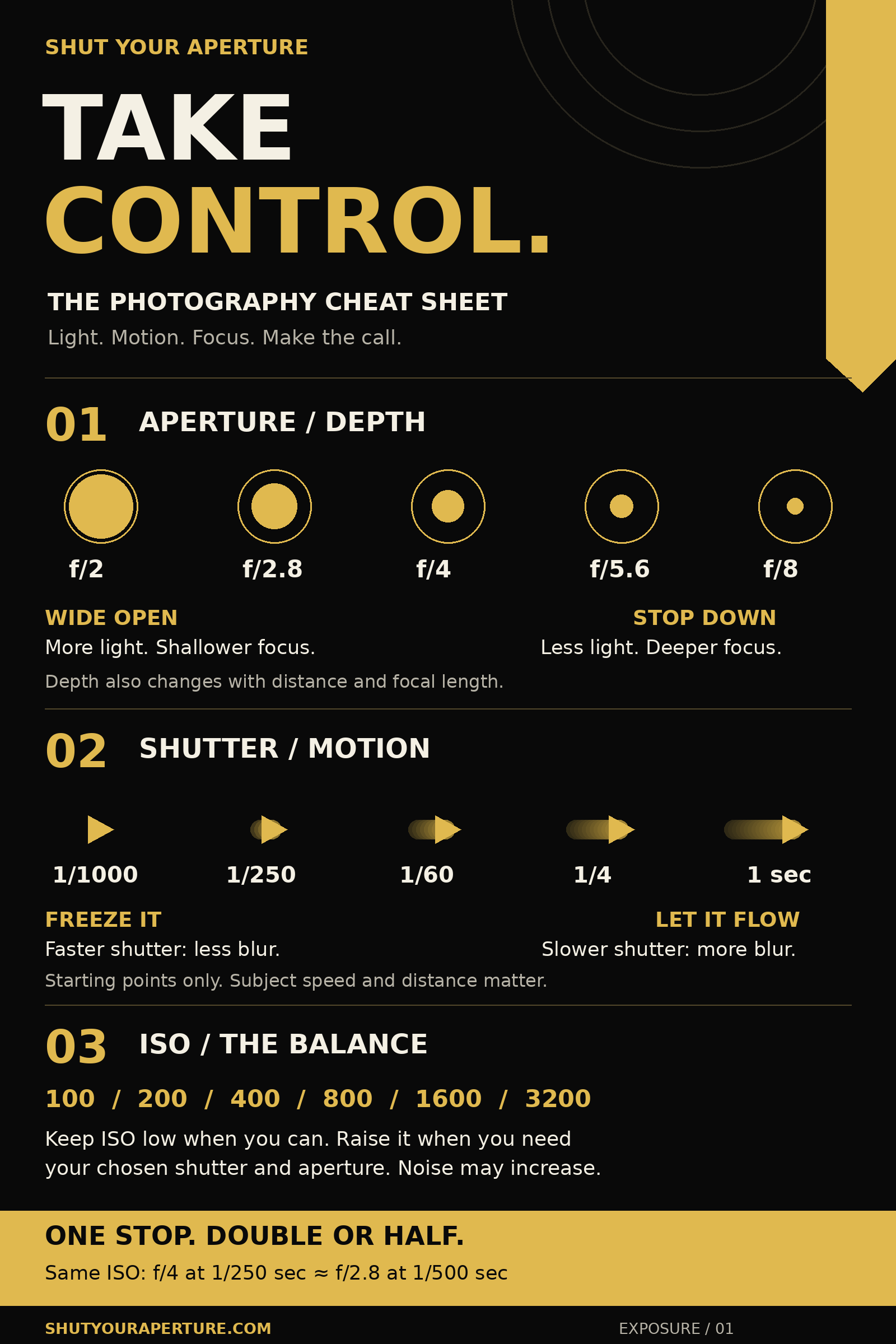
This photography cheat sheet puts those choices in your pocket. Save the black-and-gold graphic, then use the examples below to understand what the numbers actually change. There is no magic landscape setting, no single portrait aperture and no shutter speed that freezes everything. Light changes. Subjects move. You have to look.
 Save
SaveStart with the photograph, not the settings
Before touching a dial, answer one question: what must this picture do? If a person is running, motion comes first. If you want a close subject and a distant ridge both readable, depth comes first. If you want the sea to become a soft sheet of color, time comes first. That decision tells you which setting gets priority.
Use aperture to shape depth of field. Use shutter speed to shape motion. Use ISO to support those choices. Then check the result. The meter is a starting point, not a verdict on the picture.
Work in that order and you stop chasing three numbers at once. You also start seeing why two photographs made with similar settings can feel completely different. The camera does not choose your subject, your timing or the direction of the light. Those are still yours.
Aperture: decide what needs to be sharp
The aperture is the opening inside the lens. A smaller f-number means a wider opening. At the same shutter speed and ISO, f/2.8 lets in more light than f/8. A wider opening also gives you shallower depth of field when the other conditions stay the same. That can separate a face from a messy background. It can also leave the second eye soft if you are close and the face is turned.
Depth of field depends on more than aperture. Focus distance and focal length matter. Move very close and the sharp zone can become thin even at a moderate aperture. Back away and more of the scene may appear sharp. Do not expect f/8 to solve every focus problem, and do not expect f/1.8 to turn every background into smooth color.
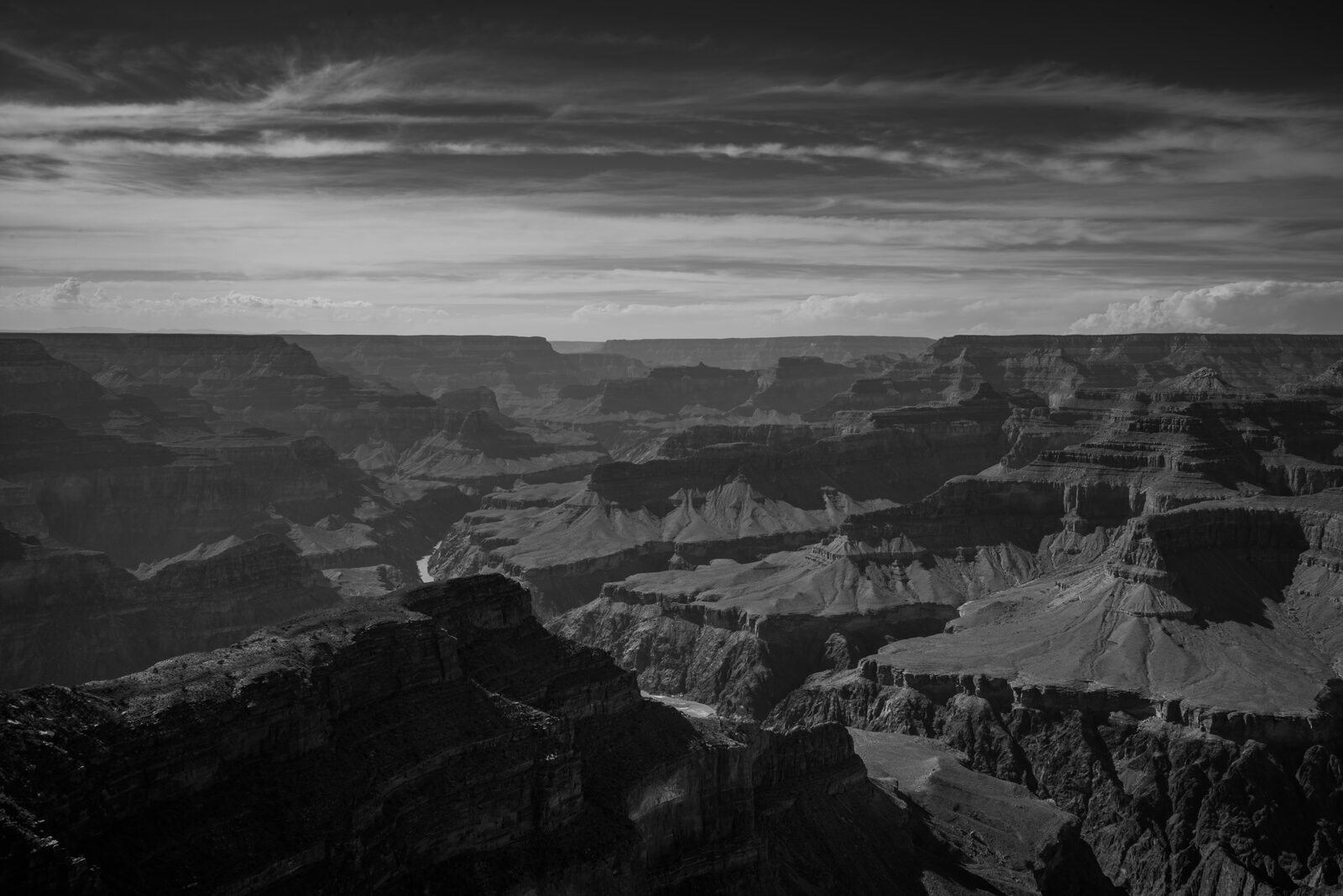
For a still landscape, try a middle aperture such as f/8 as an experiment, not a rule. Look at the nearest important detail and the farthest important detail. If they cannot both be held sharp, change position, choose a different focus distance or consider a focus stack when the scene is still. Closing all the way to f/22 can increase depth, but diffraction can reduce fine detail. The right compromise belongs to the photograph, not the chart.
 Save
SaveShutter speed: freeze it or let it move
Shutter speed controls the time during which the camera collects light. A shorter exposure gives moving subjects less time to cross the frame. A longer exposure lets movement leave a trail. Neither is automatically better. A sharp wave can show force. A soft wave can show rhythm. Decide which story you want before choosing the number.
The graphic moves from 1/1000 second to one second. Those values show a direction, not a promise. A walking person and a bird in flight need different treatment. Motion across the frame can demand a faster shutter than motion toward the camera. A close subject can travel farther across the image than a distant one moving at the same speed. Take a test frame and zoom in.
There are two kinds of blur to separate. Camera shake comes from the camera moving. Subject blur comes from the subject moving. Stabilization can help with the first. It cannot freeze a person turning their head. A tripod can hold the camera still for a long exposure, but the leaves, water and people may keep moving. Sometimes that is exactly the point.
 Save
SaveISO: protect the picture you are trying to make
ISO affects how the camera renders exposure into image brightness. Raising ISO does not open the lens or keep the shutter open longer. It can help you keep a fast shutter or a chosen aperture when there is not much light. The trade-off can be more visible noise and less room to recover highlights, depending on the camera and exposure.
Keep ISO low when the light and subject allow it. Raise it when low ISO would force the wrong shutter speed or aperture. A little noise in a sharp face is often easier to live with than a clean file with motion blur through the eyes. That is a practical choice, not permission to stop watching image quality.
Auto ISO can be useful if you set sensible limits for the job. Check what your camera lets you control, including the maximum ISO and minimum shutter speed. Do not copy another photographer’s limit without testing your own files. Look at a print or a normal-size export as well as a 100 percent crop. The final use matters.
One stop: the simple math behind exposure
A stop is a doubling or halving. Change shutter speed from 1/250 to 1/125 second and you collect light for twice as long. Open the lens from f/4 to f/2.8 and you let in roughly twice as much light. Raise ISO from 100 to 200 and the rendered brightness rises by one stop when the other settings remain unchanged.
To keep approximately the same brightness at the same ISO, trade one stop against another. If f/4 at 1/250 second gives the exposure you want, f/2.8 at 1/500 second is an equivalent starting point. You gain the wider aperture and lose exposure time. Brightness can stay similar while depth of field and motion change. That is why equivalent exposure does not mean an identical photograph.
Practice this on a still subject in steady light. Make one frame, change only aperture and shutter in opposite directions, then compare. Keep ISO fixed for the exercise. You will see the difference much faster than you will learn it by staring at a list of numbers.
Read the light before you trust the meter
The camera measures a scene, but it does not know which detail you care about. A dark background can tempt it to brighten the picture too much. A bright sky can pull the other way. Check important highlights and shadows instead of accepting the first result because the meter sits at zero.
Use the histogram and highlight warning as checks. A pile-up at the right edge can indicate clipping, but a small bright lamp is not the same as a large patch of lost skin detail. Look at the subject. Protect what matters. If you are shooting RAW, remember that the camera’s preview and histogram are usually based on its processed preview, not a direct display of all the RAW data.
Exposure compensation changes the brightness target in automatic exposure modes. Try a small adjustment, make another frame and inspect it. In manual exposure with fixed ISO, compensation may not change the recorded exposure at all. With Auto ISO, behavior varies by camera. Learn the controls on the body you actually use.
 Save
SaveFocus: check the part that matters
A bright, well-exposed picture can still fail because focus landed in the wrong place. Choose the subject before choosing the focus point. For a still subject, single autofocus can be useful. For a moving subject, continuous autofocus is often the better starting point. Names and tracking options vary across camera systems, so read the behavior rather than memorizing a label.
For a portrait, inspect the nearer eye when that is your intended point of focus. For a landscape, inspect both foreground and distance when both need to hold. For a moving subject, review more than the first frame of a burst. Tracking can drift, and a sharp jacket does not make a soft face sharp.
When the camera hunts in low light, find contrast near the subject and at the correct distance. Do not focus on a faraway light just because it is easy to see. Manual focus can be the right choice for a static night scene, but check it with magnified live view when possible. Recheck after changing focal length or moving the camera.
Composition: give the frame a reason
The rule of thirds is a useful way to break the habit of putting everything in the center. It is not a law. A centered subject can be powerful when the scene has symmetry. A low horizon can give a strong sky room to breathe. A high horizon can give the foreground more weight. Choose the arrangement that makes the subject clear.
Before pressing the shutter, inspect the edges. Look for a bright corner, a cut-off hand, a branch growing out of a head or a sign stealing attention. Move your feet before reaching for a different lens. A small change in camera height can separate overlapping shapes or remove a distracting patch of background.
Use lines to lead somewhere worth looking. Use foreground when it supports the scene, not because every landscape is supposed to have a rock at the bottom. If the picture becomes stronger when you leave something out, leave it out. For a deeper look at the grid, see the rule of thirds guide.
 Save
SaveA field routine you can actually use
First, find the light. Walk around the subject if you can. Notice what changes when the light hits from the side instead of straight behind you. Next, choose motion or depth as your priority. Set the shutter or aperture for that decision, then use the remaining controls to reach the brightness you want.
Make one test photograph. Check the important detail for sharpness, check the highlights and scan the edges. Change one thing at a time. If motion is the problem, fix shutter speed before chasing color. If the background is the problem, change position before buying a lens. If the subject is weak, find a stronger subject.
Finally, wait for the moment. The settings can be right while the picture is still early. A cloud can uncover the light. A person can step into the right space. A wave can break with a better shape. Stay ready, but do not mistake a full memory card for a finished shoot.
 Save
SaveThe small gear choice that supports the lesson
You do not need a new camera to practice any of this. Use the camera you have, a charged battery and a clear idea. If you want to experiment with long shutter speeds, stable support is useful. Match the tripod to the weight of your camera and lens, and check the ground, wind and head lock before walking away from it.
Photography cheat sheet Q&A
What should I set first?
Set the control that protects the picture you want. Choose shutter speed first for motion, or aperture first for depth of field. Balance the remaining settings, then inspect a test frame.
Does high ISO always ruin a photograph?
No. Higher ISO can increase visible noise, but a sharp photograph at higher ISO can be more useful than a blurred photograph at low ISO. Judge the file at its intended output size.
Can stabilization freeze a moving person?
No. Stabilization helps reduce camera shake. Subject movement still needs an appropriate shutter speed, unless you deliberately want motion blur.
Is f/8 always the best landscape aperture?
No. It can be a useful starting point, but depth of field also depends on focus distance and focal length. Check the nearest and farthest important details rather than relying on one number.
Why do equivalent exposures look different?
Equivalent exposure can keep brightness similar while aperture changes depth of field and shutter speed changes motion. The settings serve different visual purposes even when they balance.
Can I save this cheat sheet?
Yes. Open the original black-and-gold graphic and save it to your phone or computer. Use it as a reminder, then make test frames in the light you actually have.
Keep practicing one choice at a time. The Shut Your Aperture learning hub has more guides for the next step. The goal is not to memorize the camera. The goal is to see the picture and know what to change.
Affiliate disclosure: this post contains affiliate links. If you buy through them, Shut Your Aperture may earn a commission at no extra cost to you. As an Amazon Associate, we earn from qualifying purchases.

