

Updated October 2026
The original Canon EOS 7D paired with the EF 70-300mm f/4-5.6 IS USM is a historical DSLR and telephoto combination, not a current thousand-dollar-off offer. This page began as a 2015 retailer deal announcement. The discount, urgency, and shortened sales links are not a present-day price guide. This update explains the original equipment and what to check if you are considering a used example.
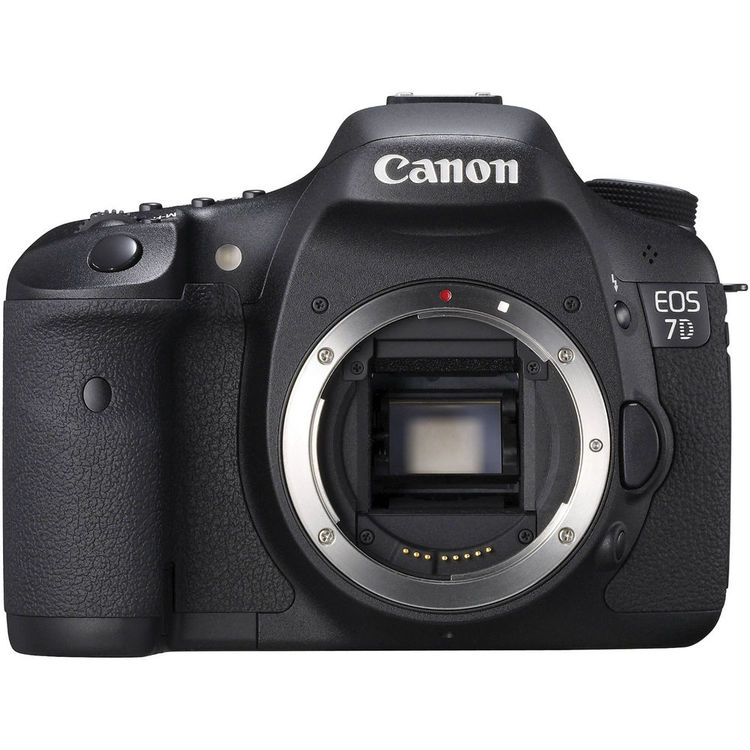
The original EOS 7D is not the EOS 7D Mark II, and the original EF 70-300mm f/4-5.6 IS USM is not the later IS II model or the L-series version. Those names matter. Similar-looking listings can describe different bodies, motors, controls, and specifications. Ask for the exact product labels and a clear inventory before comparing prices.
I would start with the subject and the working distance. A long lens can help frame something farther away, but it also narrows your view and makes careful handling important. A camera-and-lens kit is useful only when the individual equipment works and its limitations fit your plans. A historical reputation or an expired discount does not settle that decision.
The original EOS 7D specification
Canon’s museum and instruction manual describe an approximately 18-megapixel APS-C CMOS sensor, Dual DIGIC 4 processors, and continuous shooting at approximately 8 frames per second. The documented autofocus system has 19 points, all cross-type under the specified conditions. Those are model specifications, not a measured hit rate from a new field test.
The sensor measures 22.3 by 14.9 millimeters. The camera accepts Canon EF lenses, including EF-S lenses, and Canon gives an approximate 1.6 x full-frame equivalent field-of-view relationship. The optical viewfinder is a pentaprism with approximately 100 percent coverage and a listed 1.0 x magnification under stated conditions.
The manual lists Full HD movie recording. Do not assume that the camera offers modern video formats or newer autofocus features because it has a movie switch. Check resolution, frame rates, recording limits, focus behavior, and your intended editing workflow against the actual manual before using it for a project.
 Save
SaveUnderstand the 70-300mm lens name
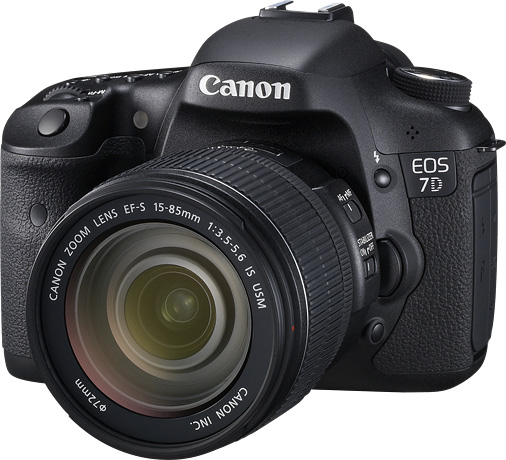
The original feature identifies the EF 70-300mm f/4-5.6 IS USM. Canon’s product description gives image stabilization and a USM autofocus motor for this lens. Its documentation also describes a zoom lock at 70 mm. Check those details on the actual lens rather than assuming a generic 70-300 listing is the same model.
The f/4-5.6 designation describes a variable maximum aperture across the zoom range. Do not plan a low-light setup as though it were a constant-aperture f/4 lens throughout. Test the exposure choices at the focal length where you intend to work, especially when a subject is moving.
A later lens with a similar name can have different controls and behavior. Confirm the exact version, condition, and accessories. Ask for actual photographs of the front label, switches, mount, and glass. A product title alone is not enough to prove what you will receive.
Equivalent framing is not a new focal length
On the 7D’s APS-C sensor, Canon describes the lens’s angle of view as roughly comparable to 112-480 mm on full frame. The lens itself remains 70-300mm. The smaller recorded field gives a tighter composition relative to using the same lens on a full-frame camera; it does not physically change the lens.
That narrower view can help isolate a distant detail, but it may be awkward in a confined setting. Before buying, imagine the nearest subject and the space you have to back up. A telephoto is not automatically a complete travel lens or the only lens you will need.
For your own photographs, start wider while finding the subject and then refine the frame where appropriate. Watch the background as well as the subject. A long focal length can make a small change in viewpoint alter the relationship between shapes in the scene. Move only where access and safety allow it.
Stabilization and subject movement are different
Canon described the original lens’s stabilizer as providing up to three stops of camera-shake correction under its conditions, with a panning option. That is a manufacturer claim about reducing camera movement, not a promise that every handheld frame will be sharp.
Image stabilization does not freeze an independently moving subject. A sharp background and blurred animal or athlete may call for a different shutter-speed choice, not more faith in the stabilizer. Review which part of the image is blurred before deciding what to change.
Test the lens’s stabilization and focus behavior before an important outing. Try ordinary safe subjects and review several frames. If the used lens makes unusual noises, behaves inconsistently, or does not respond as expected, ask the seller to demonstrate it and address the fault. Do not guess its cause from one file.
 Save
SaveChoose an autofocus approach for the scene
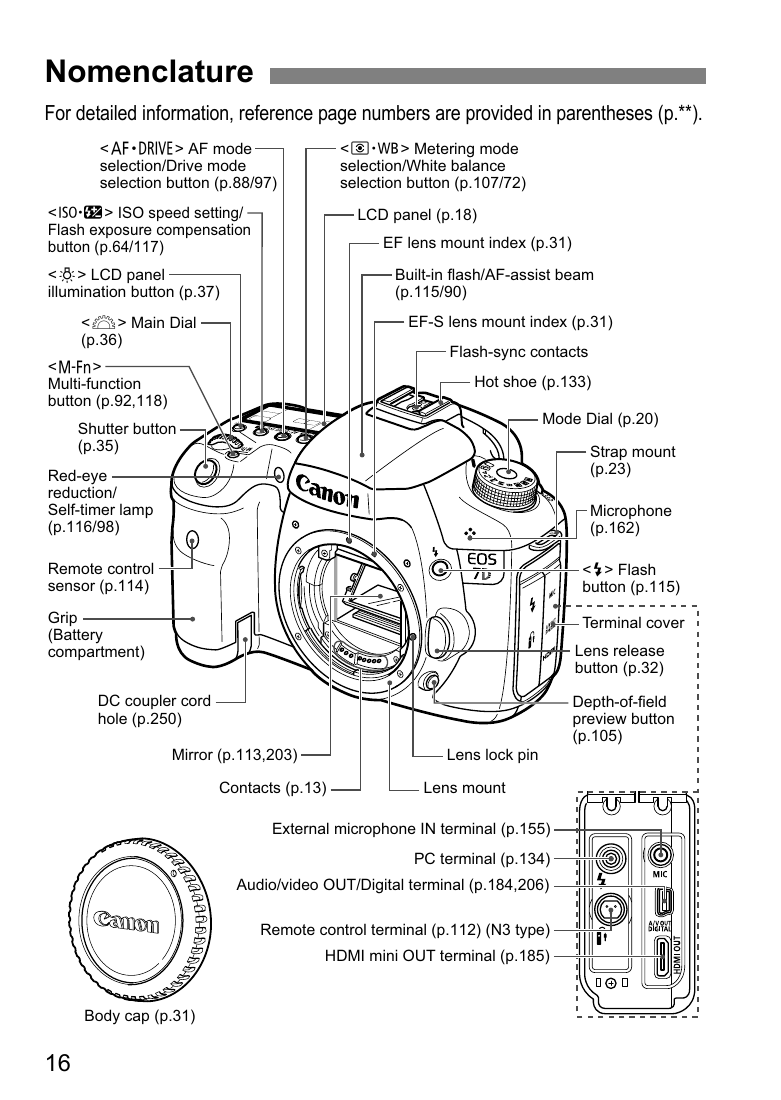
The 7D manual documents One-Shot AF, AI Servo AF, AI Focus AF, and manual focus, plus several focus-area options. Read the relevant controls and practice selecting them. A mode name does not establish the result you will get with a particular subject, lens, distance, or light level.
For a stationary subject, confirm where focus falls and inspect detail in a representative file. For motion, test the type of movement you expect: movement across the frame and movement toward the camera are different situations. Review a sequence rather than assuming the first apparently sharp preview tells the whole story.
Keep the focus-area choice understandable while learning. Check the background and whether another object is competing with the subject. A missed-focus frame is easier to diagnose when you know what area and mode were active. Do not change every setting at once and then wonder which change mattered.
Eight frames per second is not an unlimited burst
Canon lists approximately 8 fps continuous shooting for the original body. Burst depth depends on conditions, file format, media, and firmware context. A published maximum is not permission to assume uninterrupted speed for every card and every shooting configuration.
Make a short representative sequence and see how the camera behaves with the media and file type you intend to use. Check how it responds after the buffer fills and how long it takes to be ready again. That practical demonstration matters more than a listing that repeats only the headline speed.
Time your photographs around the subject’s action instead of filling cards simply because continuous drive is available. Anticipate a useful gesture, keep the frame clear, and review whether the sequence contains a convincing moment. More frames can give you options, but they do not choose the moment for you.
Exposure choices for a distant subject
Decide whether motion should be frozen or visible. Then check the actual shutter speed, aperture, and sensitivity in the light you have. A distant subject viewed through a narrow frame can be hard to track, so allow room for its movement rather than making the composition needlessly tight at the beginning.
The manual distinguishes the ordinary ISO 100-6400 range from expansion to ISO 12800. The highest setting is an option, not a general image-quality recommendation. Judge the files at the intended output size and keep the exposure decision tied to the subject’s movement and available light.
Avoid treating an old rule of thumb as a guarantee. Support, stance, focal length, subject movement, and output expectations all affect the result. Use your actual photographs to refine the technique. If you need dependable performance for a specific assignment, test the combination before promising that it will meet the requirement.
 Save
Save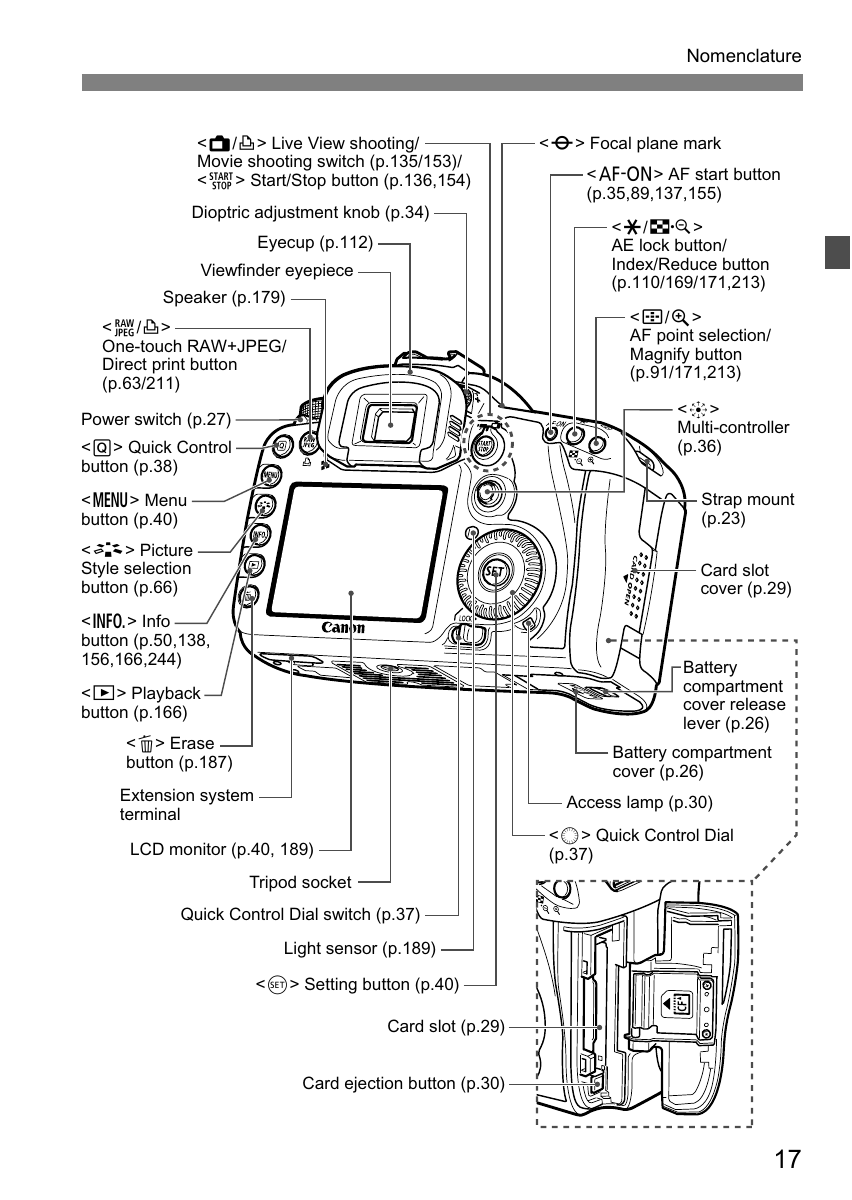 Save
SaveCards and power need an older-camera check
The original 7D uses CompactFlash media, not an SD card slot. The manual lists Type I or II CF cards with UDMA compatibility. Check the correct media, a suitable reader, and the card slot on the actual body. Do not force a card into an unfamiliar compartment.
Inspect for damaged pins, unreliable recording, and playback or transfer failures. Make several exposures, review them, and confirm that the files reach your computer correctly. A working screen does not establish a healthy card slot. A cheap body can create trouble if the storage path is unreliable.
Canon identifies the LP-E6 battery in the original documentation. Check supplied power equipment and the charger, and do not use visibly swollen or damaged batteries. A published battery-life figure was measured under stated conditions and should not be treated as a promise about an aged battery you receive from a seller.
Do not call an old body fully weatherproof
The original sales copy called the body fully weather-sealed. That wording is too broad for a used-camera decision. The existence of a durable body or sealing features is not proof that an old unit, its lens combination, and its doors are safe in every wet or dusty situation.
Inspect seals, compartment doors, mounts, and signs of corrosion or impact. Keep the equipment out of conditions you cannot justify from the manufacturer’s guidance. Avoid treating a past marketing phrase as a guarantee that lets you ignore protection or a developing fault.
A seller’s claim about condition needs a demonstration or a clear return path. Separate cosmetic wear from functional problems, but do not dismiss unexplained evidence of damage. If the camera or lens has been repaired, ask what was done and what documentation is available without assuming a repair is either good or bad.
Inspect the complete used kit
Test the body controls, displays, exposure behavior, focus, card operation, and representative files. Inspect the lens mount, zoom movement, switches, autofocus, stabilization, and visible glass condition. Test the actual pair together where possible. Two items that each power on are not automatically a dependable working combination.
Confirm the inventory: exact body, exact lens version, caps, battery, charger, strap, and any other accessories. Ask whether the seller’s photographs show the unit for sale. Compare complete packages rather than a body-only headline with a kit price that includes usable extras.
Verify current price, shipping, return window, and any warranty against the seller’s own listing. This page does not preserve the old thousand-dollar discount as a current offer. If the equipment cannot be demonstrated or returned, account for that uncertainty before committing. A historical deal announcement is not a substitute for today’s terms.
Make a file workflow before your first outing
Keep originals separate from working edits and finished exports. Test that your current software can read the files you intend to capture. Do not discover a compatibility problem only after you have cleared the card or promised a deadline.
Maintain an independent backup before reusing media. An external working drive alone is not a complete backup system. The storage suggestion below supports organization; it is not equipment claimed to have been used with this historical kit.
The useful purchase question is simple: does the individual body and lens function properly, and does the combination serve your photographs? You do not need a revived 2015 discount to answer it. You need clear model identification, representative results, a realistic working plan, and verified current terms.
To build a more deliberate approach to composition, light, and editing, explore the Shut Your Aperture Academy. Equipment and references can help you get started. Practice helps you decide what belongs in your frame, recognize distracting choices, and make an image that serves your own idea.
Frequently asked questions
Is the original thousand-dollar-off offer current?
No. This page is a historical equipment guide, not a current price or stock announcement.
Is this the EOS 7D Mark II?
No. It covers the original EOS 7D, and the exact body should be checked in any used listing.
Does the original 7D use SD cards?
No. Canon’s manual lists CompactFlash media for the original EOS 7D.
Does stabilization freeze a moving subject?
No. Camera-shake correction and independently moving subject blur are different problems.
Which 70-300mm lens is discussed?
The original EF 70-300mm f/4-5.6 IS USM, not the later IS II or L-series version.
Source note: Canon EOS 7D museum specifications; official original 7D manual; Canon original 70-300mm description. Images show the equipment, not photographs made with the kit.


