
Updated October 2026
The Canon EOS 5DS R is a full-frame DSLR built around a 50.6-megapixel sensor and a low-pass filter cancellation design. This page began as a 2015 launch-style announcement. The update replaces its available-now sales language with a historical specifications guide, practical high-resolution shooting tips, and a used-body inspection checklist. It is not a new hands-on camera test or a promise about current stock.
The important distinction is the R. The EOS 5DS and EOS 5DS R share many specifications, but they do not have the same low-pass filtering effect. The original front view and the manufacturer product view identify the R variant. Check that same label in any current used listing.
I care about what the final photograph needs. A large file can give you room for a detailed print or a crop, but it cannot turn missed focus, subject movement, or a weak composition into a better image. Understand what this camera offers, then decide whether the individual body and lens combination fit the photographs you intend to make.
Canon EOS 5DS R specifications that matter
Canon lists a 36 by 24 millimeter CMOS sensor with approximately 50.6 effective megapixels and Dual DIGIC 6 processors. The specification page gives continuous shooting at up to five frames per second and a 61-point autofocus system. These are documented model capabilities, not a measured result from a fresh test of a used example.
The camera uses Canon EF lenses. Canon explicitly excludes EF-S and EF-M lenses from the compatible mount description. Do not assume that an adapter or a lens from another Canon system will provide the same functions. Check the exact lens and any accessory combination against the relevant documentation before you make a buying decision.
Full-size files are substantial: Canon lists full-resolution RAW dimensions of 8688 by 5792 pixels. Smaller formats and crop modes also exist. Decide which you need before a job rather than filling cards with one format by habit. The original full-resolution capture may be valuable, but your delivery requirements still determine the practical workflow.
 Save
Save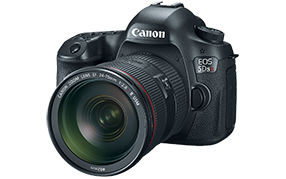
Low-pass cancellation is a tradeoff
The R variant cancels the effect of the optical low-pass filter to preserve more fine detail. Canon also warns that this can increase the possibility of moire and false colors compared with the EOS 5DS, depending on the subject and shooting conditions. Do not describe the feature as free extra sharpness with no cost.
Repeated fine patterns deserve attention. Inspect fabric, grids, screens, and other tightly repeating detail in your actual files. A problem may not be obvious in a small camera-screen preview. The question is whether the pattern remains convincing at the size and in the medium where the photograph will be used.
If you see an artifact, separate it from an ordinary focus or motion problem. Repeating colored interference and soft subject detail are not the same thing. Review alternative viewpoints and files rather than applying a universal fix. This article does not claim that every pattern can be corrected completely in software.
High resolution starts with a clear subject
Before thinking about pixel count, decide what matters in the picture. Choose the viewpoint, check the edges, and remove accidental distractions where you can do so safely and lawfully. A detailed file can show distracting objects very clearly. More resolution does not make them less distracting.
For a landscape, inspect the relationship between foreground, middle distance, and background. For a portrait, decide which part of the face or gesture carries the image. For a product, decide which surfaces and edges must remain readable. Those decisions help you choose focus and depth of field rather than letting the camera choose the idea for you.
Give yourself time to review a representative frame before making a long sequence. Zoom in for critical detail, then return to the whole composition. A picture can be technically sharp and visually confusing. Both scales of inspection matter, especially when a large print is the intended result.
Focus and depth of field need deliberate checks
Canon lists 61 autofocus points, with the available cross-type behavior depending on lens and aperture conditions. The count alone does not tell you how a specific subject will be handled. Check the relevant manual and lens information instead of assuming every point behaves identically with every lens.
Test where focus actually falls with your chosen combination. For a static subject, use a clear target and review the file at a useful scale. For movement, test the kind of direction and speed you expect to photograph. Do not translate a focus-system name into a guaranteed hit rate.
Depth of field is part of the same decision. Decide how much of the subject should be sharp, then check the actual result. A smaller aperture is not automatically the answer to every softness problem. Keep focus placement, subject movement, camera movement, and output size separate while diagnosing what you see.
Support and mirror movement
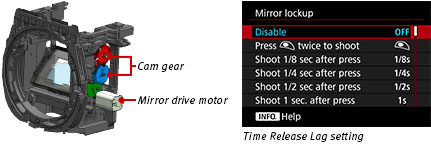
Canon describes a mirror vibration control system and a selectable shutter-release time lag intended to reduce the effect of internal movement. These features are useful to understand when working with a high-resolution DSLR. They do not eliminate every source of blur or remove the need for appropriate support.
Use a stable support when the scene and shutter speed call for one. Check that the head and mounting arrangement are secure and suitable for the complete camera and lens. A poorly supported lens can move even when the camera body appears still. Avoid placing the setup where wind, traffic, or passersby can make it unsafe.
Read the manual for the exact mirror-lockup and timing procedure you intend to use. Test before important work and inspect the files. A setting that helps a quiet still-life may not be practical for a fast-changing subject. Choose the technique for the situation, not because it sounds more advanced.
Crop modes do not change lens focal length
Canon documents 1.3x and 1.6x crop modes alongside other aspect-ratio choices. Cropping can simplify the frame and reduce the output dimensions. It does not physically change the focal length of the lens or create detail that was not recorded. Keep those ideas separate when comparing a full frame with a cropped result.
A crop is useful when the remaining file meets the intended output requirement. Check its dimensions and appearance rather than judging it only by a megapixel headline. You may prefer to preserve a wider original and crop later, depending on how the image will be edited and delivered.
At capture, still pay attention to the whole scene. If the subject is small because your viewpoint is poor, a crop may remove context without improving the picture. Move only where access and safety allow it, and use a lens that suits the working distance instead of treating resolution as permission to ignore composition.
The screen and controls deserve inspection
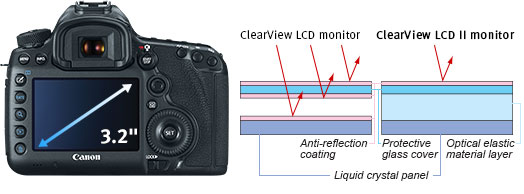
The rear controls and LCD are working tools, not only conveniences. On a used body, test the buttons, dials, playback, menus, display, and viewfinder diopter adjustment. Look for an intermittent control, damaged surface, or information you cannot see clearly. One working button does not establish that all the others are healthy.
Check the top display and controls as well. Familiarize yourself with the active exposure mode, compensation, drive setting, and focus area before you start a session. An old setting left from the previous job can cause confusion even when the camera is functioning normally.
If you are buying remotely, ask for a demonstration and representative original files from the actual unit. A generic manufacturer photograph is not a condition report. Keep the seller’s description and return terms with your records. Do not diagnose an unexplained fault confidently from a listing image.
Cards, power, and file handling
The shared Canon manual describes CompactFlash and SD card slots. Test recording and playback with suitable media, and verify the recording configuration you plan to use. A second slot does not automatically create a safe backup unless you have set up and checked the relevant behavior.
Inspect card compartments and connectors gently. A damaged pin, unreliable door, or intermittent transfer can matter more than a cosmetic mark on the body. Do not force a card or connector that will not fit normally. Ask the seller to address a fault before you commit to the unit.
Canon lists the LP-E6N battery and compatibility with LP-E6 power. Check the supplied battery, charger, and their condition. Do not use visibly damaged or swollen power equipment. Include replacements and missing accessories when comparing complete-kit costs, rather than deciding from the body-only headline price.
Video expectations should match the specification
The 5DS R belongs to the Full HD DSLR era. Canon documents Full HD recording and a time-lapse movie function. It is not sensible to buy it assuming that a high still-photo megapixel count guarantees the video format, autofocus behavior, audio connections, or workflow you need.
Write down the actual video requirement before comparing cameras. Check resolution, frame rates, focus method, recording limits, audio, and software compatibility in the relevant documentation. A camera can be well suited to detailed stills while being the wrong tool for a particular moving-image project.
This guide does not test video performance or claim compatibility with every modern editing system. Test a representative clip with your own workflow where possible. Keep the original recording and check the exported result before promising a deliverable based on an unfamiliar older camera.
Buy the individual body, not the reputation
Confirm that the seller is offering the R variant and photographically demonstrates its identifying label. Check the included lens, caps, battery, charger, cables, and stated faults. A listing title can be wrong even when its photograph looks familiar. Model accuracy is worth checking before price comparison.
Review representative files for consistent exposure, focus, and obvious defects. Test the functions you need rather than accepting “works” as a complete description. If you cannot inspect the body, weigh the demonstration, return window, warranty, and seller information together. A low price does not remove uncertainty.
Verify current total cost, shipping, return terms, and any support promise against the seller’s own listing. This historical guide does not quote market prices or promise availability. Keep originals, working edits, and exports organized, and maintain an independent backup before clearing cards. The storage option below is a workflow suggestion, not equipment claimed to have been used in a new 5DS R test.
To build a more deliberate approach to composition, light, and editing, explore the Shut Your Aperture Academy. Equipment and references can help you get started. Practice helps you decide what belongs in your frame, recognize distracting choices, and make an image that serves your own idea.
Frequently asked questions
What distinguishes the EOS 5DS R from the 5DS?
The R variant cancels the optical low-pass filter effect. Canon warns of greater potential for moire and false colors depending on the subject and conditions.
How many effective megapixels does it have?
Canon lists approximately 50.6 effective megapixels on a 36 by 24 mm full-frame CMOS sensor.
Does it accept EF-S lenses?
No. Canon lists EF compatibility and excludes EF-S and EF-M lenses.
Is this a current hands-on review?
No. It is a historical specification and used-camera guide, not a new performance test or stock report.
What should I check before buying a used body?
Verify the exact R variant, controls, displays, focus, representative files, cards, power, included accessories, and current return terms.
Source note: Canon specifications; official shared 5DS/5DS R manual; Canon EOS 5DS R product page and illustrations. Manufacturer views and diagrams are not camera sample photographs.


