

Updated October 2026.
A fast camera does not know which moment matters. You still have to see the action coming, keep the subject in the frame and give the autofocus something useful to follow. The Canon EOS-1D X Mark II can shoot quickly, but the biggest number on the specification sheet is not the whole story.
This guide covers the 2016 EOS-1D X Mark II, not the original 1D X or the Mark III. It explains the still-photo workflow, lens and card choices, video limits and used-body checks from Canon’s published specifications and instruction manual. It is not a claim of personal testing. The landscape and city images illustrate shooting decisions, not files captured with this camera.
Know the camera before building the kit
Canon lists approximately 20.2 effective megapixels on a full-frame CMOS sensor and an EF lens mount. This is a large DSLR with an optical viewfinder and an integrated vertical grip. It is a different working tool from a small mirrorless travel body. Think about the camera, lens and support as a complete kit rather than comparing body specifications in isolation.
The official manual lists approximately 1,530g with battery and cards under its stated measurement conditions. Add a long lens and that becomes a serious carrying decision. Test the grip and controls in both orientations if possible. A camera can be technically capable and still be the wrong fit for the way you walk, travel or hold it through a long event.
Canon’s compatibility listing is for EF lenses, excluding EF-S and EF-M. Do not buy a lens because the listing says only “Canon mount.” RF is a separate system, and this body is not an RF camera. Check the exact lens, teleconverter and any accessory combination against the original-model documentation.
14 fps and 16 fps do different jobs
Canon specifies up to approximately 14 frames per second through the viewfinder with AF and exposure tracking. The headline 16 fps setting uses Live View with the mirror locked up and focus and exposure locked at the first frame. It is not simply a faster version of the same tracking workflow.
For a subject moving toward you, that distinction matters. A burst of images made with focus locked at the first frame can become progressively soft as the distance changes. Choose the mode for the subject’s movement, not the largest number. Make a short test sequence and examine focus across the frames, not just the first photograph.
Actual speed depends on conditions. Canon names the power source, battery level, temperature, ISO, shutter speed, aperture, lens and other settings among the factors that can reduce it. Flicker reduction can also affect speed. Treat the published maximum as a conditional limit, not a promise that every setup will hold that rate.
A fast burst also fills storage quickly. Begin shooting just before the useful moment, then stop when it has passed. Long unfocused bursts create editing work without improving timing. Practice following the subject smoothly and leaving enough room in the composition for the next movement.
Autofocus points are not a substitute for practice
The viewfinder system has 61 AF points, with up to 41 cross-type points. Canon warns that the number and type available depend on the lens. Teleconverter and aperture combinations also deserve a compatibility check. Do not describe every point as cross-type with every lens, or treat an f/8 compatibility headline as universal behavior.
Choose One-Shot AF for an appropriate stationary subject and AI Servo for movement that needs continuous focus adjustment. Then select an AF area that suits the scene. A crowded background, a small subject and a predictable track through open space are different problems. Let the area do a specific job rather than asking the camera to guess everything.
The AF Configuration Tool offers behavior settings for different kinds of movement. Change one thing at a time and test it. If you alter tracking sensitivity, acceleration response and point switching together, it becomes harder to understand why the next sequence improved or failed.
Review the full-size files. Check whether focus landed on the intended detail, whether the subject moved during the exposure and whether camera movement affected the whole frame. Those are different failures. Raising shutter speed will not correct an AF point placed on the background, and changing an AF case will not freeze a subject at an unsuitable exposure time.

Give exposure and composition their own attention
Start with a shutter speed that fits the subject’s movement. Choose the aperture for the depth of field you need, then use ISO to reach the exposure. A sharp face and a useful background are worth more than keeping ISO low at the cost of motion blur. Make a test when the light changes instead of carrying the same settings through the entire event.
Watch the bright areas. A reflective uniform, water or a stage light can be much brighter than the subject’s surroundings. Use the histogram and highlight alert, and decide what detail needs protection. A metered exposure is a starting point, not a guarantee that every important highlight survives.
When the subject is still, slow down. Check the edges, horizon and foreground before pressing the shutter. You do not have to use high-speed drive for every photograph just because the camera supports it. A single deliberate frame can be easier to judge and easier to edit than a large group of nearly identical files.
CF and CFast are different cards
The Mark II has a CompactFlash slot and a CFast slot. Canon lists Type I CF with UDMA 7 support and CFast 2.0. CFast is not CompactFlash and is not CFexpress. Similar names do not make the cards or readers interchangeable. Match each card to its slot and reader before ordering anything.
Canon’s 170-RAW burst figure is tied to specified CFast conditions. It should not be advertised as a result every card will deliver, or attached to the 16 fps number without context. File settings, card performance and the actual shooting conditions affect how quickly the buffer fills and clears.
For 4K at 59.94p or 50.00p, the manual requires CFast 2.0. Lower-rate 4K has its own card requirements. Check the exact recording mode and Canon’s instructions, not only the speed printed on the packaging. Make a sustained recording test before an important job, then verify the file on a computer.
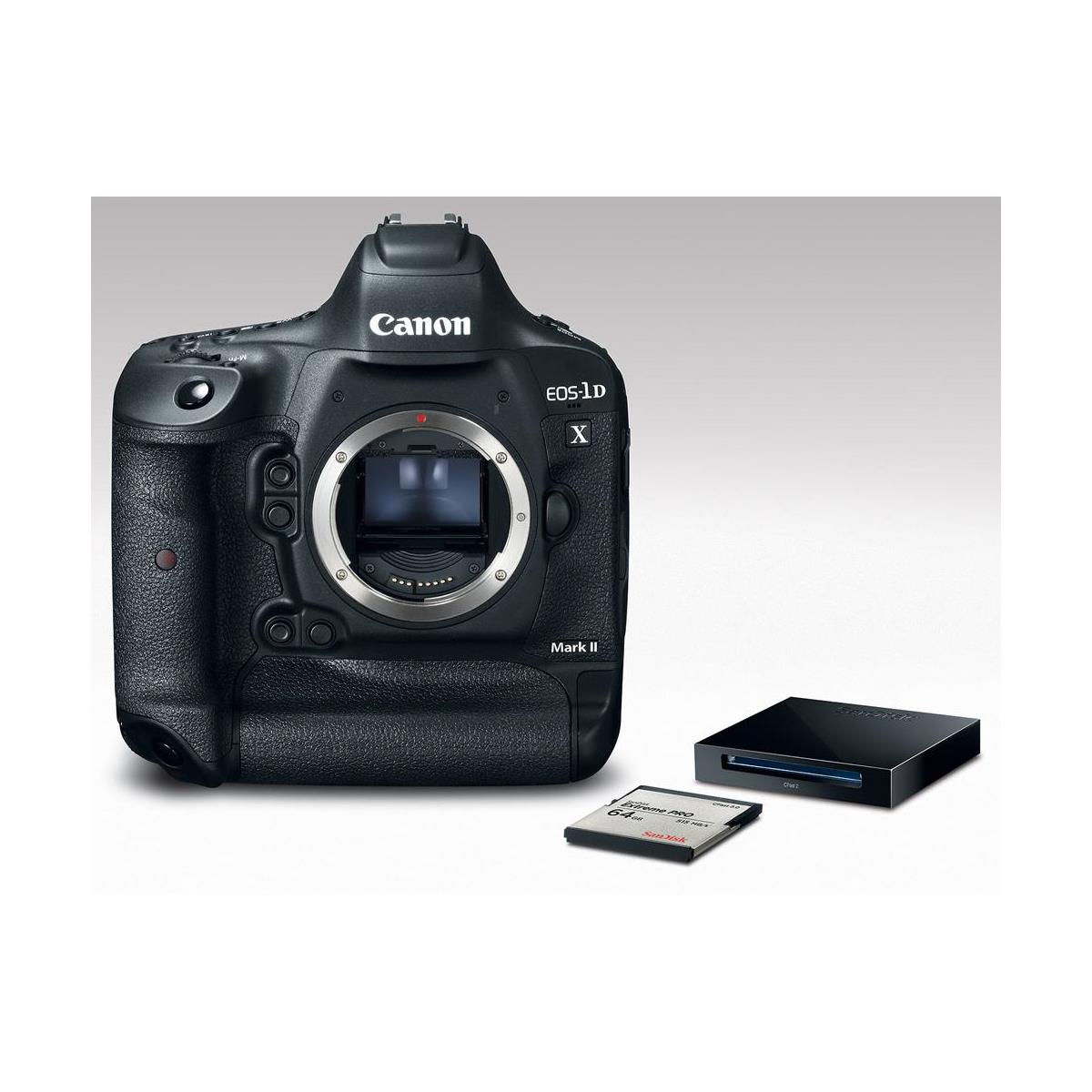
Two slots do not automatically mean two copies
The still-photo recording options include Standard, Auto switch card, Rec. separately and Rec. to multiple. Choose the option for the job. If you need the same still images on both cards, use Rec. to multiple and verify the actual files. Do not assume inserting two cards turns backup on.
Rec. separately lets you assign different recording qualities to the two cards. Auto switch card moves recording when needed; it is not duplicate storage. A RAW file on one card and a JPEG on another is also not two copies of the same RAW file. Name the protection you need, then set the camera accordingly.
The manual specifically says movies cannot be recorded simultaneously to the CF and CFast cards, even when Rec. to multiple is set. Plan movie backup after capture. Copy the files to separate storage and verify them before formatting the recording card. Two cards carried in the same bag also cannot protect against losing the whole bag.
4K and slow motion: read beyond the headline
The Mark II records 4K at 4096 x 2160, including 59.94p and 50.00p options. Canon lists Motion JPEG for internal 4K recording. That format and frame rate affect card demands, file size and editing. Test the files in your editor before deciding this is the right camera for a video project.
Canon distinguishes the image area used for 4K from Full HD. Check framing with the actual mode and lens rather than assuming the still-photo view carries over unchanged. A wide lens may give you a different working composition once you switch recording modes. Leave time to reset the camera position.
Full HD High Frame Rate uses 119.9p or 100.0p capture and is recorded for slower playback. The manual says this mode does not record sound. Rehearse the movement and test focus behavior in the exact mode before recording; do not promise synchronized audio for a silent slow-motion file.
Normal movie recording has a maximum duration of 29 minutes 59 seconds per take, while High Frame Rate recording has a shorter limit. Heat and card conditions can stop a take sooner. Check the exact mode’s restrictions and make a realistic-duration test. A short sample clip does not prove the setup will complete a long recording.

Audio, connections and GPS need separate checks
For normal movie recording, check the microphone input, recording level and headphone output with the equipment you intend to use. Listen for handling noise and distortion, then play back the saved file. Seeing a level meter move is useful, but it is not the same as hearing a clean recording.
Do not confuse built-in GPS with built-in Wi-Fi. The original body has GPS capabilities and a wired network connection; wireless file transfer uses a compatible optional transmitter such as the WFT-E8. Check the current software, network and accessory requirements before assuming an old wireless kit will work with your present setup.
GPS information can be helpful when organizing travel photographs. It can also reveal a location you would rather keep private. Inspect exported files before publishing or sending them. Turning a feature on for convenience does not mean every recipient needs the information it records.
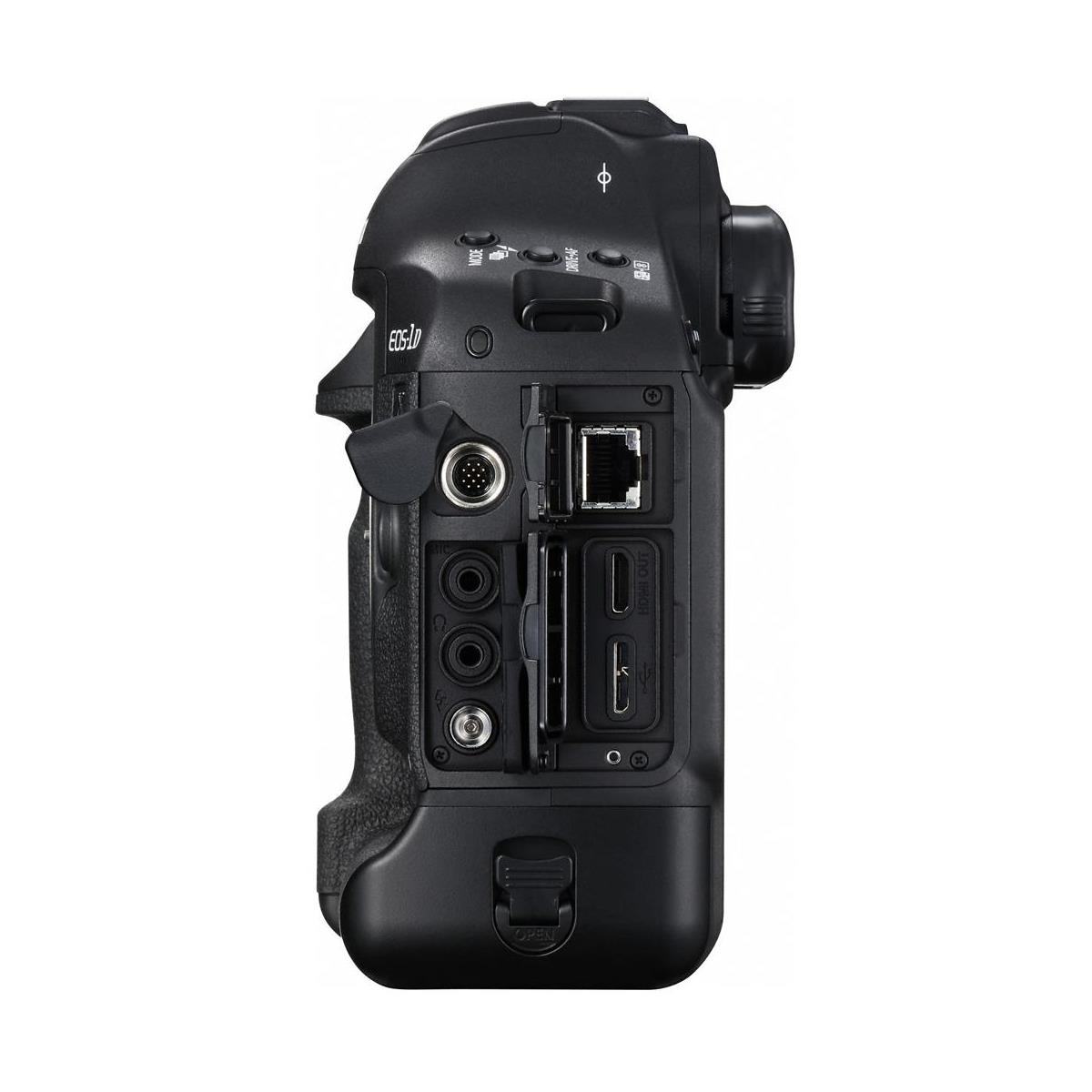
What to inspect on a used Mark II
Ask for the exact model and a written description of condition, repair history and return terms. Inspect the lens mount, viewfinder, screen, grip covering, battery compartment and both card slots. Look for damaged contacts, corrosion and signs of moisture. A professional-looking body can have had a hard working life.
Test every control you expect to use, including vertical-grip controls. With a compatible lens, make still RAW and JPEG files, try continuous autofocus and check exposure. Record on each appropriate card, copy the files and inspect them at full size. Shutter-count information may be useful, but it is not a complete health report.
Check the supplied LP-E19 battery and the correct charger. The manual lists compatibility with older battery packs too, but power-source differences can affect performance. Do not assume a seller’s replacement pack delivers the same operation as the specified setup. Include batteries, charger, cards and readers in the real kit budget.
Weather resistance is not permission to soak the camera. Protect doors and ports, dry equipment promptly and inspect used seals and covers. Before updating firmware, use Canon’s support page for the exact Mark II and follow its power and installation instructions. Firmware for a similarly named body is not a substitute.
Make the purchase match the work
The sensible reason to buy this camera is a workflow that fits its controls, EF lenses and recording limits. It is not the launch-era claim that the newest body must be the best choice. This guide makes no current availability or price promise. Compare the actual used condition, accessories and return window before deciding.
For exact settings and restrictions, keep the Canon instruction manual, official specification page and Mark II support page nearby. Learn one dependable setup before building several specialized ones.
Frequently asked questions
Does the Mark II track focus at 16 fps?
Canon lists the 16 fps Live View setting with focus and exposure locked at the first frame. The viewfinder maximum is approximately 14 fps with AF and exposure tracking, subject to shooting conditions.
Does this camera take CFexpress cards?
No. Canon lists Type I CompactFlash with UDMA 7 support and CFast 2.0. They are different card types, and neither slot is a CFexpress slot.
Does recording to multiple cards also back up movies?
No. The manual says movies cannot be recorded simultaneously to the CF and CFast cards. Verify the movie destination and make separate copies after capture.
Can I use EF-S or RF lenses directly?
Canon lists EF lenses, excluding EF-S and EF-M. This is not an RF-mount body. Check the exact lens and accessory combination before buying.
Does Full HD High Frame Rate record sound?
No. The manual says High Frame Rate movies do not record sound. Test the intended slow-motion workflow before an important recording.
Does built-in GPS mean built-in Wi-Fi?
No. GPS and wireless file transfer are separate features. Wireless transfer uses a compatible optional transmitter; verify the complete setup.
Gear to check for a Mark II kit
Verify exact model, condition and compatibility before buying. These are shopping starting points, not promises of stock or price.
Mark II camera body: Browse Amazon or B&H. Check the actual item against your setup.
Correct CFast media: Browse Amazon or B&H. Check the actual item against your setup.
Compatible power: Browse Amazon or B&H. Check the actual item against your setup.
EF lens options: Browse Amazon or B&H. Check the actual item against your setup.
Affiliate disclosure: This article contains affiliate links. If you buy through them, we may earn a commission at no extra cost to you. As an Amazon Associate, we earn from qualifying purchases.
For practical photography tips, visit the Shut Your Aperture Academy. Build your understanding of light, timing and composition alongside your camera setup.


