

Updated October 2026
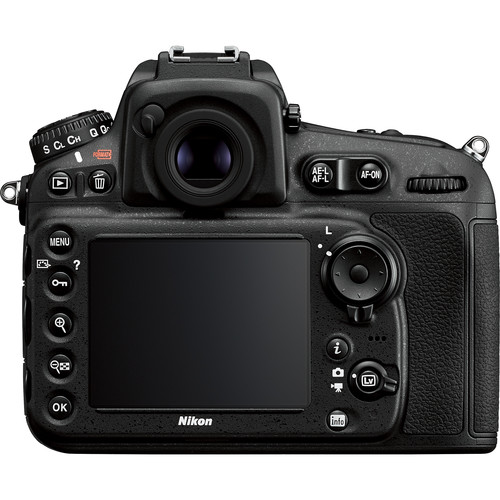
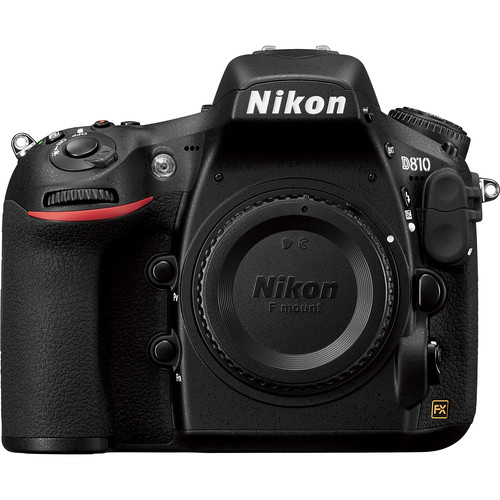
The Nikon D810 is a 36.3-megapixel full-frame DSLR built around detail, a native ISO 64 setting, and the Nikon F mount. It was announced in 2014, so the useful question today is not whether it is a new release. It is how its features work, what settings deserve attention, and where its limitations matter in a real photography workflow.
This guide replaces our original launch announcement with a practical features and setup reference. It is not a new hands-on test or a claim that every photograph below was made with a D810. The landscape and portrait examples illustrate the kinds of decisions that matter with a high-resolution camera: focus, light, movement, and editing. If your main question is whether to purchase one, use our separate Nikon D810 used-buyer guide alongside current seller information and an inspection of the actual body.
Nikon D810 specifications that affect your photographs
Nikon’s original announcement confirms a 36.3-million-effective-pixel FX sensor without an optical low-pass filter, the EXPEED 4 processor, native sensitivity from ISO 64 to ISO 12800, and Full HD recording up to 60p. Its standard full-frame continuous shooting rate is up to five frames per second. Those features describe an older high-resolution DSLR, not a modern high-speed mirrorless body.
- Sensor: 36.3-megapixel Nikon FX-format CMOS, without an optical low-pass filter.
- Native ISO: 64 to 12800; expanded settings are separate from that native range.
- Autofocus: 51-point Advanced Multi-CAM 3500FX system, including Group-area AF.
- Full-frame burst: up to 5 fps.
- Video: Full HD 1920 x 1080 recording, including 60p; this is not a 4K video camera.
- Storage: separate CompactFlash and SD-family card slots.
- Lens system: Nikon F mount, with compatibility depending on the specific lens and functions you need.
The old announcement’s seven-frames-per-second DX claim needs a qualification. Nikon specifies particular power conditions for that maximum, including an appropriate external power arrangement or MB-D12 battery-pack configuration. Do not assume an ordinary body with its standard battery delivers seven fps simply because you select DX crop. Check Nikon’s specifications for the exact configuration rather than buying accessories on an incomplete line from a launch article.
What 36.3 megapixels can and cannot do
A detailed file gives you room to make a large print or crop while retaining useful information. It does not make a poor composition good or restore detail that was lost to camera movement. The benefit appears when the subject, lens, focus, and exposure all support it. A high-resolution sensor records mistakes clearly as well as recording texture.
Think about your finished photograph before judging the file at maximum magnification. If the image is for a small screen, you may not need every pixel to carry visible detail. If it is for a large print, focus placement and unwanted movement deserve more care. Inspect at a useful enlargement, but also view the photograph at the size people will actually see.
The missing optical low-pass filter is not a promise that patterned subjects will never cause trouble. Fine repeating detail can require care in capture and processing. Photograph fabrics, screens, or intricate architecture with attention to the result rather than assuming more pixels automatically solve every rendering problem.
 Save
SaveUse ISO 64 when the scene allows it
ISO 64 is a distinctive starting point for controlled still photography. With a stable camera and a subject that is not moving, it lets you work at the bottom of the D810’s native sensitivity range. Nikon’s launch material discusses rich tones and highlight detail at this setting. That does not mean every photograph should be made at ISO 64.
If a person moves, wind shakes a branch, or you are holding the camera without support, a shutter speed that is too slow can cost more than a higher ISO. Choose the shutter duration the subject needs, then choose aperture for the depth of field and rendering you want. Use ISO to make that combination workable within the available light.
Expanded low sensitivity is not the same thing as gaining a new native setting. Do not choose the lowest displayed number simply because it looks better on paper. Start with the native range, inspect the highlights, and use expanded settings only when you understand the tradeoff for your particular scene. Good exposure is a decision about the photograph, not a contest to keep ISO low.
Focus for the subject, not for the specification sheet
The D810’s viewfinder autofocus system offers several ways to select and track a subject. A stationary detail, a person walking through the frame, and a fast-moving subject need different decisions. For a still subject, choose a focus point that falls where the photograph needs clarity. For movement, test continuous autofocus and an area mode that suits how predictably the subject moves.
Group-area AF is one of the camera’s notable additions, but no area mode knows your intent. If an unwanted object sits closer to the camera, the system may prioritize something you did not mean to emphasize. Review the result, not only the focus confirmation in the viewfinder. Change the area or your framing when the camera keeps choosing the wrong subject.
A DSLR’s viewfinder and live-view focusing workflows are different. Do not expect the D810 to behave like a current mirrorless camera with modern subject recognition. For a careful static composition, magnified live view can help you inspect focus placement. For action, spend time learning the viewfinder system and the limits of your chosen lens before relying on it for an important moment.
 Save
SaveControl camera movement in a high-detail workflow
Start with support and shutter speed. A sturdy tripod helps a static composition, but it cannot stop your subject from moving. Handheld photographs need a shutter duration that fits your lens, stance, and subject. Make a short series of test photographs and inspect them. One sharp frame does not prove the whole setup is consistently stable.
The D810 includes an electronic front-curtain shutter option intended to reduce vibration from the start of an exposure. Nikon’s manual places it in the mirror-up workflow and documents a maximum available shutter speed of 1/2000 second with that option. Treat it as a specific tool for the right setup, not a setting that makes every shooting mode vibration-free.
Use the official D810 Download Center to find the manual and verify operation for your camera. Learn the release sequence before using mirror-up during a time-sensitive shoot. A remote release or self-timer can reduce movement from touching the camera, but you still need to secure the tripod head and protect the setup from wind.
Check the exact lens before building a kit
The Nikon F mount spans many generations of lenses. Sharing the mount does not guarantee every combination delivers autofocus, metering, stabilization, or electronic control in the same way. Check the lens model against Nikon’s compatibility guidance, including any firmware requirements. Do not buy based only on a seller saying it fits Nikon.
DX lenses also deserve a deliberate decision on an FX body. A crop changes how much of the sensor you use and the resulting image dimensions. That can be useful, but it is not the same as using a lens designed to cover the full FX frame. Check the camera’s image-area setting so a crop does not surprise you later.
Match the lens to the kind of photograph you need. A wide lens suits some landscapes, while a portrait may need a different angle of view and working distance. A more expensive lens does not replace good focus or lighting. Rent, borrow, or test a lens when possible before treating a specification list as proof it suits your way of shooting.
Understand the two card slots
The D810 uses CompactFlash and SD-family media, not the newer card arrangements found in many recent cameras. Nikon’s manual lists approved media and describes the role assigned to the secondary slot. Check those details before ordering cards. Similar-looking names do not establish compatibility, and a modern card’s advertised peak speed is not a guarantee of that speed in this camera.
Choose deliberately between overflow, backup, and other supported recording arrangements. Two inserted cards do not automatically mean every photograph has a second copy. Review the menu and make a test exposure, then confirm which files exist on each card. This matters before an event, not after the only card containing the work fails.
Back up photographs outside the camera as soon as practical. Keep more than one independent copy before erasing or reformatting a card. Format through the camera after you have verified the backups, and avoid pulling cards or interrupting power while the access lamp shows that data is being written.
 Save
SaveVideo and time-lapse: useful features with older limits
The D810 records Full HD video, including 60p, and offers tools such as Flat Picture Control and a highlight display. Nikon also describes automatic ISO adjustment in manual movie exposure mode, letting aperture and shutter speed remain fixed while sensitivity changes. Those are useful controls, but they do not turn the camera into a current 4K production body.
Flat Picture Control can make a useful starting file for a planned editing workflow. It is not a rescue button for clipped highlights, poor focus, or inconsistent lighting. Test a short clip, listen to the audio, and check the result in the software you intend to use. Verify recording limits and external-recorder behavior in the manual rather than assuming a long event will record without interruption.
For interval photography, work out your intended capture time and final sequence length before starting. Leave room for exposure and processing between frames. Check battery life and storage using your own settings. A published battery figure is a standardized test result, not a promise for every session with live view, long exposures, or different temperatures.
Firmware, maintenance, and a sensible first session
Nikon’s D810 firmware page currently lists C firmware version 1.14, dated June 12, 2018, with changes that include AF-P lens support details. Read the full official instructions and compare them with your installed version before updating. Do not install an unofficial package or interrupt the camera during the process.
Before a serious session, check the battery, card slots, lens mount, buttons, viewfinder, and a small set of test files. Look for recurring faults rather than assuming every mark in a file is a sensor problem. If the camera needs repair or cleaning beyond your skill, use a qualified service provider. An older body deserves a condition check, even when its basic specification remains useful.
Make your first session simple: one lens, one location, and a few controlled compositions. Test viewfinder focus, live-view focus, different shutter speeds, and your chosen card arrangement. Compare the files at the final output size you need. That tells you more about your working setup than collecting settings from photographers using different lenses and subjects.
 Save
SaveBuild the skills that make the camera useful
A D810 can record a detailed file, but the photograph still depends on where you stand, what light you choose, and what you leave out. The Shut Your Aperture Academy can help you build exposure, composition, and editing skills through structured photography practice. Use that foundation to make your setup more consistent instead of expecting a camera change to fix every weak frame.
Support the detail: Peak Design Aluminum Travel Tripod
For a D810 landscape setup, stable support can matter more than another camera feature. This portable aluminum tripod is one option when you need to carry a kit on foot. Check the combined weight of the camera and lens, plate compatibility, working height, and wind conditions before choosing it. Keep the center column low when stability matters.
Affiliate links may earn a commission. Retailer prices and availability can change.
Frequently asked questions
Is the Nikon D810 a full-frame camera?
Yes. It has a 36.3-megapixel Nikon FX-format sensor. DX crop uses a smaller image area rather than turning the sensor into a different camera.
Does the D810 record 4K video?
No. Nikon specifies Full HD 1920 x 1080 video, including 60p. Choose another system if 4K recording is a requirement.
Does the D810 shoot seven frames per second in DX mode?
That maximum depends on a qualifying power configuration described by Nikon. Do not assume a standard body battery provides seven fps simply by selecting DX crop.
What memory cards does the D810 use?
It has CompactFlash and SD-family card slots. Check Nikon’s approved-card guidance and verify the recording role assigned to the secondary slot.
Are the photographs here D810 test samples?
No. The landscape and portrait photographs are illustrative examples of photographic decisions, not a controlled D810 test or a claim about which camera made them.


