

Updated October 2026.
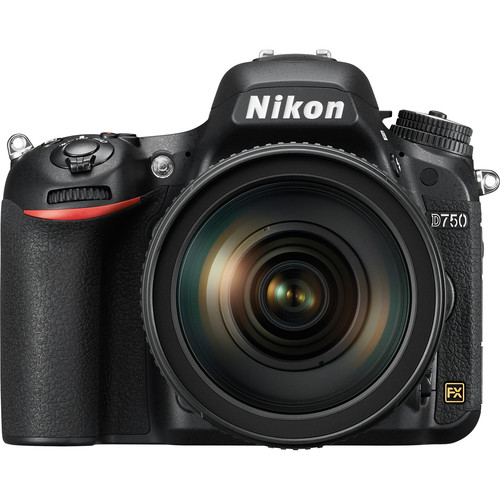
The Nikon D750 makes sense when you want a full-frame stills camera and already understand what a DSLR asks of you. Look through the optical viewfinder, choose the right focus mode, watch your shutter speed and make the photograph. The camera can still do useful work, but a used listing needs more attention than a megapixel number and a low price.
This is a practical guide to the original D750, not the D780 or a Nikon Z camera. The old launch offer is history. No current price, preorder, stock or bundled lens is promised here. The facts below come from Nikon’s specifications, manual, firmware notes and service advisories. The photographs illustrate light and framing; they are not claimed as D750 test files.
What the D750 actually offers
The D750 has a 24.3-megapixel FX sensor and Nikon F mount. Its full-resolution FX files measure 6016 by 4016 pixels. The normal sensitivity range is ISO 100 to 12,800, with extended settings outside that range. A lower or higher extended number is not a promise of better dynamic range or clean detail. Use normal settings when they fit the light and inspect the files when you push them.
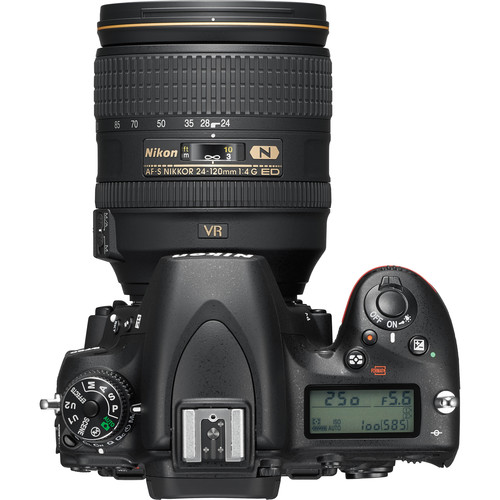
Through the optical viewfinder, the phase-detection autofocus system has 51 points, including 15 cross-type sensors. Nikon specifies support at f/8 for 11 sensors, subject to compatible lens combinations. That does not mean every point is cross-type or every teleconverter pairing works. Continuous high release reaches about 6.5 frames per second under specified conditions, not an unlimited burst at every image setting.
The rear screen tilts vertically but is not a touch screen. There are two SD card slots, a built-in flash and a built-in Wi-Fi system. The maximum shutter speed is 1/4000 second, and the normal flash-sync reference is 1/200 second. These limits matter when you want a wide aperture in bright sun or use flash. This is not a camera with in-body image stabilization, 4K recording or a modern mirrorless live-view focus system.
Start with cards, files and backup
Nikon lists SD, SDHC and SDXC cards with UHS-I support. Faster-looking labels do not change the camera’s interface into UHS-II. Choose reputable cards, test them in the camera and keep enough capacity for your workflow. Before formatting, confirm that the files have been copied and checked elsewhere. Formatting is a working step, not a backup method.
Set the role of Slot 2 deliberately. It can act as overflow, backup or separate storage for RAW and JPEG copies. Overflow keeps shooting when the first card fills; it does not create a second copy. RAW on one card and JPEG on another is not the same as two identical RAW backups. Read the menu choice and take a test photograph, then inspect both cards.
For editing, 14-bit lossless-compressed NEF is a useful starting point when storage and burst needs allow it. The manual lists compressed and lossless-compressed RAW choices, not an uncompressed RAW option. RAW plus JPEG can help with quick sharing, but it increases storage needs. Choose the format for the job instead of filling cards with files you will never use.
Separate viewfinder AF from live-view AF
The D750 behaves differently when you raise the mirror for live view. Its rear-screen focusing uses contrast detection rather than the viewfinder’s dedicated phase-detection system. Cameralabs and other reviewers describe the slower live-view focus response, especially with movement. A tilting screen is useful for low angles and tripod work, but it does not make this body behave like a recent mirrorless camera.
For a stationary subject through the viewfinder, start with AF-S and a single selected point. Put the point on the detail that matters and check the result. For a moving subject, use AF-C and a suitable area mode. Dynamic-area, group-area and 3D-tracking modes solve different problems. Start simple, then expand the area if keeping one point on the subject proves difficult.
Do not assume the camera knows which person or detail you care about. Viewfinder coverage is concentrated toward the middle of the frame. With a wide aperture, focusing and then making a large composition change can move the important detail outside the sharp plane. Select a useful point, change your position or stop down enough for the required depth. Review the eyes or other critical detail at a meaningful magnification.
Use Auto ISO without losing shutter control
Auto ISO can help when light changes, but you still need to define the movement you want. In aperture priority, review the minimum shutter-speed setting and maximum sensitivity. A quiet person, a walking person and a fast-moving subject do not need the same minimum. Lens vibration reduction can help with your movement, but it does not freeze the subject.
In manual exposure with Auto ISO, you choose the shutter and aperture while the camera adjusts sensitivity within its limits. Watch what happens when the light moves beyond those limits. A correct-looking viewfinder meter or a bright rear-screen preview is not proof that highlights survived. Use the histogram and highlight warning, and examine the important parts of the photograph.
At f/1.8 or f/2 in bright sun, 1/4000 second may not be fast enough at the sensitivity you want. You may need to stop down, change the light or use a suitable neutral-density filter. With flash, distinguish normal synchronization from compatible Auto FP high-speed sync. Faster shutter settings with flash have output and compatibility consequences; they are not free extra light.
Choose F-mount lenses with care
The D750 is an F-mount camera, not a Z-mount body. A Nikon Z lens is not a direct-fit purchase for it. Many AF-S and compatible older autofocus F lenses work, and the body has a focus drive for supported screw-drive autofocus lenses. That does not authorize the phrase every Nikon lens. The manual has a compatibility table and explicit exclusions.
Non-AI lenses, IX Nikkor lenses and lenses intended for the F3AF are among the manual’s exclusions. Certain manual-focus AI lenses can be used with limits and the appropriate non-CPU lens settings. Check the exact lens and operation before mounting an unfamiliar old lens. Mechanical fit, metering, autofocus and aperture control are separate questions.
DX lenses use a smaller image circle. With automatic DX crop, the large DX image is 3936 by 2624 pixels, roughly 10.3 megapixels, rather than the full FX resolution. Turning crop off does not magically turn a DX lens into an FX lens. It can reveal dark corners or other coverage limits. A familiar DX lens may be useful, but understand what it costs in framing and file size.
AF-P support also needs attention to firmware and lens details. Nikon’s update notes added support and changed behavior for particular AF-P functions. Check the exact camera firmware and lens rather than borrowing compatibility from another Nikon DSLR. Test focus, standby behavior and stabilization controls before taking an unfamiliar combination on an important job.
Portrait and landscape setup that earns its place
For a portrait, choose your distance and background first. A wide aperture can soften clutter, but a bright sign or branch may still steal attention. Put the focus point on the nearer eye, choose a shutter speed that handles movement and make a short set. Recheck focus when the person leans or you step forward. Sharp hair behind a soft eye is still a focus miss.
For several people, arrange them near a common focus plane and choose enough depth of field. The full-frame label does not require shooting everything wide open. A smaller aperture and a little more light may make a stronger photograph than a shallow blur that leaves half the group soft. Judge expression, placement and detail together.
For a landscape, support the camera, check the frame edges and inspect near and far details. Moderate apertures often deserve a test before f/22. A tripod helps camera movement, not wind-blown plants or moving water. Use the timer or a compatible release when it helps. The camera’s quiet release modes are not a silent electronic shutter, so do not promise noiseless shooting at an event.

Know the video limits before recording
The D750 records Full HD at up to 1080/60p, not 4K. It offers microphone and headphone connections and video exposure controls, but live-view autofocus is not the fast, confident subject tracking expected from newer video-focused bodies. For a planned scene, manual focus may be more dependable than letting the camera hunt throughout a take.
Clip length depends on frame rate and quality. The manual lists 1080/60p and 50p at up to 10 minutes in high quality or 20 minutes in normal quality. The lower listed rates allow up to 20 minutes in high quality or 29 minutes 59 seconds in normal quality. Do not describe 29 minutes 59 seconds as the limit for every mode. Capacity and other operating limits can end a recording sooner.
Choose the movie destination card deliberately, check audio on headphones and make a short test in the actual light. Playback can reveal clipping, focus changes or room noise that the recording icon cannot. If long uninterrupted recording or strong continuous autofocus is the main requirement, evaluate another camera instead of forcing this DSLR into the wrong role.
Check both service advisories and the actual copy
Nikon published separate D750 advisories for an unnatural flare pattern and for a shutter issue that could shade part of an image. They are different issues with serial-number checks. Read both official pages and use the seller’s actual serial number. An ordinary attractive sample photograph does not establish that a body is outside the affected groups or that service was completed.
The published notices describe service for affected cameras, including terms stated when the notices were issued. Before buying, ask Nikon in your region about current eligibility, parts and service arrangements. Do not assume every used D750 gets a free repair today, or that a shutter-count screenshot substitutes for service records. Ask the seller for receipts or other documentation and resolve uncertainty while a return is still possible.
Inspect the mount, hot shoe, ports, card doors, screen hinge and battery compartment. Test both slots, every control you need and repeated exposures at different shutter speeds. Photograph an evenly lit surface as well as a normal scene. Look for errors, unexpected shading and focus consistency. Check the sensor at a small aperture for dust, but leave risky cleaning to someone equipped to do it properly.
Firmware, battery and transfer checks
Nikon’s D750 download page lists C firmware 1.15. Read the installed version in the setup menu and follow the exact D750 instructions if an update is needed. Use adequate power, the specified card procedure and the correct file. Firmware can address listed behavior; it does not repair physical shutter damage or settle a service-advisory question.
The camera uses the EN-EL15 family, and the manual identifies supported replacements including EN-EL15a and EN-EL15b. Confirm a current battery and charger pairing with Nikon rather than assuming a similar-looking pack is safe. Do not expect a newer battery’s USB charging features to give the D750 in-camera USB charging. Test battery condition and carry a charged spare for work that matters.
Its built-in Wi-Fi used Nikon’s Wireless Mobile Utility workflow, not a modern connectivity promise for every phone. Verify your device and current app support before relying on wireless transfer. For a dependable editing workflow, a card reader avoids that uncertainty. Copy files, check them and keep a second backup before erasing either card. The right used body is the one whose operation, service history and accessories you can actually verify.
Frequently asked questions
Does the Nikon D750 record 4K?
No. It records Full HD at up to 1080/60p. Do not confuse it with the D780 or a Nikon Z camera.
Are both SD slots automatically backups?
No. Set Slot 2 to Backup for duplicate storage. Overflow and separate RAW/JPEG storage do different jobs.
Does the D750 have in-body stabilization?
No. Lens VR, where supported, is separate and does not freeze a moving subject.
Will every Nikon F lens work?
No. Check the manual and exact lens, including mechanical, autofocus, metering and aperture restrictions. Z lenses do not directly fit.
Is 29 minutes 59 seconds the limit for every movie mode?
No. The manual lists shorter limits at high quality and at 1080/60p or 50p. Check frame rate, quality and available capacity.
Does a service advisory mean every used D750 gets a free repair today?
No. Check the actual serial number on both official advisory pages and confirm current service arrangements with Nikon in your region.
A practical D750 kit
Check exact model, mount, condition and return terms. These links are shopping starting points, not stock or price promises.
- Nikon D750 listings: check condition, service history and return terms.
- Remote shutter releases: match the camera connector or supported wireless system.
- UHS-I SDXC cards at B&H: test both slots and confirm backup settings.
- Tripods at B&H: support the whole kit safely.
Affiliate disclosure: Some links are affiliate links. If you buy through them, Shut Your Aperture may earn a commission at no extra cost to you. As an Amazon Associate, we earn from qualifying purchases.
Find practical photography tips at Shut Your Aperture Academy. Build your understanding of light and framing alongside your camera technique.
References: Nikon D750 manual and downloads, official specifications, flare advisory and shutter advisory.


