

Updated October 2026.
The Canon EF 400mm f/4 DO IS II USM is a specific lens, not a general name for any white Canon telephoto. It is the second-generation 400mm f/4 model with diffractive optics, an EF mount and a green ring. If you are looking at a used copy, confirm the full name before comparing its controls, accessories or results with a review. The original 400mm DO, this II version and Canon’s 400mm f/2.8 lenses are different products.
I would start with the job rather than the badge. Do you need a fixed 400mm view, an f/4 maximum aperture and a lens you can support comfortably? Or would a zoom help you keep a moving subject in the frame? This guide explains the II model’s controls and practical checks without pretending these photographs are a field test. It is not an announcement of current stock, a price quote or a claim that every modern camera supports every function.
What the 400mm DO II actually gives you
Canon specifies a 400mm focal length, f/4 maximum aperture, 3.3-meter minimum focusing distance and approximately 2,100 grams of lens weight. That weight is for the lens, not your whole camera, adapter, hood and support setup. It is compact for this class of super-telephoto, but it is still a substantial object to carry and balance. Work out the complete load before choosing a tripod head or planning a long walk.
DO stands for Diffractive Optics. Canon describes a gapless dual-layer diffractive element in the II design, alongside other optical elements and coatings. The point is a smaller, lighter super-telephoto design, not a software effect or a selectable mode. Independent reviews from The-Digital-Picture and Canon Rumors discuss the II model’s improvement over the earlier lens. Those are their assessments, not results from our own testing.
A fixed focal length means you cannot turn a zoom ring to rescue tight framing. Leave room around a bird’s wings or an athlete’s next movement. Pick a safe shooting position with enough distance for the subject, and keep a wider option available when something approaches. A sharp photograph with the subject cut off is still a missed frame.

Match the mount, camera and extender first
This is an EF lens. On a compatible Canon EF-mount EOS camera it uses that mount directly. On an EOS R system camera, the relevant route is a compatible EF-EOS R mount adapter. Canon’s adapter documentation allows EF lenses on the RF system, but that does not turn the lens into an RF model or guarantee identical autofocus behavior across all bodies. Read the instructions for your exact camera and adapter.
Check firmware before judging the lens. Canon published lens firmware version 1.0.9 to address a rare issue in which the image stabilizer could make the image jump. Its notice applies to earlier lens firmware, with version checking through a camera menu. Follow the official update package and its supported-camera instructions. Do not improvise an update method, and do not assume a visible jump is normal just because the lens is old.
The manual lists Extender EF 1.4x II/III and EF 2x II/III combinations. With a 1.4x extender the combination is 560mm f/5.6; with a 2x it is 800mm f/8. Those are useful options, but the longer focal length narrows framing and the smaller maximum aperture changes the autofocus conditions. The 2014 manual’s body list is historical. Confirm the supported autofocus points and modes in your camera’s current documentation instead of treating that list as a complete modern compatibility chart.
Use compatible EF extenders, not an RF extender forced into an EF setup. Canon explains that EF extenders can be used with compatible EF lenses through an EF-EOS R adapter. The lens manual says to attach the extender to the lens first, then attach the combination to the camera, and to reverse that order for removal. It also says not to stack extenders. A used listing needs to name the exact extender, not simply promise “extra reach.”
Set the focus limiter for the working distance
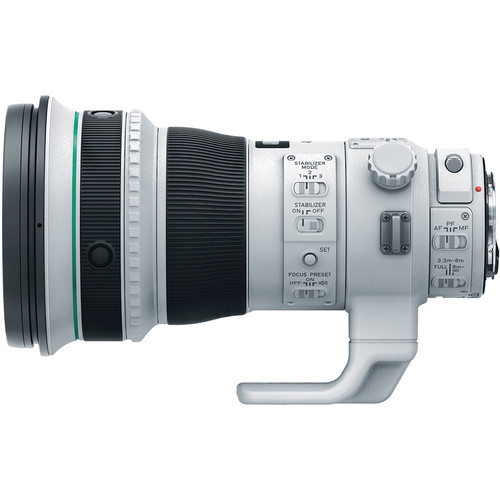
The distance-range selector offers the full range from 3.3 meters to infinity, a nearer 3.3-to-8-meter range and a farther 8-meter-to-infinity range. Use the range that includes your subject. A distant bird does not require searching through the near range, but a subject inside eight meters will not focus with the far-only setting. Check this switch before blaming the camera for hunting.
Start a used-lens test in the full range. Focus on a clear subject at several distances, then test the restricted ranges deliberately. Keep the subject large enough and contrasty enough for a meaningful autofocus check. An empty sky, tiny distant silhouette or foreground branch is a poor diagnostic target. Repeat the test without an extender before deciding which part of the combination is causing trouble.
The lens has AF, MF and PF focus-mode positions. The manual describes full-time manual correction after autofocus in One-Shot AF by keeping the shutter half-pressed and turning the focusing ring. Do not translate that into a blanket instruction for every tracking mode and modern body. The camera’s manual tells you how manual override and focus controls behave in your particular setup.
Choose stabilization for the subject, not the score
Canon rates the stabilizer at the equivalent of four stops under its stated test conditions with an EOS-1D X. That is a manufacturer rating for camera-shake correction, not a promise that every handheld frame will be sharp four stops below your usual shutter speed. It does not freeze a moving animal, stop wind moving a branch or remove the blur caused by a subject changing direction.
Mode 1 corrects shake in all directions and is intended mainly for still subjects. Mode 2 is for panning: it corrects the direction perpendicular to the pan. Mode 3 applies stabilization during exposure, with computation beginning when the shutter is half-pressed. Canon describes it as useful for irregular movement, where a continuously stabilized view may interfere with following the subject. It is not a stronger version of Mode 1.
For action, choose a shutter speed that deals with subject movement first. Then choose the stabilization mode and test your handling. For a static detail, you can try slower speeds on a supported camera and inspect results at useful magnification. Keep a short sequence rather than trusting one lucky frame. The right setting is the one that gives you a repeatable result for this subject and your support.
The manual allows stabilization with a tripod or monopod, but notes that some tripod and shooting conditions may favor switching it off. It specifically says to turn IS off for Bulb exposures. It also warns not to remove the lens while the stabilizer is operating; operation continues briefly after releasing the shutter. Avoid the simplistic rule that IS must always be off on every support, and avoid the opposite claim that it can never cause a problem.
Use focus preset when a distance repeats
Focus preset stores a focusing distance so you can return to it with the playback ring. Set the preset switch on, focus at the desired distance and press the preset button. Turning the playback ring recalls that distance. The manual describes operation in AF, PF and MF modes. A repeated landing spot or a known position on a playing field is the kind of situation where a stored distance can help.
Think of it as a starting point, not recognition of the subject. If the animal lands somewhere else, the stored distance is wrong. Practice the ring movement before using it in a fast sequence, and switch the preset off when you are not using it. The lens also has AF stop buttons that can temporarily pause autofocus, with some button behavior configurable through supported camera functions.
PF is power focus, using the playback ring for a smooth focus change. The original manual gives a specific list of cameras for its Live View and movie behavior. Check your body’s documentation before building a video plan around it. Neither PF nor focus preset is a substitute for testing the exact camera, adapter and lens combination before a paid shoot.
Balance the lens and check the small accessories
Attach a tripod or monopod to the lens’s tripod mount rather than treating the camera socket as the default support point for this long assembly. Balance the complete setup on a suitable head, secure the plate and keep a hand on the equipment while adjusting it. The orientation locking knob permits rotation between horizontal and vertical framing. Tighten it after adjustment and check for unwanted movement.
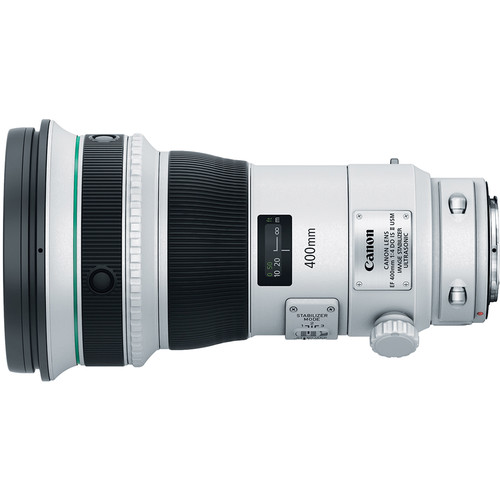
The specified hood is ET-120(WII), and the lens uses 52(WII)-series drop-in filters. This is not a normal front screw-in filter purchase. The manual says the optical design includes a glass filter and the holder must remain installed even when no gelatin filter is fitted. A missing holder is a meaningful omission in a used package, not a cosmetic detail you can ignore.
Ask which holder and filter are included and check that the holder locks into place. Canon lists separate screw-type and circular-polarizing options for this system. Match the exact accessory before ordering. A generic “52mm filter” description is not enough. Check the hood lock, cap, strap points and case too; a complete lens can become a less attractive purchase when important accessories are missing or damaged.
Backlight, distance and a clean frame
Canon’s manual warns that diffractive optics can produce colored flare around a light source under some conditions. Improved coatings do not erase that warning. Fit the hood, change the shooting angle when possible and check the frame for a bright halo or fan-shaped flare. Shading a source outside the frame may help, but keep hands and other objects out of the image and away from moving subjects.
Do not confuse atmosphere with a bad lens. A distant subject above warm ground can look unstable even when focus and support are sound. For a useful comparison, test a closer detailed subject in steadier conditions as well as your normal distant subject. Keep the shutter speed, focus target and processing consistent. Examine several frames rather than applying aggressive sharpening to one file and declaring the optical problem fixed.
Long-lens photography is also about choosing what surrounds the subject. Look for a clean background and enough separation, then use position and timing to simplify the picture. The city photograph used as the hero and the landscape below illustrate framing and light, not sample images made with this Canon lens. There is no invented EXIF, extender comparison or sharpness claim attached to them.

A used-copy inspection that earns its time
Read the return terms before testing. Confirm the II marking, serial identification and included accessories. Inspect accessible glass for scratches, haze or fungus without dismantling the lens. Look at the mount, contacts, switches and tripod foot. Ask about impact damage, water exposure and service history. Dust-and-drip resistance is not waterproofing, and a seller’s claim of weather sealing does not establish the condition of an aging copy.
Test autofocus, manual focus, the limiter, preset and all three IS modes on your own compatible camera when possible. Compare several sharp targets across the frame at f/4 and a stopped-down aperture, keeping alignment and focus careful. Check image files, not just the rear-screen preview. If one side repeatedly looks much worse, eliminate target alignment and focus error before deciding the lens needs service.
Repeat any concerning result with the extender removed. Check lens firmware and camera settings before attributing all trouble to optics. Ask the seller to explain noises or jumps you cannot reconcile with normal operation, and use a qualified service assessment when needed. Do not assume repair availability, cost or parts coverage from the product’s age or original reputation. Confirm those directly before accepting a nonreturnable copy.
Frequently asked questions
Is the Canon EF 400mm f/4 DO IS II USM a zoom?
No. It is a fixed 400mm prime lens. Framing changes require a different position, a compatible extender or a different lens.
Can I use it on an EOS R camera?
Canon supports EF lenses through a compatible EF-EOS R mount adapter. Check your exact camera, adapter and firmware for function-specific compatibility.
What happens with an EF 2x extender?
The documented combination is 800mm f/8. Autofocus support depends on the camera and firmware; verify the current body documentation rather than assuming every AF point works.
Does four-stop stabilization freeze wildlife?
No. The manufacturer rating concerns camera shake. Subject movement still requires an appropriate shutter speed and tracking technique.
Can I leave the drop-in filter holder out?
No. The manual says the optics include a glass filter and the holder must be installed even when no gelatin filter is fitted.
Which firmware notice should a buyer check?
Canon’s version 1.0.9 notice addresses a rare stabilizer-related image jump on earlier lens firmware. Follow the official package and supported update instructions.
Build the support around the lens
Check exact fit, load capacity, condition and return terms. These are shopping starting points, not current-stock or price promises.
- Telephoto support heads: balance the complete camera-and-lens load.
- Lens-cleaning blowers: start with safe external cleaning, not disassembly.
- Exact-model lens listings at B&H: confirm the II designation and included holder.
- EF-EOS R adapters at B&H: match your camera and planned lens setup.
Affiliate disclosure: Some links are affiliate links. If you buy through them, Shut Your Aperture may earn a commission at no extra cost to you. As an Amazon Associate, we earn from qualifying purchases.
Find practical photography tips at Shut Your Aperture Academy. Build your understanding of light, timing and framing alongside your equipment choices.
References: Canon lens instructions, Canon firmware notice, and Canon extender guidance.


