
Updated October 2026
The Fujifilm X-T10 was announced in May 2015 as a compact interchangeable-lens camera with an APS-C sensor, an electronic viewfinder, and direct exposure controls. This page began as a launch announcement. It is now a historical specifications guide and a practical checklist for anyone considering an older X-T10. It is not a new hands-on review, and it does not promise that a particular used body, battery, or accessory will work well.
The original available-now claim and launch-style sales language have been removed. A decade-old camera needs a different kind of decision: does this individual example function properly, does the lens suit your work, and does the complete kit make sense for the price and return terms you can verify? The model name alone cannot answer those questions.
I care more about a camera helping you make a deliberate photograph than about a long list of numbers. The X-T10 gives you physical controls that are worth understanding. But a familiar-looking dial is not a reason to skip inspection, and an attractive retro body is not proof of good condition. Start with the job you want the camera to do, then check the facts and the actual unit.
Fujifilm X-T10 specifications in context
Fujifilm’s manual lists a 16.3-million-pixel X-Trans CMOS II sensor measuring 23.6 by 15.6 millimeters. That is an APS-C sensor. The original launch material identifies the EXR Processor II and describes shooting at up to eight frames per second. Those are model specifications, not a measurement of sustained performance in a new test.
The manual separates standard sensitivity from extended settings: ISO 200-6400 is the standard range, while ISO 100, 12800, 25600, and 51200 are extended values. Do not treat the highest number as a recommendation for every low-light photograph. Image quality, shutter speed, subject movement, and your intended output still need to be judged in an actual file.
The electronic viewfinder is a 2.36-million-dot OLED unit with 0.62x magnification under the manual’s stated conditions. The rear display is a three-inch, 920,000-dot tilting LCD. Video specifications list 1920 by 1080 and 1280 by 720 recording at several frame rates, including 60 fps. This is a Full HD-era camera, not a model to buy on the assumption that it offers modern 4K recording.
 Save
SaveBody size is only part of a portable kit
The manual gives body dimensions of 118.4 by 82.8 by 40.8 millimeters and a shooting weight of approximately 381 grams including battery and memory card. The camera-only weight is approximately 331 grams. Keep those definitions separate when comparing it with another camera, especially if the other listing includes a lens or grip.
A small body can become a much larger kit with a heavy lens, charger, spare batteries, and other accessories. Think about what you will actually carry. A compact walk-around lens and a large telephoto create very different experiences even on the same body. Try the combination in your hand where possible, rather than deciding portability from the body dimensions alone.
Also check whether the grip and control spacing suit you. A camera can be light and still feel awkward with the lens you want. Make sure you can support the combination comfortably and reach the controls without constantly shifting your hand. Comfort matters when you want to concentrate on framing rather than on holding the equipment.
Understand the exposure dials before you shoot
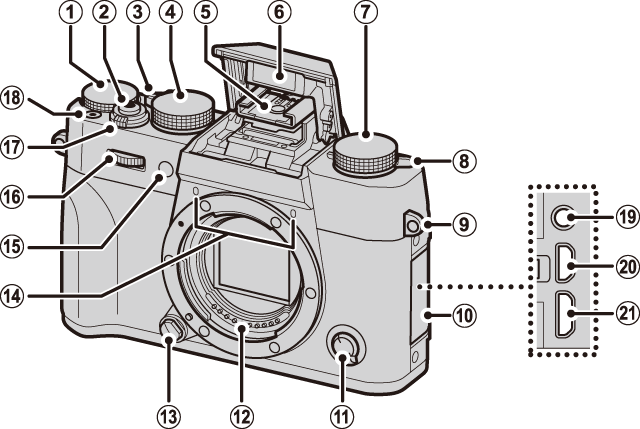
The official parts guide identifies the shutter-speed dial, exposure-compensation dial, drive dial, and automatic-mode selector lever. These controls are a large part of the X-T10’s appeal. They let you see and change parts of the shooting setup directly, but you still need to understand which mode and settings are active.
Begin with one exposure decision at a time. For a static landscape, decide what depth of field you need and then check whether the shutter speed is suitable for handholding or for a tripod. For a moving subject, start with how much motion you want to freeze or describe. Do not turn every dial just because the camera gives you several to work with.
The manual lists exposure compensation from minus three to plus three EV in one-third-stop increments. Use compensation deliberately and confirm the result in the image, not only in the position of the dial. Before a new scene, check whether compensation from your last photograph is still set. A physical control makes a setting visible, but it can also remain changed longer than you intended.
Use the viewfinder and tilting screen for different jobs
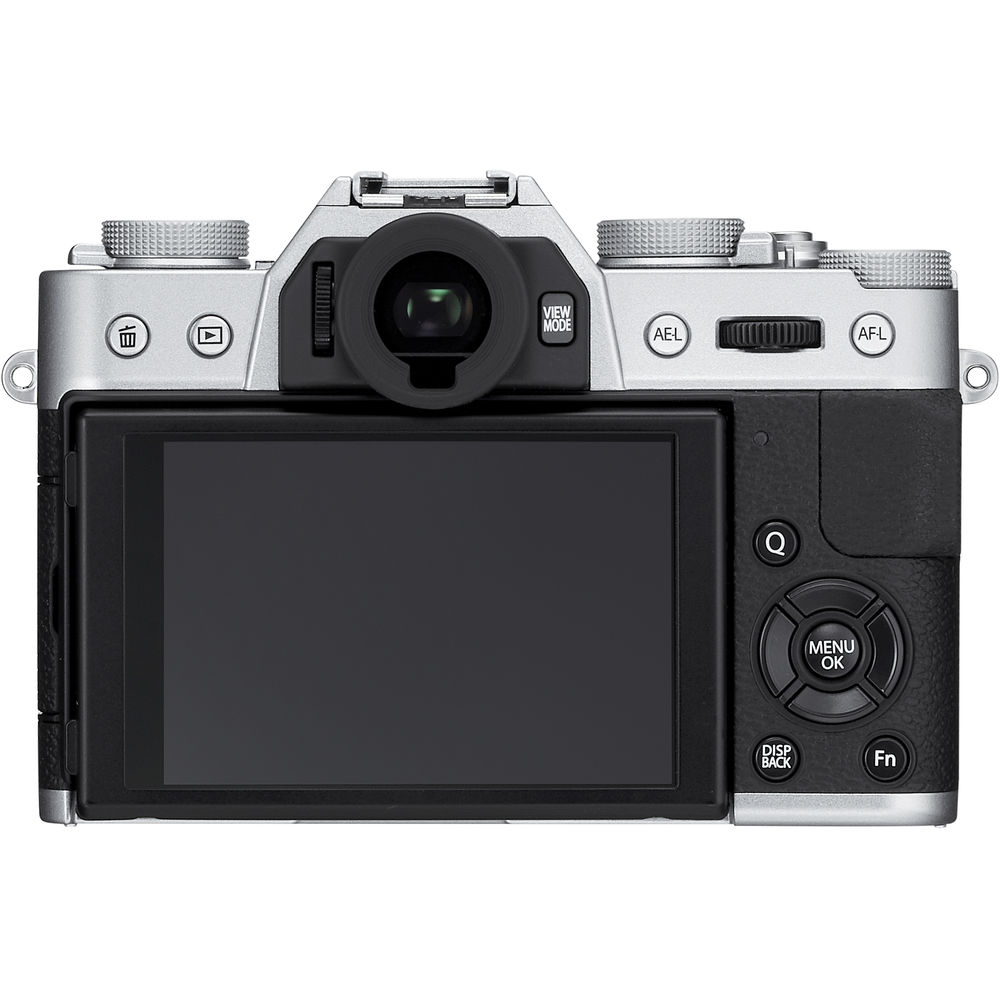
The rear photograph shows the viewfinder, display, and surrounding controls. A viewfinder can help you concentrate on framing, while a tilting screen can make a lower or higher viewpoint easier to assess. Those are different ways to work with the same scene. Choose the one that lets you check the edges of the picture carefully.
On a used body, inspect both displays rather than assuming one working screen means the whole camera is healthy. Check for obvious damage, flicker, unusual discoloration, and a diopter adjustment that lets you see the viewfinder information clearly. Test the eye-sensor behavior and the display switching in the modes you plan to use.
Move the tilting screen gently through its normal range. Look for a damaged hinge, an unstable image, or an intermittent connection. Do not force it beyond its intended movement. The purpose is to identify a problem before purchase, not to stress an old mechanism until it fails.
 Save
SaveAutofocus modes are not a guarantee of every moving shot
The launch announcement described single-point autofocus alongside Zone and Wide/Tracking modes using a wider 77-point area. It also described continuous focusing within selected zones. That explains the historical feature set, but it does not establish the hit rate you will get with a particular lens, subject, light level, or firmware configuration.
Start with a simple subject and confirm where the camera is focusing. Then try the kind of movement you expect to photograph. A walking person, a fast animal, and a subject moving directly toward you ask different things of the system. Review several actual frames instead of trusting that a tracking mode name means the result must be sharp.
For a used-camera inspection, test focus with a known suitable lens in ordinary light. Check near and farther subjects, more than one focus area, and the switching between focus modes. If the lens or body behaves inconsistently, do not diagnose the cause from a distance. Ask the seller to demonstrate it or have the equipment checked before committing.
Choose a compatible lens for your actual subject
The X-T10 is an interchangeable-lens camera, and the original body photographs show the mount without a lens. Make sure a listing identifies exactly what is included. A body-only price cannot be compared fairly with a kit price unless you account for the lens, its condition, and the accessories in both offers.
Check the exact lens mount and compatibility rather than assuming any Fujifilm-branded lens fits. Also check whether the lens’s controls and focus behavior suit the body and your intended use. A manual-focus adapted lens may be enjoyable for deliberate work but is not automatically the right choice for moving subjects.
When comparing lenses, inspect the actual example. Look for damaged mounts, obvious glass damage, inconsistent focus operation, and aperture behavior that does not match expectations. A lens can be optically useful and still have a mechanical problem. Ask for representative files when you cannot inspect it in person, while remembering that sample files do not replace a clear return policy.
Mechanical and electronic shutter choices differ
The manual lists a mechanical shutter reaching 1/4000 second and an electronic shutter reaching 1/32000 second, with mode-specific limits. It also lists Bulb operation up to 60 minutes for the relevant mechanical-shutter settings. These are capabilities described by the manual, not a recommendation that every long exposure or fast shutter setting is appropriate for every scene.
Read the manual’s guidance for the shutter mode you plan to use. Test under your own lighting and with your own moving subjects before relying on an unfamiliar mode for important work. A specification tells you the available setting, while the photograph tells you whether the choice served the scene.
During inspection, make several exposures at different reasonable speeds and review the files. Watch for obvious errors, uneven results, or a failure to record reliably. Do not assume a clean exterior establishes the condition of an internal mechanism. If the seller cannot provide a working demonstration, treat that uncertainty as part of the purchase risk.
Battery, card, and connector checks
Fujifilm’s manual identifies the NP-W126 battery and lists an approximate CIPA figure of 350 frames under stated test conditions. It also notes that battery life varies with charge level and declines in cold conditions. An older battery may not perform like the one used for a published rating, so do not plan an outing around that number alone.
Check that the supplied battery and charger are appropriate, undamaged, and included in the listing. Do not use a visibly swollen or damaged battery. Ask whether replacement or spare power is available through a source you trust, and include those costs when comparing kits. A cheap body can become less attractive if it arrives without usable power.
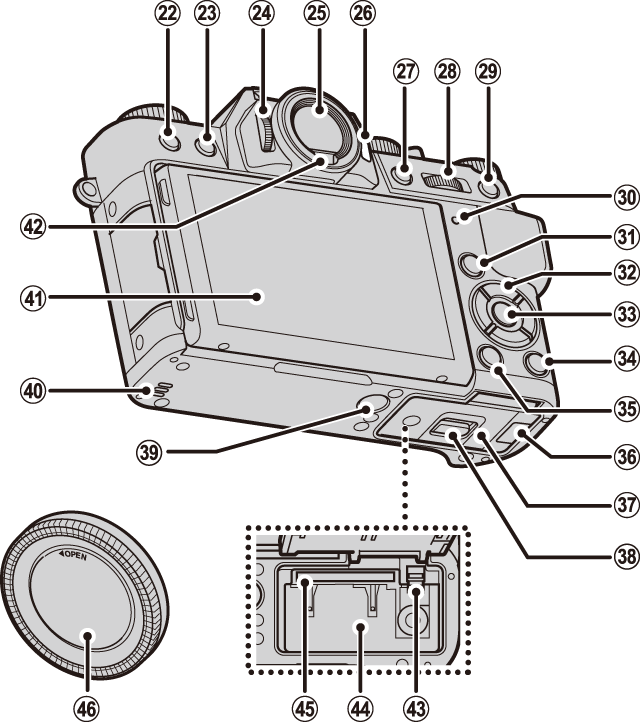
The manual lists SD, SDHC, and SDXC storage media and identifies the battery and card compartments in its rear diagram. Test recording, playback, and file transfer with a suitable card. Inspect compartment doors and connectors gently. A door that will not close or a port that fails intermittently can change how practical the camera is for you.
Inspect the individual used camera, not only the model
Read the listing carefully. Confirm the exact body, included lens, charger, battery, caps, and any stated faults. Ask for photographs of the actual unit from several sides, not only generic product images. Compare the serial and description where appropriate, and keep the seller’s condition statement with the purchase record.
Check controls, lens attachment, displays, card operation, focus, and representative image files. Look for signs of impact or corrosion and for functions the seller cannot demonstrate. A cosmetic mark does not automatically make a camera unusable, but a hidden functional fault can matter much more than a scratch. Separate the two in your assessment.
Verify the total price, shipping terms, return window, and any warranty against the current seller’s own listing. This article does not quote a used-market price or claim current stock. If there is no practical way to return a faulty unit, the saving needs to be weighed against that risk. Do not let the model’s reputation replace the condition check.
 Save
SaveA sensible place for an older X-T10
An older camera may fit someone who wants to work deliberately, understand exposure, and keep a compact interchangeable-lens setup. It may be less suitable when a project requires features outside its documented specification or when dependable current support is a deciding factor. Match the camera to the requirement rather than arguing that an old model is right for everyone.
If you already own one, learn the controls, keep a clean file workflow, and judge your actual photographs. If you are buying one, inspect the individual unit and the complete kit. Neither path needs exaggerated promises. A camera is useful when it works reliably for the photographs you intend to make.
Keep originals, edits, and finished exports organized, and maintain an independent backup before clearing cards. The storage option below can support that workflow; it is not equipment claimed to have been used in a hands-on X-T10 test.
For a more deliberate approach to composition, light, and editing, explore the Shut Your Aperture Academy. Understanding why a frame works matters more than owning the newest body. Build the skills that help you make useful choices with the equipment you actually have.
Frequently asked questions
Is this a new Fujifilm X-T10 hands-on review?
No. The page began as a May 2015 announcement. This update uses official specifications and offers an inspection checklist, not a new performance test.
What sensor does the X-T10 use?
Fujifilm lists a 16.3-million-pixel APS-C X-Trans CMOS II sensor measuring 23.6 by 15.6 millimeters.
Does it record 4K video?
The official manual lists Full HD 1920 by 1080 and HD 1280 by 720 recording, not 4K. Check the exact requirements of your video project before choosing it.
Is the highest ISO a recommended setting?
No. The manual separates standard ISO 200-6400 from extended values. Choose according to actual light, motion, file quality, and intended output rather than the largest number.
What matters most when buying a used X-T10?
Inspect the actual body, lens, battery, charger, displays, controls, focus, card operation, and representative files. Verify the seller’s current price and return terms.
Source note: Original 2015 product photographs; official specifications; official parts guide and diagrams; May 2015 launch announcement; manufacturer archive.


