

Updated October 2026.
The GoPro HERO4 Black is a legacy action camera, not a current GoPro with modern stabilization and support. It can still record useful footage if the actual camera, battery, card and housing work. Before buying one, understand the limit that matters most: GoPro says HERO4 Black and Silver no longer receive customer support or software and firmware updates. GoPro no longer supplies batteries or replacement parts and cannot repair or replace these cameras.
Quik is not officially supported for this model either. Some features may still work, and GoPro publishes legacy pairing instructions, but that is not a promise that your phone and app combination will connect reliably. Treat local recording and card-reader transfer as the workflow you can test yourself. Do not buy an old body because a seller says it works just like a new GoPro.
I would start with a short, ordinary recording in good light. Check the framing, sound, card behavior and battery before taking it anywhere difficult to reach. A small camera encourages ambitious placements, but a clear viewpoint and a secure, appropriate mount matter more than the action-camera label.
Identify Black, Silver and Session correctly
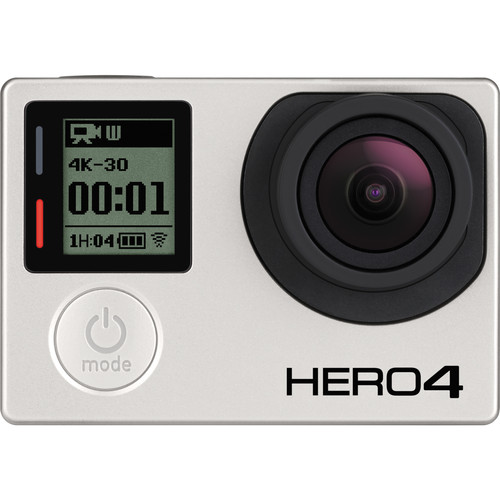
The HERO4 Black is the rectangular model with a front status display, removable battery and no built-in rear touchscreen. The Silver has a built-in touchscreen, while HERO4 Session is a different cube-shaped camera with different power and handling arrangements. Similar names do not make the batteries, housing or video settings interchangeable.
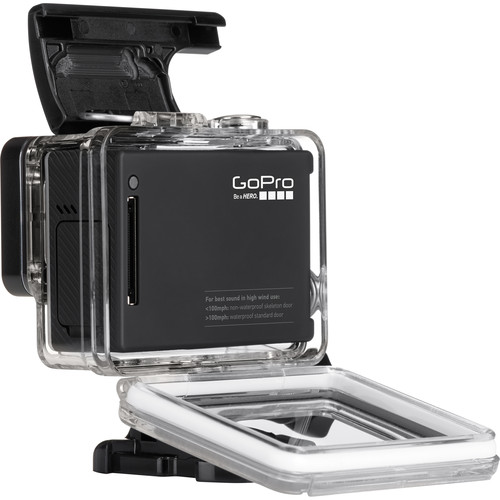
The original product photographs on this page show the Black body and a housing. They do not establish what any current seller includes. Ask for photographs of the actual unit, its label, ports, battery compartment and accessories. Confirm whether a working charger cable, usable battery, correct housing and mount are included before comparing packages.
The front status screen is for settings and recording information, not a live picture preview. Learn the three-button controls before relying on the camera: Power/Mode, Shutter/Select and Settings/Tag. You should be able to change the recording mode, confirm the selected settings and stop a recording without a phone connection.
Choose resolution, frame rate and framing together
The HERO4 Black manual lists 4K at up to 30fps, 2.7K at up to 60fps and 1080p at up to 120fps. Exact choices depend on the video format, resolution, field of view and available mode. Read the combination on the camera, not just the biggest numbers on a listing. NTSC and PAL settings give different frame-rate choices.
Use 4K when the extra recorded detail serves the finished video and your computer can play and edit the files. For a simple movement study, 1080p at a supported higher frame rate may be more useful. High-frame-rate capture gives you the option to slow footage in an edit; it does not automatically choose a slow-motion playback speed or improve a poorly lit scene.
Wide framing helps include the surroundings, but it can make the main subject small. SuperView changes how a taller captured image is presented in a wide output; it is not a neutral substitute for every field of view. Put important shapes where the framing serves them and inspect the edges for stretching before committing to a long take.
The lens is fixed-focus, and this camera has no in-camera image stabilization. It does not offer the modern HyperSmooth behavior associated with newer GoPros. A stable placement, controlled movement and a sensible distance from the subject are your first tools. Do not plan a close-detail shot as though you can tap the screen to focus on it.
Higher frame rates need light and power
A high frame rate is useful only when the footage has enough light and the intended movement benefits from it. Start in daylight or another well-lit setting. Review a clip for noise, blur and detail before assuming the 120fps option is the best choice. More frames per second can bring a greater demand on exposure and storage without improving the story.
Auto Low Light can adjust frame rate to suit changing light in supported modes. If you need consistent high-frame-rate footage for slow motion, check that setting rather than assuming the selected headline rate stays fixed. The manual advises turning Auto Low Light off for high-frame-rate slow motion and lists mode-specific availability.
GoPro’s manual says high-performance modes can make the camera warmer and use more power. Do not turn an old review’s battery-life result into a promise about a twelve-year-old battery. Recording mode, wireless use, accessories, temperature and the condition of the individual pack affect the result. Test the actual camera for the length of recording you need.
Keep ventilation and operating conditions in mind, and stop if the camera gives a temperature warning. Do not improvise cooling by exposing an unprotected camera to water. A shorter, repeatable take with checked results is more dependable than one long recording whose end you have not tested.
Use the right microSD card and verify the files
The manual identifies microSD, microSDHC and microSDXC cards up to 64GB, with a minimum Class 10 or UHS-I rating. That is the documented capacity to start from, not a blanket approval for any much larger modern card. A speed label is not proof that an old, counterfeit or damaged card will record reliably.
Use a genuine card, make a representative recording and transfer the files. Check playback on the computer and inspect the beginning and end of the clip. If the camera reports an SD error or stops unexpectedly, follow GoPro’s legacy troubleshooting rather than repeating the same important recording and hoping the next attempt works.
Formatting erases the card. Copy the files, confirm the copies and keep an independent backup before selecting All/Format in the camera. Do not confuse seeing a thumbnail with verifying the full file. The card reader gives you a way to move footage even when app pairing is unreliable.
Looping is not the setting for keeping an entire outing. It records over earlier footage according to the selected interval. Choose ordinary Video when you need to retain the whole take, and check the capture-mode icon before pressing record. Make the transfer workflow part of your first test, not an afterthought.
Housing and backdoor determine water protection
The bare HERO4 Black body is not waterproof. The manual describes a compatible housing with a Standard Backdoor rated to 40 meters when correctly assembled and maintained. That rating belongs to the housing arrangement, not to the uncovered camera and not automatically to every old third-party shell.
The Skeleton Backdoor is non-waterproof. The original rear product photograph shows a backdoor with openings, so do not treat the pictured arrangement as ready for underwater use. A door that lets more sound reach the microphone also lets the environment reach the camera. Match the door to the setting instead of guessing from the clear plastic appearance.
Inspect the seal, latch, hinge and lens window. GoPro warns that a single hair or grain of sand at the seal can cause a leak. An old housing can have wear or cracks that a product photograph cannot show. Clean and check it according to its instructions, and do not entrust an uncertain housing to an important wet or underwater recording.
After salt-water use, follow the manual’s fresh-water rinse and drying guidance for the housing. Never open a wet housing casually over an exposed camera. If water reaches the camera, stop and follow the manufacturer’s instructions. The legacy support limit makes prevention more important, not less.

Mounting and sound need a practical test
Use the mount’s instructions and inspect the buckle, screw and attachment before recording. Adhesive mounts need the correct surface preparation, temperature and cure time. The camera manual says to attach its adhesive mounts at least 24 hours before use. Do not take a recently pressed-on or damaged mount as proof that the camera is secure.
A helmet or other protective item has its own safety requirements. Follow its manufacturer’s guidance and do not drill, alter or attach accessories in a way that compromises protection. Do not recommend a tether as a universal safety fix: GoPro’s manual includes specific warnings about tethers and locking plugs on personal protective gear.
Record sound with the housing and position you intend to use. Listen for wind, handling noise, vibration and muffling. A dry indoor test with the bare camera does not establish how an enclosed moving camera will sound outside. If clear speech matters, plan an appropriate separate audio workflow rather than promising that a tiny internal microphone will solve it.
Check orientation before the take. The camera has orientation settings, but you still need to verify which way the image will appear and whether the mount places a horizon or subject where you want it. A short test can save an entire sequence of upside-down or badly aimed footage.
Protune is an editing choice, not instant quality
Protune provides controls including white balance, color, ISO limit, sharpness and exposure compensation in supported modes. GoPro Color is the simpler starting point if you want a finished-looking file. Flat is intended to give a different starting point for adjustment; it does not make this camera a modern RAW-video system or recover detail already lost to clipping.
Choose white balance with the light and the edit in mind. A consistent setting can make a sequence easier to match when the lighting stays consistent, but one setting is not right for every indoor and outdoor scene. Make a representative clip and look at skin, neutral surfaces and important colors before changing everything.
ISO Limit places a ceiling on sensitivity, with a brightness and noise tradeoff. Exposure compensation works within the available limits; raising it cannot create more light once the camera reaches the relevant ceiling. Keep the decision tied to your subject and judge the footage at the size it will be viewed.
For stills, the camera includes single, burst and time-lapse options, plus Night Photo and Night Lapse settings. A longer night exposure needs a stable camera and a subject that suits it. The sunset photograph illustrates light and composition, not an image claimed to have been captured by this HERO4 or a test of its night performance.

Inspect the battery and the whole used package
The removable HERO4 battery is a model-specific item. Do not assume a HERO3 battery or a newer GoPro pack fits. Inspect for swelling, damage or leakage and stop using a suspect pack. GoPro says it no longer sells HERO4 replacements and does not provide guidance on how well third-party batteries will work. A cheap listing with an unusable battery is not a complete working camera.
Check the Mini-USB connection and supplied cable, and follow the current legacy charging guidance. GoPro specifies a 5V/1A wall charging source for its troubleshooting procedure. Do not force a USB-C cable into the older connector or improvise a damaged charging arrangement. Test power, recording and file transfer before a seller’s return window closes.
GoPro still publishes a manual-update route for available legacy firmware. That is different from receiving new updates or restoring official app support. Use the exact HERO4 Black instructions if needed, and do not expect firmware to repair a worn port, leaking housing or failing battery.
Ask for the actual accessory inventory, current return terms and a recording demonstration. Inspect the lens window, buttons, card slot, doors and housing; test the files on your computer. Choose this camera only when its limitations and the individual copy fit the job. The original launch film is a promotional showcase, not a useful substitute for that check.
Frequently asked questions
Is the HERO4 Black waterproof without a housing?
No. Water protection depends on a correct, intact housing and appropriate backdoor. The Skeleton Backdoor is non-waterproof.
Does the HERO4 Black have a built-in touchscreen?
No. Do not confuse it with HERO4 Silver or an optional LCD accessory.
Does it have HyperSmooth stabilization?
No. This model has no in-camera image stabilization. Use a stable placement and controlled movement.
Can it record 4K at 30fps?
Yes. The manual lists 4K at up to 30fps, with frame-rate and mode differences between NTSC and PAL settings.
Is Quik officially supported for HERO4?
No. GoPro says the camera is no longer officially supported. Some features may work, but pairing and app behavior are not guaranteed.
Does GoPro still repair HERO4 cameras?
No. GoPro says HERO4 Black and Silver no longer receive repair or replacement, new software or firmware updates, or manufacturer-supplied batteries and replacement parts.
A practical legacy-camera kit
Check exact model, mount, condition and return terms. These links are shopping starting points, not stock or price promises.
- HERO4 Black listings: check operation, battery and return terms; GoPro no longer repairs this model.
- microSD card readers: match your computer connection and test file transfer.
- 64GB microSD cards at B&H: start with the documented capacity and test recording.
- Tripod mounts at B&H: verify the interface and support the camera safely.
Affiliate disclosure: Some links are affiliate links. If you buy through them, Shut Your Aperture may earn a commission at no extra cost to you. As an Amazon Associate, we earn from qualifying purchases.
Find practical photography tips at Shut Your Aperture Academy. Build your understanding of light and framing alongside your camera technique.
References: GoPro HERO4 legacy support and troubleshooting and HERO4 Black user manual.


