

Updated October 2026
The Sony a6000 camera is still worth understanding if you already own one or are considering a used body. Its 24.3-megapixel APS-C sensor, interchangeable E-mount lenses and electronic finder give you a capable still-photography setup in a small package. The important question is not whether an old launch announcement called it fast. It is whether the camera, lens and workflow meet your needs today.
This guide covers the original ILCE-6000. Do not borrow instructions from an a6100, a6400 or a newer Sony and expect every feature to exist here. The a6000 has useful autofocus and Full HD video, but no 4K recording, no touchscreen and no in-body stabilization. Its Eye AF is also different from the continuous eye-tracking systems in newer cameras.
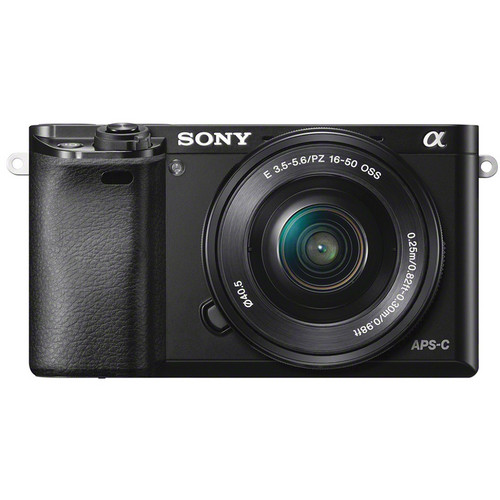
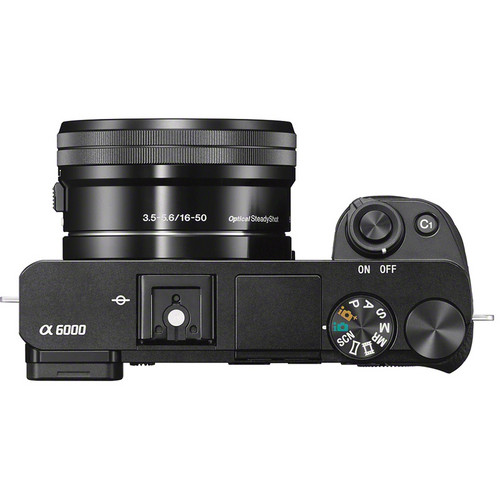
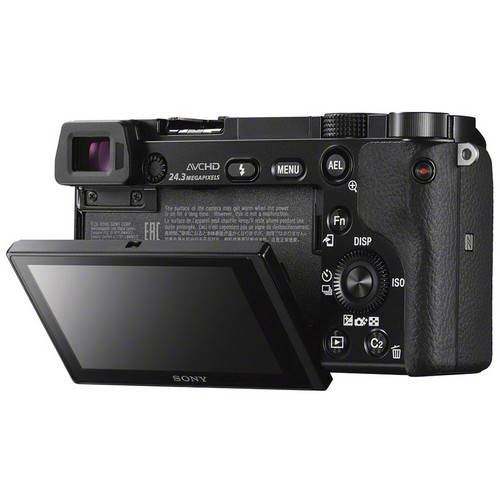
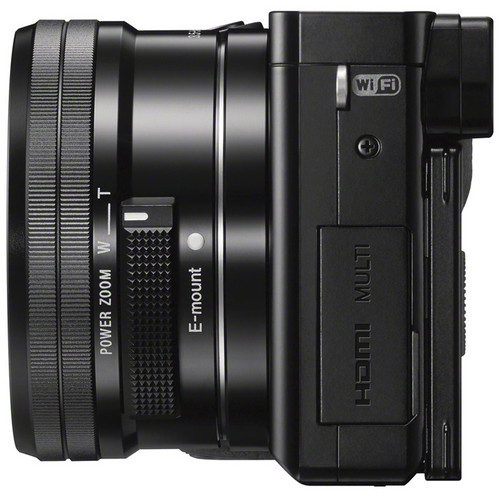
Use the landscape photograph introducing this guide as a composition example, not as an a6000 test file. The original product photographs show the camera’s controls and kit-lens arrangement. The practical goal is simple: set up the camera well, know the limits and test a used copy before committing.
Start with the exact body and lens
Check the model label for ILCE-6000. A listing may use “Sony Alpha” loosely, show a different generation in its stock photographs or describe a kit without actually including the lens. Ask for photographs of the unit being sold and a written list of what comes with it.
The a6000 uses Sony E mount. Sony A-mount lenses are not direct-fit alternatives; adapters introduce their own compatibility and autofocus questions. Full-frame FE lenses use the E-mount interface, but they can be larger and more expensive than an APS-C lens that suits the same job. Choose for the photographs you plan to make rather than buying the biggest lens name you recognize.
The familiar E PZ 16–50mm f/3.5–5.6 OSS kit lens gives a 24–75mm-equivalent field of view. It retracts for carrying and uses power zoom. Its aperture gets slower toward the long end, so a shutter speed that worked at 16mm may require a higher ISO or more light at 50mm. A used body-only offer does not include this lens just because the original camera was often sold with it.
Inspect the lens mount, battery door, card slot and controls. If a lens is included, test its extension, zoom, autofocus and aperture response. A camera that powers on is not necessarily a camera that reliably makes files.
 Save
SaveBuild a useful first-day setup
Set the date, time and language, then check the firmware under the Setup menu’s Version item. Sony’s support page lists firmware 3.21, released March 19, 2019, with autofocus-operation stability improvements. Earlier updates added functions including XAVC S recording. Follow the official instructions for your computer and region if an update is needed; do not assume an old updater works on every current operating system.
For stills, choose RAW or RAW & JPEG under Quality if you want editing flexibility. The original help guide describes compressed RAW capture. Do not look for an uncompressed RAW option copied from a newer camera tutorial. RAW & JPEG gives you an immediate viewing file and an original for editing, at the cost of more card space.
Put the controls you use regularly in the Fn menu. Focus Mode, Focus Area, ISO, white balance, Drive Mode and exposure compensation deserve easy access. Keep the setup simple enough that you can change it without losing the moment. Test a custom button after assigning it; a menu label is less useful than knowing what the button does with the camera at your eye.
Adjust the finder diopter for your eyesight before judging manual focus. Turn on a grid if it helps with horizons and building lines. This model does not have a touchscreen for moving a focus point. Practice the wheel and button sequence at home so it does not become a distraction while shooting.
Choose autofocus for the subject, not the headline
The a6000 combines 179 phase-detection points with 25 contrast-detection points. Those numbers describe the system, not a guarantee that every subject will be sharp. Light, lens behavior, subject contrast and your chosen focus area all matter.
For a stationary subject, start with AF-S and a focus area you can place deliberately. Flexible Spot is useful when a wide area keeps choosing something closer than your intended subject. Focus on the detail that matters, then check the photograph at full size rather than assuming the confirmation signal solved everything.
For a person or object moving toward you, use AF-C and a suitable area or Lock-on AF arrangement. Begin tracking before pressing the shutter fully. Keep the subject within the area you selected and use short bursts. A fast burst filled with the wrong focus is simply more sorting work.
Eye AF needs a specific explanation on this camera. Assign it to a custom key, press that key to focus on the eye and press the shutter while holding the assigned key. Sony’s help guide says it cannot be used in circumstances including Continuous AF or Manual Focus. This is not modern continuous Eye AF. For a moving portrait subject, prioritize a working AF-C setup instead of trying to force the older eye function into that role.
For careful manual focus, use magnification to inspect a meaningful detail. Peaking can help show contrast, but it should not replace a magnified check when depth of field is thin. If a scene is dark or low in contrast, switch technique rather than repeatedly asking autofocus to solve the same poor target.
 Save
SaveControl shutter speed, ISO and stabilization separately
Aperture Priority is a useful starting point for static travel scenes. Choose the aperture for the depth of field you need, then watch the shutter speed the camera selects. Do not let a comfortable-looking ISO number hide motion blur. If a person is moving, the shutter speed must address that movement.
Shutter Priority gives you direct control when timing matters. Manual exposure can be useful in consistent light or when you want to keep a sequence visually steady. These are choices, not rankings. Select the mode that makes the important variable easiest to control.
The still-photo ISO range runs from 100 to 25600. Keep ISO low when light and support allow, but raise it when that is necessary to preserve a sharp photograph. Sony’s guide lets you set minimum and maximum values for Auto ISO using the control wheel. That range does not remove the need to watch the resulting shutter speed.
There is no in-body stabilization. OSS is a lens feature. The SteadyShot setting applies to compatible stabilized lenses, and Sony’s help guide notes that it cannot be set with lenses whose names do not contain OSS in the described arrangement. Stabilization helps with camera movement; it does not freeze a moving subject. For tripod work, Sony recommends turning SteadyShot off.
For a static scene at dusk, support the camera, use a delayed release and inspect a frame before making a long series. Long Exposure NR activates for exposures of one second or longer and, when enabled, runs for the same duration as the exposure. You cannot make another photograph during that processing. Plan that delay when light is changing quickly.
Use the burst rate without living in the buffer
The camera can shoot up to 11 frames per second with subject tracking, but that is a maximum burst specification, not an unlimited recording speed. File type, card performance, focus conditions and buffer use affect the session. You also need to anticipate what the subject will do while the finder is showing the rapid sequence.
Use short bursts around a meaningful action: a turn, a stride or an expression. Release the shutter and let the camera clear when needed. A slower drive setting can make framing and reviewing easier when the fastest setting is unnecessary.
Do not remove the card or battery while files are being written. Watch the activity indication and wait. If you need dependable action coverage, test the lens and file settings you will actually use before the event. Changing from JPEG to RAW & JPEG can change how quickly the buffer becomes a constraint.
The a6000 does not offer a silent shutter option. If a venue requires silent capture, this body is not a substitute for a camera with a suitable electronic silent mode. Ask about the venue’s rules rather than discovering that limitation after the event starts.
 Save
SaveRecord Full HD with realistic audio expectations
The a6000 records Full HD, not 4K. Firmware support matters for XAVC S, which was added after the original launch. Sony’s update instructions specify an SDXC card rated Class 10 or faster for that format, formatted in the camera after updating. Back up first: formatting erases the card.
Frame-rate options depend on the PAL/NTSC arrangement and recording format. Check the camera menu and region-specific guide rather than copying a setting from someone else’s body. Make a short test clip, transfer it and confirm that your editing software reads the file and audio.
Use the movie AF drive-speed and tracking settings to suit the transition you want. A quick focus change is useful for some subjects; a slower change can be less distracting in a deliberate shot. Manual focus can be a better choice when you need the focus to stay put. Confirm it before recording and watch for someone moving out of the sharp area.
There is no standard 3.5mm microphone input or headphone jack. The Multi Interface Shoe can work with particular compatible accessories, but that does not mean every newer Sony digital microphone is compatible. Verify the exact accessory and body pairing. For important speech, an external recorder can be a separate workflow, provided you plan synchronization and monitor that recorder.
The screen tilts, but it does not become a modern fully articulated touchscreen. Check whether you can see it from your intended position. For a longer recording session, test power, temperature behavior and the actual clip limits under your conditions. Do not promise uninterrupted event recording from a launch specification.
 Save
SaveUnderstand what changed with phone apps
Wi-Fi and NFC were part of the original camera’s feature list, but the software around an older camera changes. Sony’s current supported-camera guidance lists ILCE-6000 under Imaging Edge Mobile, not Creators’ App. Check the current phone and operating-system requirements and test a transfer with your own device.
PlayMemories Camera Apps are a separate matter from a phone transfer app. Sony ended the download service for paid and free in-camera apps on August 31, 2025; updates had already ended. Its notice says already downloaded camera apps can continue to be used. Do not buy the body expecting to install an old time-lapse or remote-control app today.
If a particular installed app matters, ask the seller to show it functioning on the actual camera and verify what remains available after any reset or account change. An old review describing an app store is historical evidence, not a current download promise. Avoid unofficial modifications just to recreate a function from a discontinued service.
Keep a card-reader transfer path even if phone sharing works. It is a useful fallback and a clear way to copy original files. Open a sample RAW file in your preferred editor before depending on that editor for a trip or paid work.
Check a used copy through a complete shooting cycle
Test every dial and button, including the shutter’s half-press and full press, the control wheel, playback and menu navigation. Look for intermittent behavior, not only a total failure. Make several photographs, change settings and review them. Do not accept an unexplained stuck control as a harmless quirk.
Inspect the finder, screen hinge, lens mount, card slot, battery compartment and ports. Test a supplied lens at wide and long settings and review detailed files for focus and consistent sharpness. Check the sensor through sample photographs without touching it or trying a casual cleaning procedure during the inspection.
The battery is NP-FW50. Verify the supplied pack and charger, then test the intended USB charging or external-charger workflow. Battery age matters more than the launch-era shot rating. USB charging is not a promise of unlimited shooting while connected, and a cable fitting the port does not establish that it carries data reliably.
Ask for the included accessories, return terms and service options in writing. Shutter count can provide context when available, but it does not measure battery health, impact damage, worn controls or lens condition. The strongest check is a complete cycle from power-on to capture, playback, file transfer and editing on your own computer.
 Save
SaveFrequently asked questions
Is the Sony a6000 still useful for still photography?
Yes, when its autofocus, lens and workflow meet your needs. Inspect a used copy and judge full-size files rather than relying on old performance superlatives.
Does the a6000 have continuous Eye AF?
Not the modern version. Its assigned-button Eye AF has restrictions including no use in Continuous AF or Manual Focus. Use a suitable AF-C setup for moving subjects.
Does it have in-body stabilization or a silent shutter?
No. Stabilization depends on a compatible OSS lens, and the original a6000 does not offer silent shutter capture.
Can it record 4K or use a regular microphone cable?
It records Full HD, not 4K, and has no standard 3.5mm microphone input. Verify specific Multi Interface Shoe accessories or use a separate recorder.
Can I still download PlayMemories Camera Apps?
No. Sony ended the download service on August 31, 2025. Already installed apps can continue to be used, subject to their existing functionality.
Which card is needed for XAVC S?
Sony specifies an SDXC card rated Class 10 or faster with the required firmware. Back up files before formatting the card in the camera.
Build a simple a6000 kit
These are retailer search links, not current stock or price claims. Confirm exact compatibility and return terms before buying.
Affiliate disclosure: Some links are affiliate links. If you buy through them, Shut Your Aperture may earn a commission at no extra cost to you. As an Amazon Associate, we earn from qualifying purchases.
Find practical photography tips at Shut Your Aperture Academy. Keep improving your light, timing and framing while you learn the camera. A smaller kit can still make a strong photograph when your choices are clear.
References: Sony a6000 support, original help guide, Camera Apps ending notice and current mobile-app compatibility.


