Updated October 2026 | By Edin Chavez, owner of Edin Studios
Heads up: some links below are affiliate links. If you start an Aftershoot plan through them, Shut Your Aperture earns a commission at no extra cost to you. Readers who sign up through my link also get a 15% discount coupon.
School photography is a volume game. Picture day means hundreds of kids, a few frames each, a tight deadline, and a client (the school, the PTA, the parents) who wants every child to look good and every order to be correct. You do not get to be precious about any single image. You get to build a pipeline that moves thousands of frames from camera to delivery without mistakes.
This article lays out a school photography workflow built around AI culling, editing, and retouching. One honest note up front: my own business, Edin Studios, is national event photography, not school portraits. So I am not going to pretend I have run a thousand picture days. What I can give you is a workflow built from how volume work behaves, plus the documented features of Aftershoot, checked against the company’s own pages. And I can show you what volume looks like in my own app.
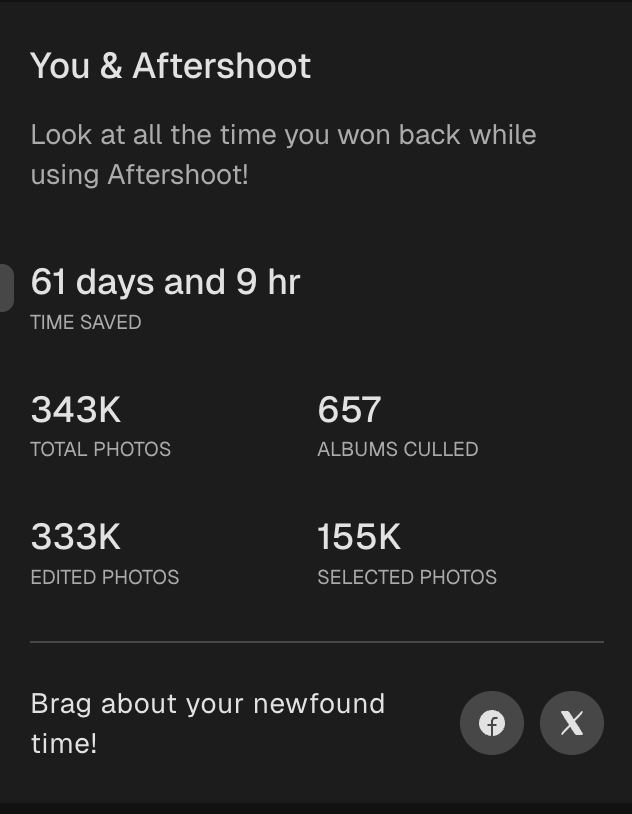
My numbers, straight from the app. I run Edin Studios, a national event photography business, and Aftershoot is in my workflow every single day. The “You & Aftershoot” screen in my own app currently shows 343K total photos, 657 albums culled, 155K selected photos, 333K edited photos, and 61 days and 9 hours of time saved. That time figure is the app’s own tally, so read it as an estimate, not a stopwatch. Still, 657 albums is a lot of real work to run through one tool.
That is 657 albums and 343K photos, which is the kind of throughput school work demands. Different jobs, same pressure: lots of frames, little time, and zero room for a pipeline that breaks.
Table of Contents
- Why school photography is its own workflow
- The pipeline, step by step
- Culling a picture day
- Editing for consistency
- Retouching at volume
- Delivery and parent galleries
- The per-image fee trap
- A picture day checklist
- Questions volume photographers ask
Why school photography is its own workflow
A wedding is a story. School photography is a production line. Compare the two and the differences are clear.
Every subject is equal. At a wedding, you hunt for the best moments. On picture day, every student gets the same treatment, and every parent expects a good result for their child. There is no “hero shot” hierarchy.
The frames are near-identical. You shoot a few frames per student in the same setup. The differences are tiny: eyes open, chin position, smile. Sorting these by eye is slow and tedious, and it is exactly the kind of repetitive visual work software handles well.
Consistency is the product. Class composites, yearbook pages, and individual portraits all need matching color, crop, and background. One off-color image stands out immediately.
The numbers are huge. A single school day can produce several thousand frames. Multiply that across a season of schools and you are into the hundreds of thousands. Any tool that charges per image can quietly eat your margin.
Mistakes cost real money. A wrong crop, a missed blink, or a mislabeled student means reprints and unhappy parents.
The pipeline, step by step
Here is the pipeline I would build for a school job, with the AI steps in the middle where they do the most good.
- Capture with discipline. Consistent lighting, consistent backdrop, consistent distance. The easier your capture is to repeat, the easier everything after it becomes. AI works best on predictable input.
- Back up before anything else. Two copies, two drives, same day.
- Import and cull. Let AI group near-duplicates and flag blinks and blur, then review.
- Batch edit. Apply one consistent look across the whole job.
- Batch retouch. Light, natural cleanup applied across the set.
- Check and export. Spot-check a sample, then export in the format your lab or gallery system needs.
- Deliver. Parent galleries, proofing, ordering.
Culling a picture day
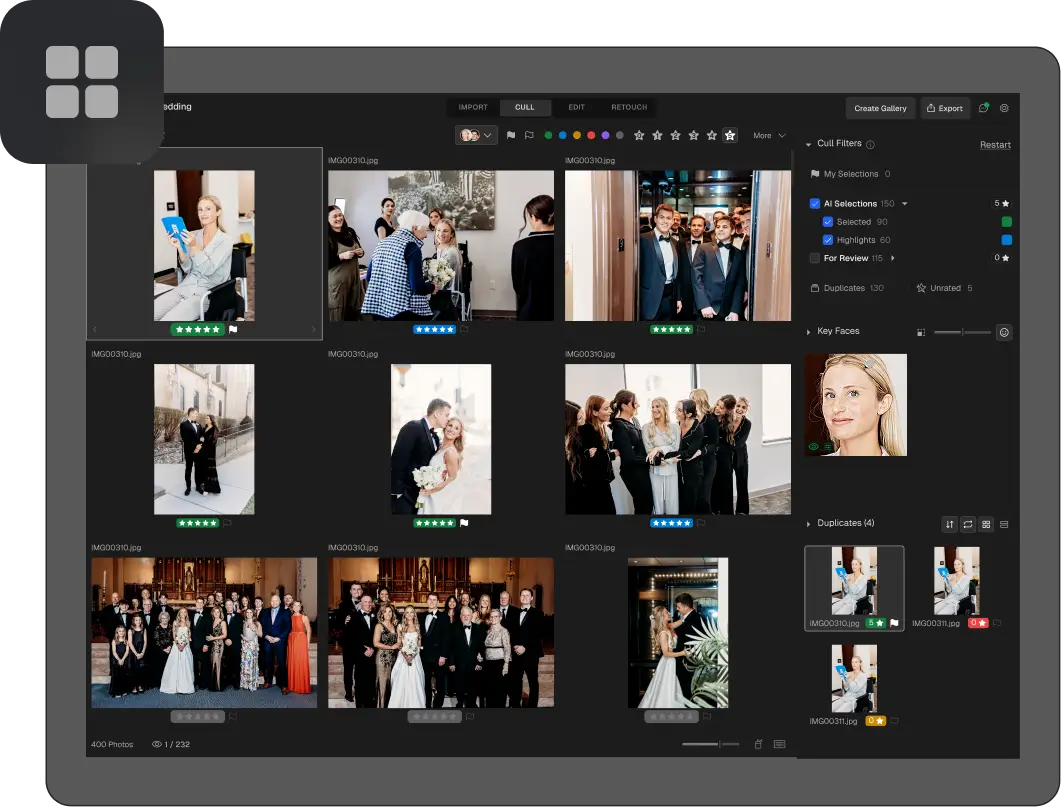
Culling is where picture day workflows usually bog down. You have, say, three frames of every student and you need the one with open eyes and a natural expression. Do that for 800 kids and you have made 800 small decisions about almost identical images.
Here is how Aftershoot’s culling features map to that job, per the company’s own documentation.
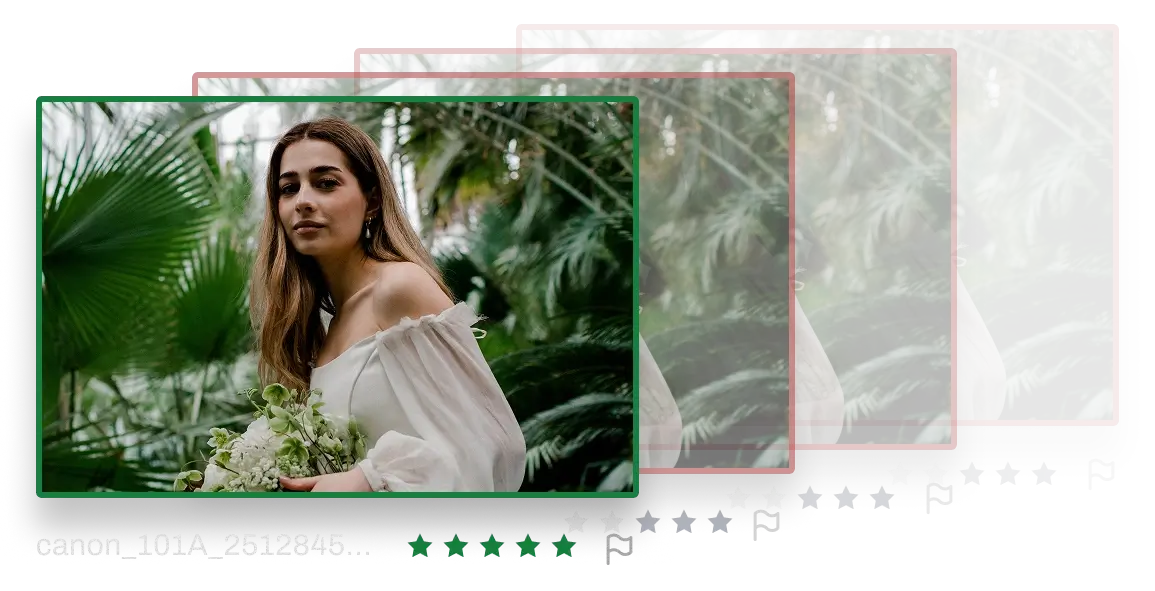
Duplicate grouping. Aftershoot says its AI differentiates true duplicates from intentional variations, so near-identical frames of one student collapse into a group with a suggested best frame. The company says this results in 15 to 20 percent fewer files in editing.
Blink and blur flags. Aftershoot says it flags closed eyes and blur automatically. For a school setting with children who blink constantly, this is the feature that matters most.
Key face detection. Aftershoot says its AI highlights the moments where everyone looks their best, which matters for group and class photos.
Image scoring. Every photo gets a quality rank, so the strongest frame of each student rises to the top.
Two groups: Selections and For Review. The software sorts the shoot into two clear groups so you know where to spend your attention. In a volume job, that means quickly accepting the confident picks and only slowing down for the uncertain ones.
Aftershoot also offers Cull to Target, where you set your photo count before you cull. For picture day, the “target” is simple: one final image per student (or however many your package includes). Read our Cull to Target guide for how that works in practice.
A practical tip: cull each class or grade as its own album. It keeps the review manageable and makes it easy to spot a missing student before the lab deadline.
And a caution I will repeat throughout this article: AI gives you a draft. A child who happened to blink in the “best” frame is still going to end up in a parent’s inbox, so spot-check. Aftershoot’s own copy describes it as a starting point, with every selection yours to review and approve.
 Save
SaveEditing for consistency
School photography lives and dies on consistency. Every child should be exposed and colored the same way across the whole school.
Aftershoot’s editing product is built around the idea of learning your style and applying it to every photo. According to the company, you can import past edits from Lightroom or Capture One to build a profile, or pick from its marketplace of styles. It describes a personalized AI profile built from 2,500+ edited images, and instant profiles that convert a Lightroom preset into an AI editing style that adapts to different lighting conditions.
For a school job, the most useful pieces are these:
- Batch editing across an entire album, so the whole class gets the same look.
- Portrait and headshot crop. Aftershoot lists batch cropping with “close,” “medium,” or “wide” modes in one pass, which is exactly what you need for consistent framing across hundreds of portraits.
- Smart cropping and straightening to fix small framing mistakes automatically.
- Intelligent AI masking to isolate subjects for targeted adjustments across the gallery.
One important point: do your own lighting and white balance setup right at capture. AI editing can match a look across lighting conditions, but a clean, repeatable setup in the camera is still the best foundation for consistent results. For more on the editing steps themselves, see our import-to-export editing workflow.
Retouching at volume
Parents expect natural, flattering portraits. They do not expect heavy retouching, and school photographers generally cannot afford to spend minutes on each face. Light, consistent, automatic cleanup is the right level.
Aftershoot’s retouching page lists tools that line up with school work:
- Blemish removal, stray hair removal, and face shine removal
- Natural face retouching that is meant to keep people looking like themselves
- Cloth dewrinkle, which smooths clothing creases while keeping fabric texture, embroidery, and pleats intact
- Custom backgrounds for headshots, which the company labels as beta, with edge refinement built in
- Batch retouching and the ability to sync settings across an album
- Ten built-in retouch presets for real-world shoots
Aftershoot says its retouching is subtle by default and adjustable per image. That matters for children. You want a light touch, not a plastic look. Set a conservative preset, test it on a sample of students, and only then run the full batch. For a deeper look, our guide to portrait retouching at volume goes through the settings I would start with.
 Save
SaveDelivery and parent galleries
The last mile matters. Parents want to find their own child quickly, preview, and order. Aftershoot Galleries is the company’s delivery product, and its page lists several features that fit school work: built-in proofing, face-based filtering and keyword search so clients can go straight to their photos, a print store, and branded galleries with your logo and watermarks.
The Galleries page says you can start with 10 GB free and that the plans shown are a preview of launch pricing available for a limited time. Because pricing there is described as a preview, check the Galleries page directly before you plan around it. I would also confirm that the gallery system fits your school contracts and ordering requirements before switching any live school job to it. Many school photographers already use dedicated school-photo ordering platforms, and you should keep whatever your contracts require.
 Save
SaveThe per-image fee trap
This is where volume photographers get burned. Some AI tools charge per image. That sounds cheap until you do the math.
Aftershoot’s culling page states that per-image tools charge $0.05 or more per photo, while every Aftershoot plan is unlimited. Take that company claim at face value and run the numbers on a school job. If a single picture day produces 5,000 frames, a per-image fee of $0.05 means $250 for that one day, before editing and retouching. Over a season of dozens of schools, that adds up fast, and it scales directly with your busiest months.
A flat fee flips that. According to Aftershoot, Select (AI culling) starts at $10 per month, billed annually. Edit is listed at $30 per month and Retouch at $20 per month, with a complete bundle listed at $45 per month against $60 for the plans bought separately. All of these are described as unlimited with no per-image fees. The retouching FAQ even gives a volume example: three portrait shoots a month with 1,000 images each costs a fixed $20. Check the Aftershoot site because plans and promotions change.
For a volume business, predictable cost is as valuable as the time saved. You can quote jobs without worrying that a big school will erase your profit.
A picture day checklist
- Test the full pipeline on a small past job before picture day, not during your busiest week.
- Set up lighting and backdrop so capture is repeatable.
- Back up cards to two drives the same day.
- Cull by class or grade, one album at a time.
- Review the For Review group for students with no clear keeper.
- Confirm a final image exists for every student on the roster.
- Run a conservative retouch preset on a sample, then the full batch.
- Spot-check 5 to 10 percent of the final images against the originals.
- Export in the exact format your lab or ordering system requires.
- Keep originals until the job is paid and delivered.
Want to go deeper on this? Take a look at the ShutYourAperture Academy, our photography school.
Questions volume photographers ask
Can AI culling handle thousands of photos per job?
Aftershoot says it culls 5,000+ photos in minutes and that every plan covers unlimited photos. How fast it runs for you depends on your computer and file sizes, so test it on a real past job.
Does it work without internet?
Per Aftershoot, yes. Processing is local, and it works offline.
Is student data safe?
Aftershoot states that photos stay on your hard drive during culling and that you can opt out of data sharing on the import screen. Schools often have strict privacy rules, so read the current privacy terms and your school contract before using any tool on student images.
Will AI retouching make kids look fake?
Aftershoot describes its retouching as natural and adjustable per image, with subtle defaults. Start conservative and test before batch runs.
Do I have to cull and edit in the same app?
No. Aftershoot exports to Lightroom Classic and Capture One, and it also lists integrations with PhotoMechanic and Bridge. You can use only the parts you need.
What does it cost for a volume business?
Select starts at $10 per month billed annually, Edit is $30 per month, Retouch is $20 per month, and the complete bundle is listed at $45 per month. All are unlimited with no per-image fees. Verify current pricing on the pricing page.
Is there a free trial?
Yes, 30 days with full access to AI culling features, with no credit card required.
Have you shot school photos with this?
No. My own work is national events at Edin Studios, and I use Aftershoot every day for that. The school-specific workflow here is built from how volume work behaves and from Aftershoot’s documented features, so test it on your own jobs before relying on it.
The bottom line
School photography rewards the photographer with the best pipeline, not the best single frame. AI culling, batch editing, and light retouching take the repetitive middle of that pipeline off your plate, and a flat fee keeps your costs predictable when the work gets big. Start small: run one past job through the 30-day free trial, compare the results with your current process, and then decide.
Gear that helps a high-volume workflow
These are categories worth browsing, not specific picks I am recommending. Check specs and reviews for your own camera and computer. Not sure what to buy? See my camera buyer guide.
- A color-accurate monitor. Judge exposure and skin tones on a screen you can trust. Browse on Amazon | on B&H
- A portable SSD. Keep shoots and exports on fast external storage. Browse on Amazon | on B&H
- A fast card reader. Import thousands of RAW files without waiting on a slow reader. Browse on Amazon | on B&H
Amazon and B&H links are affiliate links. I may earn a commission at no extra cost to you.
Aftershoot feature and pricing details were checked against aftershoot.com in October 2026 and can change. Verify on the official site before you buy. Usage numbers are from the author’s own Aftershoot app.
Images: Aftershoot.