
Updated October 2026 | By Edin Chavez, owner of Edin Studios
Heads up: some links below are affiliate links. If you start an Aftershoot plan through them, Shut Your Aperture earns a commission at no extra cost to you. Readers who sign up through my link also get a 15% discount coupon.
Every photographer says “this saves me time.” Fewer can tell you how much, or whether it was worth the money. So let’s do the math properly. This article gives you a formula you can fill in with your own numbers, a look at what my own app reports after hundreds of albums, and an honest read on what you should and should not expect.
The tool here is Aftershoot, and the thing we are pricing is your time, which is the only resource you cannot buy more of.
Table of Contents
- What my app says after 657 albums
- The formula for your own season
- A worked example
- What Aftershoot says about time saved
- The cost side
- Savings people forget
- Where the math can mislead you
- How to measure your own savings in two weeks
- Questions photographers ask
What my app says after 657 albums
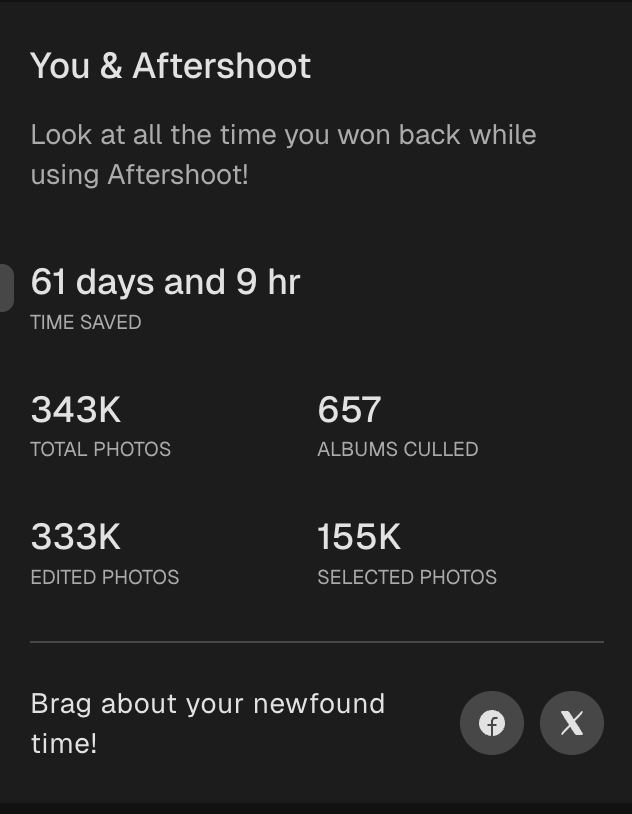
My numbers, straight from the app. I run Edin Studios, a national event photography business, and Aftershoot is in my workflow every single day. The “You & Aftershoot” screen in my own app in the screenshot below shows 343K total photos, 657 albums culled, 155K selected photos, 333K edited photos, and 61 days and 9 hours of time saved. That time figure is the app’s own tally, so read it as an estimate, not a stopwatch. Still, 657 albums is a lot of real work to run through one tool.
Do the division. 61 days and 9 hours is 1,473 hours. Spread over 657 albums, that works out to a bit over two hours per album, on the app’s own estimate. Two things to keep in mind. First, it is the app’s tally of time saved, and I do not know the exact assumptions behind it, so it is a reasonable estimate rather than a measured fact. Second, my albums are mixed: some are small, some are huge, so the average hides a lot of variation. Still, it is a real, running total from real work, which is more than most “time saved” claims can say.
Also look at the ratio of selected to total: 155K selected out of 343K processed. A bit under half of everything I shoot makes it through the cull. That is the pile AI has to sort, and it is the reason the savings add up.
The formula for your own season
Here is the math. It is four numbers and one multiplication, and you already know all four.
A = number of shoots you cull per year. Weddings, events, sessions, whatever goes through your pipeline.
B = hours you spend culling one shoot by hand, on average. Be honest. Include the second and third passes, and the time you spend agonizing.
C = hours you would spend reviewing the same shoot after an AI first pass. This is the number you have to test, because it varies by photographer. Include the time you spend rescuing images from the rejected pile.
D = what an hour of your time is worth. If you are not sure, take your annual profit and divide by the hours you work. Or use what you would pay an assistant.
The formula: (B minus C) x A x D = annual value of the time you save.
Then subtract the yearly cost of the software. What is left is your net gain. If the result is positive, the tool pays for itself. If the result is small, the real benefit is probably not money but the evenings you get back.
 Save
SaveA worked example
Here is an example with made-up round numbers, not mine, so you can see how it works. Please do not read these as results from any real shoot.
- A = 30 weddings in a season
- B = 4 hours of manual culling per wedding
- C = 1 hour of review after AI culling
- D = $40 per hour
(4 minus 1) x 30 x 40 = $3,600 of time value. And 3 x 30 = 90 hours saved, which is more than two full work weeks.
Now the cost. Aftershoot lists its Select (culling) plan from $10 per month, billed annually, which is $120 a year. Net gain in this example: about $3,480. Even if the real C turns out to be 2 hours instead of 1, you still save 60 hours and come out well ahead.
Run the formula with your own numbers. If your B is only 1.5 hours because you shoot small galleries, the case is weaker. If your B is 6 hours because you shoot long weddings with second shooters, the case is much stronger.
What Aftershoot says about time saved
It helps to see the company’s own figures next to yours, with the right amount of skepticism.
- On its culling page, Aftershoot compares manual culling at about 3 to 5 hours per shoot with about 20 to 30 minutes of review when AI surfaces its top picks, roughly 200 to 500 images.
- On its main platform page, it says you can reclaim 39+ hours per month across cull, edit, retouch, and deliver.
These are marketing figures, not a promise about your next wedding. The platform total also bundles several products. Keep it separate from the culling-only comparison. The point is that the company’s numbers and my own app’s tally point in the same direction: the savings are real and they add up across a season. Your result may be lower or higher. The only way to know is to measure.
 Save
SaveThe cost side
Here are the prices as listed on Aftershoot’s pricing and product pages at the time of writing. Check the Aftershoot site because they change.
- Select (AI culling): from $10 per month, billed annually. Unlimited photos, no per-image fees.
- Edit: from $30 per month, billed annually.
- Retouch: from $20 per month, billed annually.
- Complete bundle: from $45 per month, billed annually, against $60 for the three separate plans at their annual-billing rates.
- Trial: 30 days with full access to AI culling, no credit card required.
Also worth knowing: the retouching FAQ says plans can be paused during slower seasons. For a wedding photographer with a real off-season, that can matter. And if you are pricing against a per-image tool, Aftershoot’s page says those tools charge $0.05 or more per photo. At that rate, 10,000 photos is $500, so a flat fee wins on busy months by a wide margin.
If you sign up through my link you also get a 15% discount coupon, which takes a little off the bill. It does not change the math above, which is why I left it out of the formula.
 Save
SaveSavings people forget
Fewer files downstream. Aftershoot says duplicate grouping gives you 15 to 20 percent fewer files in editing. Every file you do not keep is a file you do not edit, export, or upload. That saving shows up in a later step and rarely gets counted.
Faster turnaround. Clients remember who delivered quickly. Faster culling lets you share a sneak peek sooner, and that has value you will not see in the formula. See our post on same-day delivery for event photographers.
Energy. Culling at midnight after a 12-hour wedding drains you. Giving the grunt work to software means you review while fresher, and your decisions improve.
Capacity. If you save 90 hours a season, you could shoot more weddings, or take more time off. Either one has a dollar value that the formula only partly captures.
Where the math can mislead you
Your C is not the company’s C. The company’s 20 to 30 minute review is a typical case. If you review every rejected image, double-check every group shot, and fix many picks, your C will be higher.
The learning curve is real. The first few shoots will take longer while you figure out settings and learn how far to trust the picks. Aftershoot says it adapts to your corrections, so results should improve with use, but expect an adjustment period.
Do not count saved hours you will not use. If you save 90 hours but spend them scrolling your phone, the dollar value was theoretical. The formula only matters if the hours go somewhere useful.
Hardware matters. If your computer is slow, processing time goes up. Test on your own machine.
Count the whole workflow, not just the review
Keep two columns in your test log: hands-on time and elapsed time. Hands-on time includes importing, checking groups, rescuing photographs and exporting the selection. Elapsed time also includes waiting for the computer. A processing job that runs while you answer emails has a different cost from one that ties up the only machine you can work on. Record both instead of calling every unattended minute a lost minute.
Compare the same deliverable, too. If your manual test ends at 600 photographs and your AI test ends at 350, the second run may look faster because you stopped earlier. Use the same coverage checklist and final-gallery goal. Check the ceremony, family combinations, reception details and quiet moments in both selections. Speed only counts when the gallery still tells the story you promised.
How to measure your own savings in two weeks
- Pick two past shoots of similar size that you culled by hand. Write down roughly how long each took.
- Start the free trial and run one of them through AI culling. Time the whole thing, including your review and rescues.
- Compare. That gap is your (B minus C) for that kind of shoot.
- Repeat with a different shoot type, such as a long wedding versus a short event.
- Plug your own numbers into the formula and decide.
The trial is 30 days and needs no credit card, so you can finish the test before spending anything. Start it here.
 Save
SavePutting it on a season calendar
One way to feel the numbers is to lay them on a calendar. Wedding season is not evenly spread. You might shoot four weekends in a row in June and then have a quiet stretch in August. Culling backlogs build up exactly when you have the least spare energy.
Look at your busiest month from last year. How many shoots did you cull that month, and how many nights did you spend on it? If the answer is “most of them,” then your biggest gain is not the average hours saved, it is the peak-month relief. A tool that turns an evening of culling into a quick review can be the difference between delivering on time and falling a week behind during the weeks you can least afford it.
The same view helps you decide when to start. Do not begin testing in the middle of your busiest month. Use a slow week, run two or three past galleries through the trial, and have your settings dialed in before the rush starts.
A faster cull helps most when the photographs are worth delivering. Build stronger wedding coverage with The Wedding Day course at ShutYourAperture Academy. Get practical tips for ceremony coverage, couple portraits, reception light and delivering the gallery. Use the time you save here to make your next wedding story stronger.
Questions photographers ask
How many hours will AI culling really save me?
It depends on your shooting style and gallery size. Aftershoot’s published comparison is 3 to 5 hours of manual culling versus 20 to 30 minutes of review. My own app estimates 61 days and 9 hours saved across 657 albums. Test your own to get your number.
Is the time-saved figure in the app accurate?
It is the app’s own estimate, so I treat it as a good guide, not a stopwatch measurement.
Is it worth it if I only shoot a few weddings a year?
Possibly, since the Select plan starts at $10 per month. Run the formula with your numbers. If you shoot few events, the savings in dollars will be smaller.
Do I pay per photo?
No. Aftershoot says its plans are unlimited with no per-image fees.
Can I pause the plan in the off-season?
The retouching plan FAQ says plans can be paused during slower seasons. Check current terms for each plan on the pricing page.
Is there a free trial?
Yes, 30 days of full access to AI culling features, with no credit card required.
What about editing and retouching time?
Those are separate plans with their own savings. Measure editing separately from culling. We cover that in our guide on AI photo editing for photographers.
Does a faster cull hurt quality?
It can if you accept the AI’s picks without review. Aftershoot says every selection is yours to review, adjust, and approve. Save a little of the time you gain for that review.
The bottom line
The honest answer to “how much time does it save” is: more than you expect on big shoots, less than the marketing says on small ones, and you will not know until you measure. The formula takes five minutes. The trial costs nothing. And if you want the full workflow behind the savings, start with how to cull wedding photos faster.
Gear that helps a high-volume workflow
These are categories worth browsing, not specific picks I am recommending. Check specs and reviews for your own camera and computer. Not sure what to buy? See my camera buyer guide.
- A portable SSD. Keep shoots and exports on fast external storage. Browse on Amazon | on B&H
- A color-accurate monitor. Judge exposure and skin tones on a screen you can trust. Browse on Amazon | on B&H
- Backup drives. Keep two copies of every shoot before you cull. Browse on Amazon | on B&H
Amazon and B&H links are affiliate links. I may earn a commission at no extra cost to you.
Aftershoot feature and pricing details were checked against aftershoot.com in October 2026 and can change. Verify current terms before buying. Usage numbers are from the author’s own Aftershoot app. Images: Aftershoot.
