Updated October 2026 | By Edin Chavez, owner of Edin Studios
Disclosure: I am an Aftershoot affiliate and use it daily at Edin Studios. If you start a plan through my links, I may earn a commission at no extra cost to you. Check the current offer at checkout; I am not promising a particular discount.
Search for the best AI culling and editing software and you will find a pile of “best of” lists, most of them written by someone selling something. So here is the disclosure first: I am an Aftershoot affiliate, and I use it every day. This article is not a neutral shootout. What it is: a practical guide to choosing AI culling and editing software, with the criteria I would use, an honest look at the pricing models that trap people, and a description of how Aftershoot’s cull, edit, retouch, and deliver stack fits those criteria.
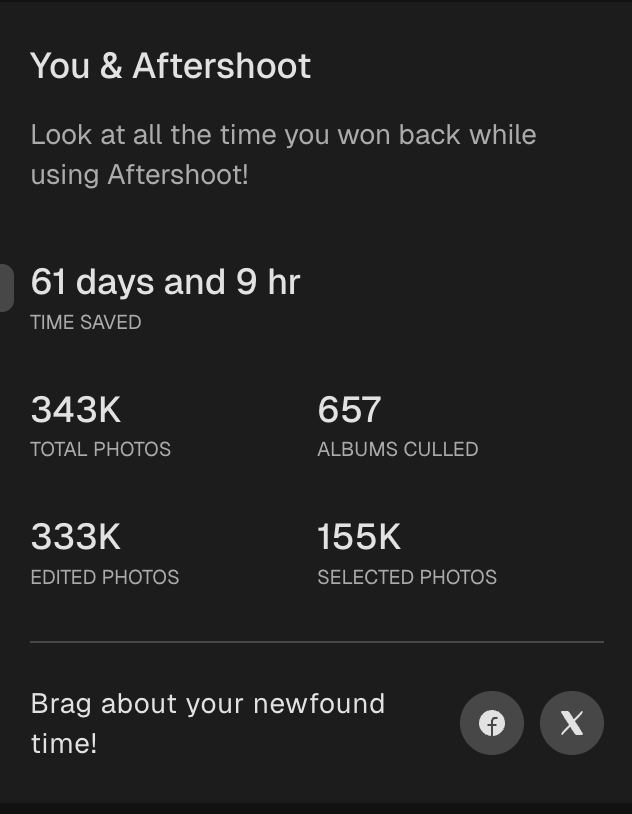
My October 2026 app snapshot. I run Edin Studios and use Aftershoot every single day. My supplied screenshot shows 343K total photos, 657 albums culled, 155K selected photos, 333K edited photos, and 61 days and 9 hours saved. These rounded app counters are not an independently timed benchmark, an annual usage total, or a guarantee of your savings. They are a supplied snapshot, not a live reading.
 Save
SaveOther tools can suit different photographers. This is an affiliate buying guide, not a controlled head-to-head test. I have not run the competing apps through the same jobs for this article. The comparisons below separate documented pricing and workflow options from the practical checks you should make on your own photographs.
Table of Contents
- The seven criteria that matter
- Pricing models: flat fee vs per-image
- What the Aftershoot stack includes
- Compare current plans
- Who each approach fits
- How to run a fair trial
- Buyer’s checklist
- Questions photographers ask
The seven criteria that matter
Ignore the feature lists for a moment. These are the questions that decide whether a tool works for your business.
1. Accuracy on your style of work. A tool that culls beautifully for a bright-and-airy wedding photographer may stumble on your moody, low-light work. The only way to know is to test on your own past shoots.
2. Pricing model. Flat fee or per image? This single question matters more than almost any feature, and I cover it below.
3. Workflow fit. Does it export to the software you finish in, such as Lightroom Classic or Capture One? Does it write ratings in a way your catalog understands?
4. Control. Can you review, override, and adjust every decision? A tool that hides its choices is a tool you cannot trust.
5. Privacy. Does it process locally or upload your images? This matters for NDAs, private events, and client trust.
6. Learning and consistency. Does it adapt to your taste and keep your edits consistent across shoots?
7. Scope. Does it only cull, or does it also edit, retouch, and deliver? One stack is simpler. Separate tools can be more flexible.
 Save
SavePricing models: flat fee vs per-image
This is where photographers get surprised. There are two main models.
Per-image or credit-based. The charge normally applies to a defined service, such as editing selected photographs. Do not multiply an editing rate by every frame you captured and call that a culling bill. Check which images count, which tools cost extra, the minimum charge, and whether failed jobs or repeated edits consume credits. A low headline rate is only useful once you know its unit.
Flat subscription. You pay for a named plan and its permitted use, rather than each processed photograph. That can make busy-season costs easier to predict. It does not mean every tool, every team member, gallery storage, or every business use is included. Read the plan limits as carefully as the price.
Use a full year of your own recent jobs, separating captured frames from selected finals. Culling, editing and retouching can have different volumes. Multiply only the eligible billable images by the actual service rate, then add minimums and optional tools. Compare that total with the annual subscription for the same work. My 343K lifetime-style snapshot does not tell you a one-year cost or another service’s billable count.
Low volume can favor pay-as-you-go, while regular use can favor a fixed plan. Neither model is automatically better. Include review time, upload or download time, and your normal finishing software in the comparison. A cheaper app that adds twenty minutes of cleanup to every job may not be the cheaper workflow.
What the Aftershoot stack includes
Here is what Aftershoot lists, with prices from its pricing and product pages at the time of writing. Check the Aftershoot site for current plans.
Select: $10/month billed annually ($120/year), or $15/month on monthly billing. Aftershoot lists automated and assisted culling, duplicate grouping and key-face detection. Its current pricing page lists exports to Lightroom, Capture One, Lightroom CC, Bridge and Adobe Camera Raw. Confirm your exact app version and handoff in a trial. Our Cull to Target guide covers the target-count workflow.
Edit: $30/month billed annually ($360/year), or $35/month on monthly billing. The published feature list includes personal AI profiles trained on your edits, pre-built or creator styles, cropping, straightening and masking. Those are starting points to review, not a substitute for knowing your color and exposure decisions. See our AI photo editing guide.
Retouch: $20/month billed annually ($240/year), or $25/month on monthly billing. Aftershoot lists blemish and shine cleanup, glasses glare, stray hair, clothing wrinkle cleanup and other portrait adjustments. Its custom-background feature is labeled beta. Keep the finish natural and review every delivered face; see portrait retouching at volume.
Complete: $45/month billed annually ($540/year), or $55/month on monthly billing. It includes Select, Edit and Retouch. The annual-equivalent rates of the individual modules total $60/month, so the official pricing page describes a $180/year saving for the annual bundle. This is a subscription, not a one-time license. Check current checkout terms, taxes and any eligible offer before paying.
Galleries is a separate delivery consideration. A processing subscription is not a promise of unlimited free hosted storage. Verify the storage allowance, proofing features, retention and paid fair-usage terms on the current Galleries page. Keep delivery permissions and backups separate from choosing the processing app.
Trial. Aftershoot advertises a 30-day trial without a credit card. Verify which workflow modules are included in the current offer. Use representative past jobs rather than buying a plan on the strength of a vendor demo.
 Save
SaveCompare current plans, not old category stereotypes
Aftershoot is not the only flat-fee option. Narrative’s current pricing page lists unlimited projects and images, with different tiers for assisted culling, pre-built editing presets and custom trained presets. Lite begins at $10/month on annual billing or $15 on monthly billing; the higher tiers add capabilities and users. Its stated workflow keeps the final selection with you. Verify the tier you need, rather than comparing its entry plan with a fully equipped bundle.
Imagen’s current pricing page offers pay-as-you-go and Limitless, plus a separate Business option. Its page says the unlimited plan is for photographers who shoot their own work; multi-photographer studios should check Business eligibility. On pay-as-you-go, culling and backup can be separate add-ons. That means the old claim that every alternative charges per image is wrong. Check the actual plan, eligible use and extra tools before deciding.
I am not assigning an accuracy winner to either competitor here. Those are documented choices, not my test results. Aftershoot is my daily tool, but familiarity is not proof that it will choose the best expression in your wedding gallery or match your preferred skin tones. Shortlist the plans that fit, then use the same test set and acceptance rules for all of them.
Who each approach fits
All-in-one processing. This suits photographers who want culling, editing and retouching in one app, whose volume makes predictable processing costs useful, and whose finishing workflow works with the exports. Delivery still needs its own checks. A bundle only saves money if you actually use the included modules.
Single-purpose tools. Best for photographers who love their current editor and only want to fix one step, or who need a specialty feature a bundled stack does not have.
Manual workflows. Best for low-volume work, personal projects, or learning. See our AI culling vs manual culling comparison for when doing it by hand still wins.
Mixed workflows. You can use AI culling with a manual finish, or keep manual culling and use batch editing. Start at your actual bottleneck. Aftershoot offers separate modules, so you do not have to buy all three merely because they sit in the same app.
 Save
SaveHow to run a fair trial
Do not judge any tool on a demo gallery. Use this process instead.
- Pick three past shoots of different types, such as a wedding, an event, and a portrait session, all ones you already culled and edited by hand.
- Time your old process as best you remember, or time a manual pass on a smaller sample.
- Run each through the new tool and time the whole thing, including your review.
- Compare picks. How many of your hand-picked finals did the tool select? What did it reject that you wanted?
- Compare edits. Place the AI edit next to your delivered edit. Is it close enough that a light touch would finish it?
- Check the export. Open the results in your finishing software and confirm the ratings and files arrive as expected.
- Total the cost. Using your real annual photo count, price each option.
If you want to see how to turn timing into dollars, our time-saved math for a wedding season gives you the formula.
A test that measures the whole job
Start with a written delivery brief. How many finals does the client expect? Which people and moments must appear? What level of skin cleanup is acceptable? A tool can produce sharp photographs and still miss the brief. For a conference, the main speaker and sponsor moments may matter more than a technically cleaner crowd photograph. For a wedding, an imperfect frame of an important relative may matter more than another perfect portrait.
Make a small reference set before opening the trial. Include frames you definitely want, frames you definitely reject, and difficult choices such as half-closed eyes, mixed light or a busy background. Keep the reference private and avoid letting the first app’s choices become your answer key for the next app. You are checking the workflow against your own delivery judgment, not asking the programs to agree with each other.
Record review time separately from processing time. Fast processing is useful, but it is not the whole saving. Count time spent checking rejected images, correcting ratings, fixing crops, rebuilding a profile and opening the export in your finishing software. Run the same hardware and representative set where possible. A second pass after initial setup can show whether the first run was slowed by learning the controls.
Use a simple decision log instead of a vague impression. Note an important frame missed, a duplicated pose kept, a useful crop, and an edit that needed correction. Describe the issue in ordinary words. A handful of clear examples is easier to act on than a score you cannot explain. Decide which mistakes are tolerable with review and which would create a client problem.
Test the exported files, not only the preview. Open them in your normal catalog, inspect color and dimensions, confirm ratings and crop settings, and check a sample on the screen the client will use. Keep your source files and independent backups. Do not let a free trial become the only place holding a completed client job, and do not delete the old workflow until you know you can deliver without it.
Cost the work you really do
Separate a quiet month, an ordinary month and your busiest month. A low monthly average can hide the one month when a usage bill becomes uncomfortable. A flat plan can be easier to budget, while an annual commitment can be wasteful if you use only a small part of it. Calculate both the year and the cash-flow peaks before choosing a billing cycle.
Use an illustrative ledger with culling frames, edited finals, retouched portraits and delivery storage in separate rows. Do not count the same photograph as though each app bills it the same way. Add your existing Lightroom or Capture One costs only when they are still required, and avoid claiming a saving from software you would keep anyway. The useful number is the extra cost of the workflow you actually plan to use.
If you work with associates, check licensed users and business eligibility before comparing prices. Sharing one subscription might not be permitted, and an unlimited solo plan may not cover a studio pipeline. Also check whether two computers can be used, how settings are shared and who owns a trained profile when a team member leaves. Those are practical fit questions, not reasons to assume that the cheapest headline price is available to your business.
For private events, get the client’s handling requirements before uploading a trial set. Check local processing, optional data sharing, profile training, cloud features and gallery access independently. Offline culling does not prove that every feature in the product is offline. An affiliate article cannot promise compliance with your client’s contract. Use a permitted test set and read the current privacy terms.
Buyer’s checklist
- Is pricing flat or per image, and what is my real annual cost at my real volume?
- Does it export to the software I use, and do ratings arrive intact?
- Does it work offline, or does it upload my images? What are the privacy terms?
- Does it leave my originals untouched?
- Can I review the rejected pile and override any pick?
- Does it learn from my corrections?
- Can I pause or cancel in my slow season?
- Is there a trial without a credit card?
- Did I test it on my own past shoots, not a demo?
Switching without breaking your workflow
The scariest part of changing software is the middle of a busy season. Here is how I would make a switch safely, whichever tool you choose.
- Switch in your slow season. Never swap your pipeline the week before a big wedding.
- Run in parallel first. For your first few shoots, cull both ways, with the new tool and by hand, until you trust the results.
- Keep your old presets and catalog. Do not delete anything you cannot rebuild.
- Write down your settings. Target counts, strictness levels, and profile choices should be in a note so you repeat what works.
- Set a review date. After a month, check your real time saved and your real costs against what you expected.
The current Aftershoot pricing page advertises a pause of up to three months. Confirm eligibility and billing dates for your exact subscription before treating this as a seasonal cost reduction. Cancelling a renewal and receiving a refund are different things; check the written terms before an annual commitment.
Want a stronger eye before judging an AI edit? My Complete Lightroom Editing Course at ShutYourAperture Academy offers instruction for deliberate color decisions and a repeatable Lightroom workflow. Learn to recognize the finish you want, then use automation to support that look instead of accepting whatever a profile produces.
Questions photographers ask
What is the best AI culling software?
It depends on your style, volume, and workflow. I use Aftershoot and I am an affiliate, so weigh that. Test any tool on your own past shoots before deciding.
What is the best AI photo editing software for photographers?
The best one is the one that matches your look across your real lighting conditions. Aftershoot Edit learns from your past edits and offers pre-built styles, but compare alternatives on your own images.
Are per-image AI tools worth it?
They can be, particularly for lower editing volume. Compare the exact billable service and add-ons. Do not apply an editing rate to every captured frame or assume competing tools all use per-image pricing.
How much does Aftershoot cost?
Annual billing is Select $120/year, Edit $360/year, Retouch $240/year and Complete $540/year, shown as $10, $30, $20 and $45 per month. Monthly billing is $15, $35, $25 and $55 respectively. Check current checkout terms; hosted gallery storage is separate.
Can I try it free?
Aftershoot advertises a 30-day trial without a credit card. Confirm the current included modules and trial terms before starting.
Does it keep my images private?
Check the current privacy terms for each feature, including processing, profile training, optional data sharing and galleries. Offline processing alone is not a promise that every connected feature stays local or meets your client contract.
Do I need all three plans?
No. You can use only culling, only editing, or only retouching, or take the bundle.
Is this a neutral review?
No. I am an Aftershoot affiliate and daily user. The app counters are a supplied snapshot, not a controlled benchmark. Competitor details come from their published pricing pages, not my side-by-side tests.
The bottom line
Choose software the way you choose lenses: by testing it on your own work. Check the pricing model against your real volume, confirm privacy and exports, and run a trial on shoots you already know. If a flat-fee, all-in-one stack fits how you work, Aftershoot’s 30-day trial is a free place to start. If you want to begin with a single step, our guide to culling wedding photos faster is the easiest first test.
A pen tablet for the manual finish
The Wacom Intuos Pro Small (2025, PTK470K0A) is a specific option for brush-based cleanup after the batch. B&H lists a 7.4 x 4.1-inch active area, Pro Pen 3 and USB or Bluetooth connectivity. It is a pen tablet, not a display. Check operating-system support and whether your finishing application supports the controls you need. This is a researched option, not a claim that I used it for these photographs.
Check the Wacom Intuos Pro Small at B&H
This is an affiliate link. I may earn a commission at no extra cost to you. Price and availability can change.
Sources and images: Edin Chavez owner-portfolio event photographs (workflow illustrations, not software test results); Edin supplied October 2026 app snapshot; official Aftershoot press-kit promotional artwork. Current plan and feature facts checked against Aftershoot Pricing, Complete, Select and Retouching, and the current official Imagen and Narrative pricing pages. This affiliate guide is not an independent benchmark.