

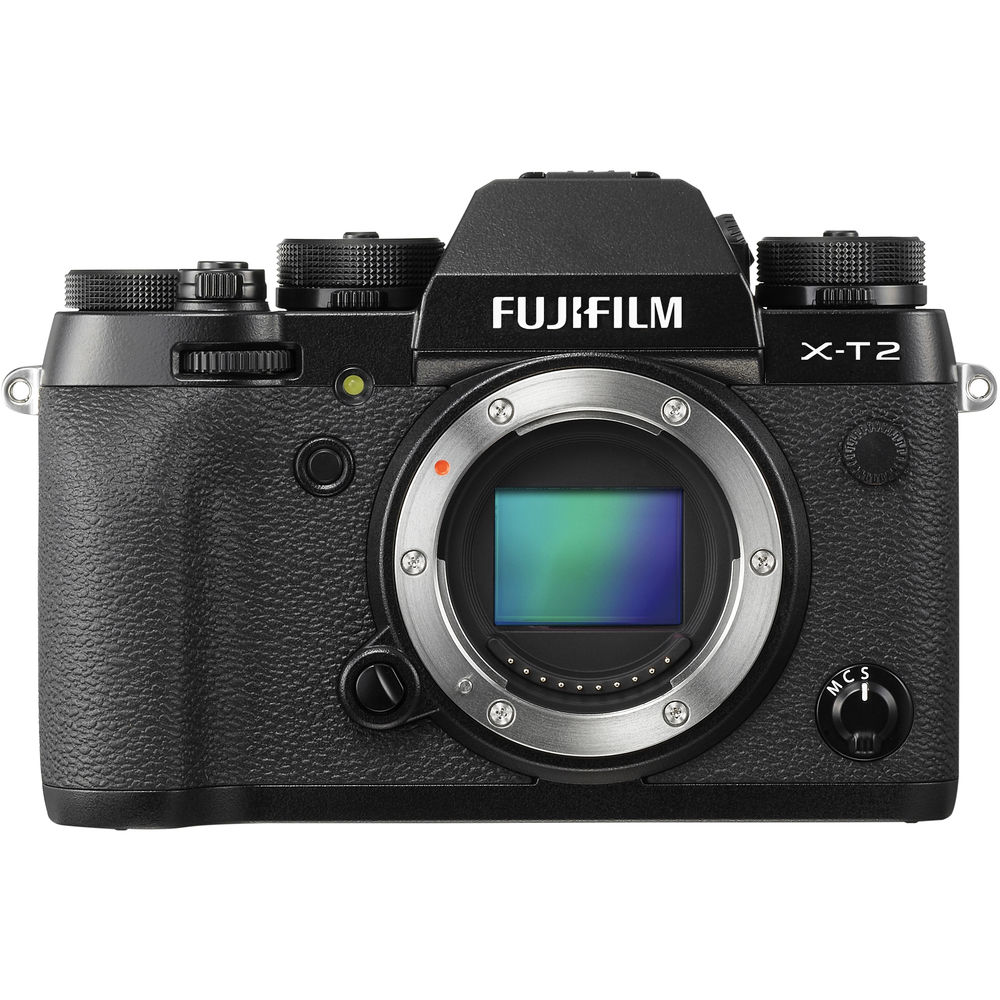
The Fujifilm X-T2 puts the main exposure choices on dials you can see. That is a good reason to look at it. It is not a reason to believe every photograph will suddenly look better. Before buying an older camera, ask what you want to shoot, which lens gives you the right view and whether the actual body in front of you works properly.
This is the original X-T2 from 2016, not an X-T3, X-T4 or another later model. Fujifilm now lists it as discontinued. That changes the useful conversation: less launch hype, more compatibility, condition, setup and honest limits. A complete, reliable kit matters more than a bargain body with the wrong lens and tired batteries.
Updated October 2026. This guide uses Fujifilm’s published specifications, owner’s manual and setup guidance. It is not a hands-on test. The landscape and city photographs illustrate light and composition, not files made with an X-T2 or proof of its image quality. There are no current price or availability promises here.
Start with the original X-T2’s basics
Fujifilm’s X-T2 specifications identify a 24.3-megapixel APS-C X-Trans CMOS III sensor and Fujifilm X mount. It records JPEG, RAF raw files or both. The sensor is smaller than full frame, so compare the field of view of a lens on this body rather than comparing focal-length labels alone.
The camera has an electronic viewfinder, a tilting rear screen and physical exposure controls. None of those replaces a deliberate composition. Use the viewfinder to check the edges, watch the relationship between foreground and background and decide where the brightest part of the frame belongs. An epic scene can still become an ordinary photograph if you point at it without choosing anything.
Choose a lens for the working distance and framing you need. An X-mount lens is not the same thing as a lens for Fujifilm’s GFX system. An adapted lens also brings its own restrictions. Check the exact lens, adapter and firmware combination rather than assuming that anything with a matching-looking mount will autofocus or communicate correctly.
Make the exposure dials work for you
Fujifilm’s X-T2 quick-start guide explains the controls and customization options. Begin with a simple setup you understand. Check the shutter-speed dial, aperture control, ISO setting, exposure compensation and drive mode before photographing. A visible dial can also be visibly set to yesterday’s choice.
For a still landscape, aperture priority can let you choose depth of field while watching the shutter speed the camera selects. If wind is moving foreground plants, that shutter still matters. For moving subjects, choose a shutter that fits the movement before worrying about keeping ISO low. Our shutter priority guide explains that decision.
Manual exposure is useful when the light and subject stay consistent, but it is not a badge of seriousness. If the light changes, review and adjust. Look at important highlights and subject detail, not only whether the picture seems bright on the rear screen. The aim is a usable file and a convincing photograph, not loyalty to one mode.
Set up the Q menu around the controls you actually change. Keep the arrangement simple enough to use without a menu hunt. Fujifilm lets you customize function buttons and viewfinder information too. Learn one adjustment at a time, then practice it before a trip or a paid assignment.
Focus mode and focus area solve different problems
The focus-mode selector and the focus-area choice are separate decisions. A static detail and an approaching cyclist do not need the same setup. Fujifilm’s guide describes Single Point, Zone and Wide/Tracking areas, along with the focus lever for moving the selected area. Place the area where it can see the subject you actually want sharp.
A single point is useful when you need to be precise. A zone can give a moving subject more room inside the selected region. A wider tracking area can be helpful in some situations, but it does not read your intention. If the background attracts focus, reduce the area or change your position instead of repeatedly hoping the next burst will fix it.
The X-T2 also has AF-C custom settings for tracking behavior. Fujifilm describes presets and a custom option for tracking sensitivity, speed tracking sensitivity and zone-area switching. These are responses to different types of movement, not a universal improvement switch. Start with the documented preset that resembles your subject, then judge the actual sharp frames.
Practice with the lens you will use. Follow a subject before releasing the shutter, keep the chosen area on it and review a sequence at useful magnification. A missed frame can come from shutter speed, subject movement, focus placement or technique. Diagnose the problem before changing several settings at once.

Do not buy the headline burst rate without its conditions
The original specifications list up to approximately 8 frames per second with the mechanical shutter. The optional VPB-XT2 grip can raise that mechanical-shutter figure to approximately 11 fps under its stated power conditions. The 14 fps figure uses the electronic shutter. These are different operating choices, not three interchangeable promises.
Fujifilm’s owner’s manual warns that electronic-shutter photographs can show distortion with moving subjects and banding under flickering or erratic lighting. It also disables flash with the electronic shutter. A higher frame count is not useful if the shape of the subject or the lighting pattern is wrong.
For a moving subject or an indoor scene with artificial light, test the shutter choice before the important moment. The mechanical shutter can be the more sensible starting point when electronic-shutter artifacts are a concern. Review a real sequence under the actual light, not a few photographs of a still object at home.
Buffer behavior and the time needed to write files matter too. File type, card performance and recording choices affect the workflow. Shoot short, deliberate bursts and leave time to recover. Keep the best gesture or position in mind rather than treating the fastest possible burst as the whole technique.
Stabilization belongs to the lens, not this body
Fujifilm’s X-T2 specification lists stabilization with OIS lenses. Do not confuse this original camera with a later Fujifilm body that has in-body image stabilization. Check whether the specific lens provides OIS and how its controls work before planning a handheld low-light setup.
Lens stabilization can help with camera movement. It does not hold a walking person still, stop wind or remove the need for a suitable shutter speed. For a long exposure of a still scene, a tripod and careful technique may be the better answer. Follow the lens guidance for stabilization when mounted, rather than applying one rule to every lens.
For a cityscape, decide whether you want traffic sharp or moving through the frame. For a landscape, look closely at water and foreground plants. The exposure can suit one part of the scene and fail another. Make that choice intentionally, then check the result instead of assuming that a stabilized lens guarantees sharpness everywhere.
Two card slots do not automatically mean two copies
The manual says UHS-II cards can be used in both slots. Its still-image slot settings include Sequential, Backup and RAW/JPEG. Sequential fills one card and then uses the other. Backup records each picture to both. RAW/JPEG separates the file types when the corresponding image-quality option is selected.
Those modes answer different needs. If you want duplicate still files, choose Backup and confirm both cards received them. Splitting raw and JPEG files is not the same as making two copies of the raw file. Movies have their own file-destination setting; do not assume the still-image backup selection duplicates video.
Use Fujifilm’s X-T2 compatibility page and the manual when choosing cards. The published guidance calls for UHS Speed Class 3 for movie use. A large capacity label does not prove sustained recording performance or compatibility with an older camera.
Before an important shoot, back up anything already on the cards, format them in the camera and test the intended modes. Photograph, play back and open the files on your computer. Two cards in the camera do not replace a separate backup after the shoot. Keep confirmed copies before clearing either card.
4K recording has a clip limit and a power cost
The original X-T2 specifications list 4K at 3840 by 2160, with frame rates up to 29.97p and a normal clip limit of approximately ten minutes. They list Full HD frame rates up to 59.94p with a normal limit of approximately fifteen minutes. This is not a 4K 60p camera.
The VPB-XT2 grip description says the grip extends 4K recording to approximately thirty minutes. That does not promise an uninterrupted session regardless of battery level, card space or temperature. The manual warns that recording and other demanding operations can end unexpectedly depending on power and temperature.
Match the workflow to the job. Short clips are different from a long ceremony or interview. Test the full setup for a realistic duration, including audio and playback. Check the installed firmware and the matching instructions before relying on a feature described in a later guide. Do not mix specifications from later X-series cameras into an X-T2 plan.
The manual describes a 3.5mm external microphone connection and restrictions on microphones requiring bus power. Verify the microphone’s own requirements. Camera and lens noises can enter the recording, so listen to a test with headphones during playback. A clean-looking picture is not proof of clean audio.

Inspect batteries, weather exposure and the used body
The supplied battery is NP-W126S. Fujifilm’s published endurance figures are test-condition numbers, not a measurement of a years-old battery offered in a sale. Inspect battery condition and charging behavior, check the charger and confirm what comes with the body. Stop using a damaged or swollen battery.
Fujifilm lists an operating temperature range of minus ten to plus forty degrees Celsius. The old text on this page confused the cold-weather figure. Weather resistance is not permission to submerge the camera or ignore the condition of doors, seals and the attached lens. Protect the kit and ask about previous moisture exposure.
Check the mount, card slots, battery compartment, dials, buttons, focus lever, viewfinder and screen mechanism. Try both card slots and the connections you expect to use. Look for signs of impact, corrosion or repair. A tidy product photograph does not establish the condition of the particular camera being sold.
Make ordinary photographs with a compatible lens and inspect them on a computer. Try autofocus, manual focus, mechanical shutter and the recording mode you need. Ask about service history and read the seller’s actual return terms. If a fault cannot be explained or tested properly, do not treat a low asking price as proof that the risk is worthwhile.
The X-T2 makes sense only as part of a working kit. Add the lens, reliable batteries, cards, carrying setup and any grip you truly need before judging the total. Then spend time learning light, framing and focus. Those decisions remain yours, whatever camera name is printed above the mount.
Frequently asked questions
Which Fujifilm camera does this guide cover?
The original X-T2 from 2016, not the X-T3 or X-T4. It is a published-source guide, not a hands-on review or a current availability claim.
Does the X-T2 have in-body image stabilization?
No. Fujifilm lists stabilization with OIS lenses. Check the specific lens, and remember that stabilization does not freeze a moving subject.
Can the X-T2 shoot at 14 frames per second mechanically?
No. The 14 fps figure uses the electronic shutter. The mechanical shutter is listed at approximately 8 fps, or approximately 11 fps with the VPB-XT2 under its stated power conditions.
Does putting in two cards automatically create a backup?
No. Choose Backup for duplicate still files and verify both cards. Sequential and RAW/JPEG modes do different jobs, and movies have a separate destination setting.
Can the original X-T2 record 4K at 60p?
No. Its original specification lists 4K frame rates up to 29.97p, normally for approximately ten minutes per clip. The optional grip extends the stated clip duration, subject to recording conditions.
Is the X-T2 waterproof?
Do not treat weather resistance as waterproofing. Fujifilm lists an operating range of minus ten to plus forty degrees Celsius; protect the camera and lens and inspect used equipment for damage.
Gear to check for an original X-T2 kit
Verify the exact model, condition and compatibility before buying. These are shopping starting points, not promises of stock or price.
Original X-T2 body: Browse Amazon or B&H. Check the actual item against your setup.
Compatible batteries: Browse Amazon or B&H. Check the actual item against your setup.
Optional booster grip: Browse Amazon or B&H. Check the actual item against your setup.
Recording cards: Browse Amazon or B&H. Check the actual item against your setup.
Affiliate disclosure: This article contains affiliate links. If you buy through them, we may earn a commission at no extra cost to you. As an Amazon Associate, we earn from qualifying purchases.
For practical photography tips, visit the Shut Your Aperture Academy. Build your understanding of light and composition alongside your camera setup.


