

Updated October 2026
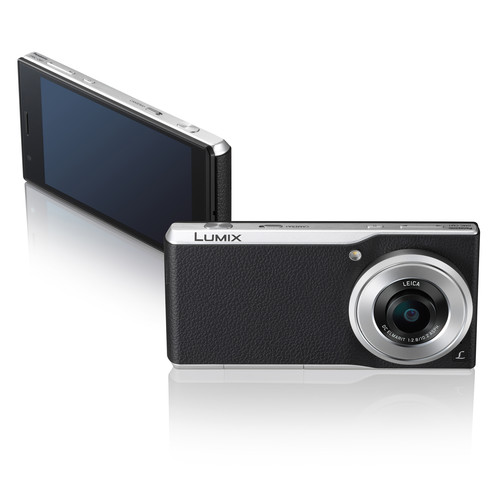
The Panasonic Lumix CM1 is an unusual used-camera choice. It puts a 1-inch-type sensor, a fixed 28mm-equivalent Leica lens and physical camera controls inside an Android phone body. That combination was the point of the original 2015 CM1P announcement. Today, the useful question is whether a particular example still works well as a camera, not whether its old phone specifications sound impressive.
Start with the camera. Check the lens mechanism, shutter button, control ring, touchscreen, battery and file transfer before buying. Then think about the software separately. An old Android installation is not a reason to move your banking, work accounts or everyday communications onto this device. Treat an offline photography workflow as the safer starting point, and do not assume modern apps, carrier service or account sign-in will work.
This is a setup and used-buying guide for the DMC-CM1 family, including the CM1P named in the original US listing. Check the exact model and region on the unit. Panasonic’s US advanced manual identifies the camera as DMC-CM1. Use instructions and update files that match your device, not a similar-looking Lumix name.
Know what the CM1 camera actually offers
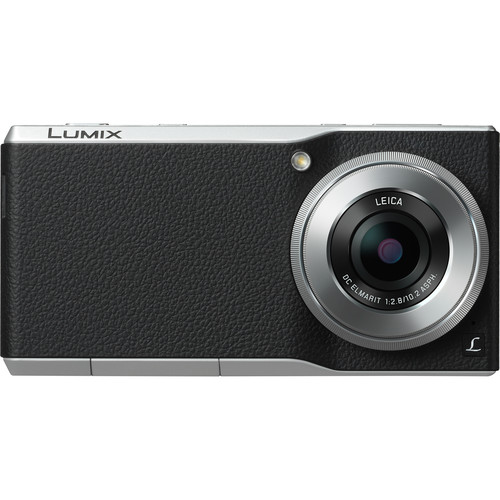
Panasonic lists a 20.1-megapixel, 1-inch-type MOS sensor and a 10.2mm lens with an angle of view equivalent to 28mm on a full-frame camera. The lens opens to f/2.8 and has an adjustable iris down to f/11. It is a fixed focal-length lens, not an optical zoom that changes from wide angle to telephoto.
The practical attraction is a familiar wide-angle view with control over aperture, shutter speed, ISO, focus and raw capture. You can frame streets, buildings, interiors and everyday scenes without assembling a separate camera system. If you need a distant detail or a tight portrait from far away, cropping is not the same as having a longer lens.
Panasonic’s specifications show no optical image stabilizer. Do not buy it expecting the stabilization behavior of a modern premium compact or phone. Check shutter speed and handholding technique, especially indoors or after sunset. A sharp stationary subject and a moving person create different exposure problems.
Read our camera buying guide if you are comparing the CM1 with a conventional compact or mirrorless camera. A unique design is interesting, but your actual shooting and file-handling needs should settle the choice.
 Save
SaveStart with a simple offline setup
Charge the camera, confirm the date and time, and check the available storage before making important photographs. If the unit has been sitting unused, do not judge battery condition from a few minutes on the home screen. Test it while operating the camera and reviewing photographs.
Airplane mode is described in Panasonic’s manual. It can be a useful starting point when you want to use the CM1 as a camera without cellular communication. Check Wi-Fi and Bluetooth separately rather than assuming every radio setting behaves exactly like a current phone. Keep the setup simple and avoid adding applications you do not need.
Do not assume an old owner’s account can be removed later. A used seller should demonstrate that the device can be unlocked and handed over cleanly before you pay. Back up any photographs you want to keep before a reset. Resetting is not a harmless troubleshooting step when the only copy of an image is on the device.
Panasonic’s official software page documents an Android 5.0 update from Android 4.4. It warns that the change cannot be reversed, needs at least 500MB of free space and should be performed with sufficient battery charge. That page is historical update guidance, not a promise of ongoing security updates or that an old download and installation path will still work today.
If you are considering an update, verify the exact variant, installed version and available official file first. Do not install an unofficial package merely because it claims to make the camera modern. A working offline camera is more useful than an experiment that leaves the device unusable.
Use the camera switch and shutter button
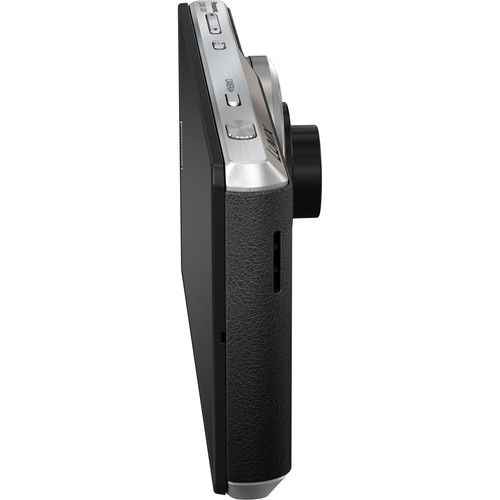
The camera selector switch starts or ends camera operation. Panasonic describes a separate physical shutter button: press it halfway to focus, then fully to take the photograph. Practice that distinction so you are not squeezing through both stages before the camera has focused.
Hold the device securely without covering the lens, flash or sensors. Keep the lens area clear when the mechanism moves. Do not force the lens or use it as a handle. If it catches, grinds or fails to move normally, that is a used-condition problem to investigate, not something to push through.
The control ring changes camera settings according to the selected mode and configuration. Learn one mode at a time. Make a setting change, look at the display, take a photograph and review it. That small loop is more useful than trying to memorize every menu before you start shooting.
A clean touchscreen matters because much of the camera’s interface lives there. Check touches near the edges as well as in the middle. Test the ring and buttons with the camera held in a normal shooting position, not only while it is lying on a table.
 Save
SaveChoose exposure settings for the subject
Program mode is a reasonable place to learn the controls. Aperture priority gives you a direct way to choose the lens opening, while shutter priority lets you start from the motion you need to control. Manual exposure is useful when the light is steady and you want consistent frames.
For a walking subject, start with a shutter speed that keeps the movement sharp enough for your purpose, then inspect the result. For a stationary building, you may be able to use a slower exposure, but the CM1 has no optical stabilization to rescue careless handholding. Raise ISO when you need the shutter speed, rather than accepting blur just to keep the ISO number low.
Do not close the aperture to f/11 automatically. A small opening increases depth of field but also reduces the light reaching the sensor and can cost fine detail through diffraction. Choose it because the scene needs it, not because the largest f-number sounds most precise.
Watch bright windows, pale walls and reflective water. Use exposure compensation when the camera’s meter is not giving you the result you want. Review the highlight information and make another frame when necessary. Raw files provide editing flexibility, but they do not make every badly exposed photograph recoverable.
For a city outing, our street photography practice guide gives you a simple visual task and a respectful approach to working around other people. Familiarity with one wide-angle view can help you react without spending the whole walk in menus.
Focus carefully, especially close up
Panasonic lists autofocus and manual focus, with a focusing range starting at 10cm. That specification does not mean every composition made close to the lens will look good or that the camera can focus through an obstruction. Leave room, confirm focus and check the photograph at a useful magnification.
For a stationary subject, choose the focus area deliberately rather than letting the camera select whichever edge has the strongest contrast. Half-press, confirm the intended subject and finish the exposure. If you recompose substantially at close range, check focus again.
Manual focus can help with a subject that autofocus struggles to isolate. Use the camera’s available focus aids and review the result. Do not assume a distance setting that worked for one aperture and subject position covers everything nearby.
Moving subjects are a different test. Take several real photographs of motion before buying a CM1 for that job. The camera’s burst specifications are short and mode-dependent; a large frames-per-second number is not a promise of sustained full-resolution raw action photography.
 Save
SaveSet up raw and JPEG before an important outing
The CM1 can record JPEG, raw or raw plus JPEG. Its raw files use Panasonic’s RW2 format. Raw plus JPEG is a useful test setup because you can inspect a ready-to-view image while checking that your computer editor handles the raw file correctly.
Do not assume an Android camera or editing app supports the native raw workflow. Contemporary reviews already noted limitations with third-party applications. A modern app’s availability on another phone tells you little about its behavior on this old device.
Make a test photograph, copy both files to your computer and open them in your intended editor. Check that the image renders correctly and that you can export a usable JPEG. Verify color and exposure on your usual display rather than deciding only from the CM1’s screen.
Keep the original RW2 files even after exporting. Store them with the JPEGs and a second backup. Editing latitude is useful only when the original files survive the transfer and remain readable.
Transfer files without depending on old cloud services
Panasonic’s manual describes USB file access and copying photographs to a microSD card. Either can support a straightforward camera-to-computer workflow. Test the exact route you will use before buying or traveling with the camera.
Use a data-capable USB cable, not one that only charges. Connect the device, unlock it when needed and choose the file-transfer mode described in the manual. USB tethering is a different feature; Panasonic notes that the computer cannot access the device’s files while USB tethering is enabled.
A card reader can be convenient once the photographs are on a compatible microSD card. Panasonic lists microSD, microSDHC and microSDXC support up to 128GB. Check the manual’s recording-speed requirements for the video mode you want. A capacity number alone says nothing about sustained writing performance.
Back up existing files before formatting a card. If a computer or another device offers to format a card unexpectedly, stop and investigate rather than accepting the prompt. After copying, open several files from the destination and compare the file count before deleting anything from the camera.
 Save
SaveUnderstand the video and battery limits
The original specification includes UHD 4K recording at 15 frames per second and Full HD at 30 frames per second. The 4K mode is not a substitute for smooth modern 4K video. Choose the frame rate for the movement and playback you need, and test the result on your computer.
Check sound, recording duration and the available storage with a real clip. Do not buy it for a long recording job based on resolution alone. Heat, battery condition and file handling matter alongside the number of pixels.
The battery is built in. Panasonic’s original capacity specification is 2600mAh, but an old unit’s endurance cannot be inferred from that launch number. The manual says a battery may need replacement when runtime becomes drastically shorter and directs replacement questions to the dealer. Do not assume a fresh battery, authorized service or replacement parts are currently available.
If the device is swollen, damaged, leaking or behaving abnormally while charging, stop using it and seek qualified advice. Do not open the case as a casual setup step. A low used price is not a reason to overlook battery safety or an unreliable charging port.
Inspect the exact used unit
Check the lens for haze, scratches and damage, then make photographs at several apertures and focus distances. Inspect the corners and center on a computer. Photograph an evenly lit surface as well as a detailed scene so you are not relying on the seller’s small screen preview.
Test the shutter button, ring, selector, touchscreen, speaker and charging connection. Check card recognition and actual file transfer. Ask about drops, water exposure, repairs and account locks. Panasonic explicitly says the CM1 is not dust, splash or waterproof.
Confirm the exact regional model and any network expectations separately. An “unlocked” label does not guarantee current carrier compatibility, calling features or app support. If you need a dependable daily phone, choose a currently supported phone rather than asking an old camera-phone to fill that role.
Finally, carry it and make photographs for long enough to notice heat, battery loss and controls that stop responding. Buy the condition you can verify, with clear return terms. The CM1’s appeal is its camera design; the best example is one that lets you shoot and save files reliably.
Learn faster with a plan. The ShutYourAperture Academy has 22 photography courses, from the fundamentals of aperture, shutter and ISO to genre courses like landscape, portrait and street.
Frequently asked questions
Does the Lumix CM1 have optical zoom?
No. Its fixed 10.2mm lens gives a 28mm-equivalent view. Digital cropping is not optical zoom.
Does the CM1 have optical stabilization?
Panasonic lists no optical image stabilizer. Check your shutter speed and inspect handheld photographs for blur.
Can it shoot raw files?
Yes. It can record Panasonic RW2 raw files or raw plus JPEG. Test support in your own computer editor before relying on the workflow.
Is its 4K video 30 frames per second?
No. The original UHD 4K specification is 15 frames per second; Full HD is listed at 30 frames per second.
Can I rely on it as a modern daily phone?
Do not assume current carrier, app or account compatibility. An offline camera workflow is the safer starting point for this old Android device.
What should I check before buying used?
Test lens movement, focus, shutter, ring, touchscreen, charging, battery endurance, storage and file transfer on the exact unlocked unit. Confirm return terms.
Keep the CM1 workflow simple
Confirm compatibility before buying. These are retailer searches, not promises of stock or current prices.
Affiliate disclosure: Some links are affiliate links. If you buy through them, Shut Your Aperture may earn a commission at no extra cost to you. As an Amazon Associate, we earn from qualifying purchases.
Find more practical photography tips at Shut Your Aperture Academy. Learn the controls, test your files and spend the rest of the walk paying attention to light.
Sources: Panasonic US advanced manual, official CM1 specifications, original Android update guidance and contemporary DPReview camera review.


