RAW vs JPEG: Honest Comparison and a Clear Winner
–
 Save
SaveSide-by-Side Spec Comparison
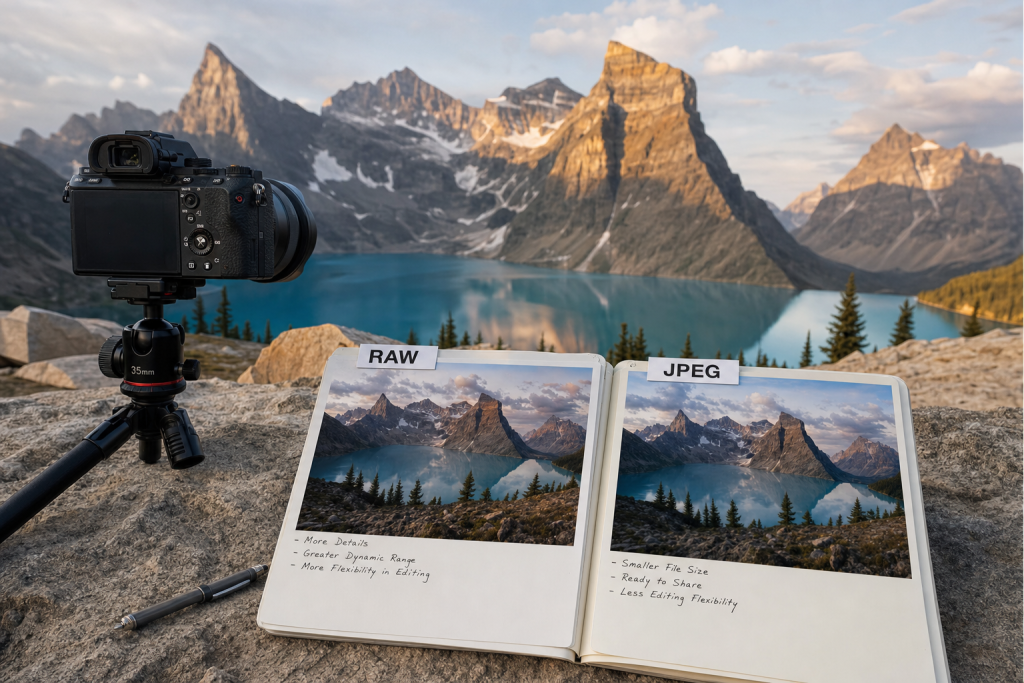
Before diving into use cases and recommendations, here is a direct specification comparison. Use this table as a quick reference when you need to compare a specific attribute.
| Specification | RAW Format (.ARW, .CR3, .NEF, .RAF, etc.) | JPEG Format |
|---|---|---|
| File size (24MP, typical) | 20–45MB per file | 4–12MB per file (lossy compression) |
| Color depth | 12-bit or 14-bit (4,096–16,384 tones per channel) | 8-bit (256 tones per channel) |
| Dynamic range recovery | Excellent — 3-5 stops of shadow/highlight recovery in post | Limited — 0.5-1 stop; shadow noise reveals quickly |
| White balance | Adjustable in post with zero quality loss | Baked in — correcting WB in post degrades quality |
| Noise reduction | Non-destructive — apply any NR algorithm in post | In-camera NR applied irreversibly |
| Post-processing required | Yes — must process to export/share | No — ready to share directly from card |
| Buffer depth (burst photography) | Lower — RAW files fill buffer faster | Higher — smaller files enable longer burst sequences |
| Compatibility | Requires software (Lightroom, Capture One, etc.) | Universal — any device, any app, instantly |
| Long-term future-proofing | Adobe DNG conversion recommended for archiving | JPEG is permanent — no proprietary lock-in |
Real-World Use Cases: Which Option Wins for Your Situation?
Specifications only tell part of the story. Here is how each option stacks up for specific photography scenarios:
| Your Situation | Best Choice | Why |
|---|---|---|
| Landscape photographer (prints and fine art) | RAW | The dynamic range recovery and 14-bit color depth make the difference between a print with visible blown highlights and one with full tonal gradation across the entire exposure range. |
| Sports photographer (sustained burst) | JPEG (or RAW + JPEG simultaneous) | High-speed bursts (20-30fps) fill RAW buffers within seconds. JPEG allows continuous shooting. Use simultaneous RAW+JPEG where the camera supports it. |
| Street photographer (casual, personal) | Either — depends on workflow preference | JPEG works well for photographers who edit minimally and value speed. RAW is better for street photographers who crop heavily or print exhibitions. |
| Wedding photographer (professional delivery) | RAW | Inconsistent mixed lighting is a wedding reality. RAW’s 3-5 stops of recovery latitude saves exposures that would be undeliverable from JPEG. The post-processing time is justified by the reliability. |
| Social media travel photographer | JPEG (or RAW with Lightroom Mobile) | If the final output is Instagram (1080p, sRGB, 72dpi), JPEG quality 90 is indistinguishable from a RAW-processed equivalent on screen. JPEG is dramatically faster for volume social posting. |
Pricing Breakdown
Both RAW and JPEG are features of every camera — no cost difference in-camera. The cost of RAW is software: Adobe Lightroom ($9.99/mo Photography Plan), Capture One ($24/mo), or free alternatives (Darktable, RawTherapee). Storage cost for RAW is approximately 3-5x more than JPEG — at 50 shots per day for a year, RAW requires ~1-2TB vs JPEG’s ~200-400GB. A 2TB Samsung T7 SSD costs approximately $100 for field backup.
 Save
SaveAlternatives Worth Considering
Before you commit to either option, these alternatives may better suit your specific needs:
- RAW + JPEG simultaneous: Many cameras can write both simultaneously. RAW goes to a fast card for post-processing; JPEG goes to a second card for immediate sharing. Best of both worlds at the cost of double storage.
- HEIF / HEIC (10-bit in-camera): iPhone default format and available on some Sony/Canon bodies — 10-bit color in a smaller file than RAW. Better than JPEG, less flexible than RAW. Increasingly useful as software support improves.
- Compressed RAW (Lossy DNG): Some manufacturers offer “compressed RAW” or “small RAW” — reduced file size with minor quality loss. For photographers who shoot volume (sports, events) but want some RAW flexibility.
Frequently Asked Questions
Can I convert JPEG to RAW?
No — JPEG is a lossy final format. Once captured as JPEG, the discarded data cannot be recovered. You can open a JPEG in Lightroom or Photoshop but it behaves as an 8-bit JPEG, not a RAW file.
Do I need to process every RAW file?
No — you can export RAW files directly from Lightroom, Capture One, or any RAW processing app with zero adjustments (the camera’s default profile applies). Processing only happens when you want to improve on the camera’s baseline rendering.
Which RAW format is the most future-proof?
Adobe DNG — it’s an open standard with published specifications. Convert proprietary RAW files (.ARW, .CR3, .NEF) to DNG after backup for archiving. Keep the original proprietary RAW as well until DNG compatibility is confirmed by your workflow.
Does RAW vs. JPEG affect autofocus?
Autofocus performance is identical regardless of capture format. The difference only appears in buffer depth — RAW files fill the camera’s buffer faster during sustained burst shooting.
 Save
SaveThe Bottom Line
Our recommendation: RAW for any serious or professional photography; JPEG for speed, volume, and immediate sharing. The best choice ultimately depends on your specific shooting style, budget, and existing kit. Use the use-case table above as your primary decision framework — find your most common scenario and choose the option that wins there. Both options in this comparison are used by working professional photographers; you cannot make a wrong choice if it aligns with your actual workflow.