Updated October 2026

Night cityscapes are the most technically demanding edits in landscape work: extreme dynamic range, five different light sources at five different color temperatures, and noise lurking in every shadow. This is the complete Lightroom workflow, in the order that works, from a flat RAW to a night city that glows. For the capture side, our night photography guide covers settings and technique.
Why night cities are hard to edit

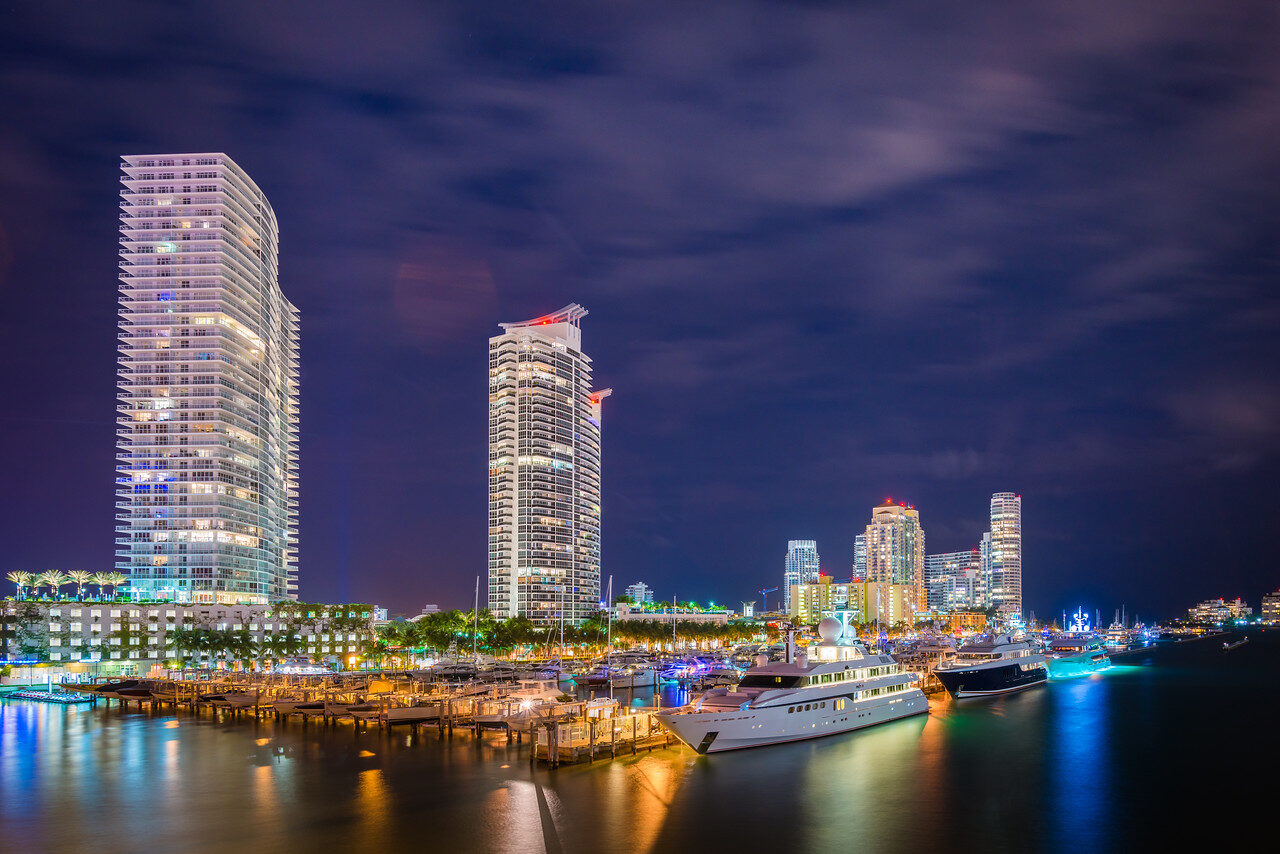
A night scene throws everything at you at once. Streetlights burn orange while LED signs burn blue. Windows are tiny bright rectangles, the sky is nearly black, and the shadows between buildings hide noise. A single global slider cannot handle it, so the edit is about controlling each part on its own terms.

The goal is a night that still looks like night. Dark skies, glowing lights and rich color, without the gray, glowing HDR mush that gives the genre a bad name.

Start with a file that gives you room

  • Shoot RAW. Night files need every bit of data to recover highlights and keep color in the lights.
  • Use a tripod and a low ISO. Long exposures keep noise down, and a tripod keeps lights sharp.
  • Shoot at blue hour. The sky still has deep color and detail, so the buildings do not float in black.
  • Expose to protect the lights. A slightly dark file recovers cleanly. Clipped signs and windows do not.
  • Bracket if the scene is extreme. You can merge in Lightroom later if one frame cannot hold it all.

Step 1: White balance for mixed city light

City nights mix tungsten streetlights, cool LED signs, and whatever color the buildings decided to be. There is no correct global setting, only a deliberate choice. Cooler temperatures make night feel like night and let warm signs pop. Warmer temperatures flatter the lights but gray the sky. Pick a base around 3200 to 4000K, then fix problem areas locally with masked temperature shifts rather than chasing a global compromise.

A good test is the sky. If the sky looks a clean deep blue and the lights look natural, you are close. If the sky looks green or magenta, your global choice is off.

Long exposure of red and blue car light trails curving along a city highway at nightSave
Light trails need protected highlights and clean blacks. Pull the lights down before you lift anything.

Step 2: Exposure architecture

Pull highlights down hard. Signs, windows, and streetlights clip fast, and clipped color in a night file turns to white mush. Then lift shadows moderately. Pushing them too far is what produces the gray, noisy, HDR-looking night file. Blacks can stay genuinely black. It is night. Let it be dark.

Watch the histogram. A good night cityscape has data crowded on the left and a few bright spikes on the right for the lights. A histogram stretched evenly across the graph usually means the shadows were lifted too far.

Step 3: Noise without mush

Night files need luminance noise reduction, but the sky and the buildings want different amounts. Apply a moderate global setting for the sky and water, then mask the buildings and lights back to full detail. Sharpening comes after noise reduction, never before, and the sky gets little to none.

If your version of Lightroom has Denoise in the Enhance menu, run it on the RAW first, then make the rest of the edit on the denoised file. Check at 100 percent. Over-smoothed windows and signs look like plastic.

Step 4: Color control

The HSL panel is where night cityscapes are made. Saturated neon needs control, not boosting. Pull the loudest channel down until it sits with its neighbors. A slight teal push in blue hue and a warm shift in orange gives the classic night-city palette without the overcooked cyberpunk look. Dehaze goes on light. Heavy dehaze at night creates halos around every light source.

Wide view of a city and hillside covered in glowing lights at night with a light-trail road curving through the sceneSave
Thousands of small lights are the challenge. Mask the sky and the lit areas separately so neither fights the other.

Step 5: Local adjustments that make it pop

  • Sky: a Linear Gradient from the top with Exposure down a little and a cooler tint deepens the sky and frames the city.
  • Key buildings: a soft Brush or object mask on the hero building with a small Exposure and Clarity bump pulls the eye to it.
  • Lights: a Brush on specific signs or windows, with Highlights down and Saturation adjusted, tames the ones that scream.
  • Water or wet streets: reflections double the lights. Lift Exposure and Contrast in the reflection a touch so it matches the source.
  • Vignette: a gentle dark vignette keeps the viewer inside the frame.

Step 6: Light trails and long exposure

If your frame has moving traffic, the trails are the star. Keep their highlights under control so they hold color instead of clipping to white. A small push in saturation on red and blue brings them out. Then clean up the road: remove a stray bright car that did not blur, or a streak that crosses the wrong way.

Check for sensor dust on the sky while you are there. A night sky is dark, so spots often hide until you invert the view or use Visualize Spots in the Spot Removal tool.

Step 7: Final sharpening and crop

Use the Masking slider in the Sharpening section so only edges get sharpened. Windows, rooflines and signs get crisp, and the smooth sky stays smooth. Then check your verticals. Tall buildings that lean look wrong, and the Transform panel fixes it in one click. Finish with a crop that puts the strongest building or trail on a line of thirds.

City skyline of lit towers against a deep blue twilight sky with light trails flowing along a highwaySave
Blue hour is the sweet spot. There is still color in the sky, so the buildings do not float in black.

When one frame is not enough

Some night scenes have more range than a single RAW can hold, such as a bright lit lobby next to a deep dark street. Shoot a bracket of three or five frames, then use Photo Merge, HDR in Lightroom to build a single file with room to work. Keep the Deghost option on if cars or people moved between frames. Edit the merged file the same way, but be gentle with shadows. A merge already opens them up, and lifting more makes the file look flat.

Many photographers prefer a single well-exposed frame for night cities, because the result looks more natural. Merge only when the scene really needs it.

Working with reflections and wet streets

Water, wet streets and glass add a second set of lights to your picture, and they make a night frame feel rich. Treat the reflection as a mirror of the source. If you dim a sign, dim its reflection too, or the picture looks off. A soft Brush mask on the reflected area with a small Exposure change is usually enough.

Watch the color in reflections. Water often picks up a cool tint from the sky, which is fine, but a strong green or yellow cast looks wrong. Nudge the Temperature slider inside the mask until it matches the light above.

A quick starting recipe

Use these as a first pass on a flat night RAW and adjust from there. Every scene is different, so treat the numbers as a place to start, not a rule.

  • Temperature: around 3200 to 4000K, then adjust by eye.
  • Highlights: minus 40 to minus 80 to protect lights and signs.
  • Shadows: plus 10 to plus 30, no more.
  • Blacks: minus 10 to minus 25 so the sky stays dark.
  • Vibrance: plus 10 to plus 20 before touching Saturation.
  • Luminance noise reduction: enough to calm the sky, then mask the buildings back.
  • Dehaze: plus 5 to plus 10 at most.

Check it on more than one screen

A night edit can look great on a bright laptop and murky on a phone, or the other way round. Before you export, turn your screen brightness to a normal level and look at the picture on your phone. Check that the shadows still have shape and the lights are not blown out. Most people will see your photo on a phone first, so it is the screen that counts.

Build a night editing routine

Night cityscapes reward a repeatable routine. Build a base preset with your lens correction, a cool white balance, protected highlights and light noise reduction. Apply it on import, then spend your time on the masks and color, which are what change from scene to scene. Over a few shoots you will learn which sliders you always touch and which you can leave alone.

Keep a before and after to hand. Toggle the original often. If the edit looks louder but not better, pull the sliders back. The best night cityscape edits feel like the city looked at its best moment, not like a different place.

Common night cityscape mistakes

  • Lifting shadows until the sky goes gray and the file looks like a bad HDR.
  • Pushing saturation on neon until it glows radioactive.
  • Heavy Dehaze that leaves halos around every light.
  • Sharpening the sky, which amplifies noise.
  • Ignoring tilted verticals on tall buildings.
  • Editing on a bright screen, so the final file looks too dark everywhere else.

The fast version

The cityscape looks in the Landscape, Cityscape and Drone Preset Pack are built on this exact logic: controlled highlights, protected blacks, managed neon. One click gets you the architecture, then white balance and the HSL panel tune it to the scene. The free starter pack in our Lightroom presets guide lets you test the workflow on your own night files first.
Keep learning

If you want every slider explained from the start, take the Lightroom editing course in the Shut Your Aperture Academy. It is a beginner-friendly post-processing course taught by Edin Chavez, with 10 modules and 42+ parts you can finish at your own pace, with lifetime access. Browse the rest of the Academy courses too.

Pick one night frame, run these seven steps start to finish, then come back to it the next day. Night edits fool you after twenty minutes, and a fresh look shows what is too strong.

Frequently asked questions

How do I edit a night cityscape in Lightroom?

Set a deliberate white balance, pull highlights down to protect the lights, lift shadows only a little, reduce noise with masks, control neon in the HSL panel, add local contrast to key buildings and sharpen only the edges.

What white balance is best for city lights at night?

A base around 3200 to 4000K is a good start. Cooler looks more like night, warmer flatters the lights. Fix problem areas with local masks.

How do I reduce noise in a night photo?

Use luminance noise reduction or Denoise in the Enhance menu on the RAW. Mask the buildings and lights back to full detail and avoid sharpening the sky.

Why do my night photos look gray?

Usually shadows were lifted too far or blacks are too high. Bring Blacks down, keep the sky dark, and add contrast with a curve.

How do I stop neon from looking too saturated?

Pull the loudest color channel down in HSL until it sits with the others. Control beats boosting.

Should I shoot a night cityscape at blue hour?

Yes, if you can. Blue hour keeps color and detail in the sky so the buildings do not float in black.

Gear box: night cityscape photography

These are starting points, not rankings. Check current specs, reviews and prices before you buy.

  • Sony FE 24-70mm f/2.8 GM II: a sharp, fast zoom for city nights. It is for Sony E-mount cameras and a heavy, expensive lens, so check the weight and price before you commit. See it at B&H or on Amazon.
  • Peak Design Travel Tripod: a compact tripod that holds steady for long night exposures. Check the head and load rating against your camera and lens. See it at B&H or on Amazon.
  • Vello FreeWave Plus wireless remote: a shutter remote that avoids touching the camera on long exposures. Match the model to your camera brand before you buy. See it at B&H or on Amazon.

Affiliate disclosure: some links above are affiliate links. If you buy through them, Shut Your Aperture may earn a small commission at no extra cost to you.